TL;DR: Official Meta WABA lacks broadcast channel features. For automated broadcasting, connect your number via Whapi.Cloud's web-session socket gateway in under 2 minutes. Use the
POST /newsletters endpoint to create channels, and use POST /messages/text to quickly and easily publish posts to the channel. Map dynamic JSON payloads in n8n or Make to automate cross-posting with zero per-message fees.Why Official Meta WABA Fails for WhatsApp Channels
The official Meta WhatsApp Business API offers zero broadcast channel features. There are no endpoints to create channels, publish updates, or manage subscribers in the official Meta API environment.
If you want to automate newsletters, send news broadcasts, or build programmatic channel feeds, official credentials will not work. Whapi.Cloud provides full, direct REST API access to WhatsApp Channels by linking any standard phone number via a stable web-session protocol.
| Feature / Capability | Official Meta WABA (Cloud API) | Whapi.Cloud Channel API Gateway |
|---|---|---|
| WhatsApp Channels (Newsletters) | Not Supported (0% functionality) | Full REST API Access |
| Message Pricing Model | Variable per-message Meta fees + BSP markups | Flat monthly subscription (unlimited messages) |
| Onboarding & Verification | Complex Facebook Business verification (days/weeks) | Instant QR code scan (under 2 minutes) |
| Message Templates & HSM | Mandatory pre-approval required for all broadcasts | No templates required; send any content freely |
| Interactive Channels (Quizzes/Questions) | Not Supported | Native programmatic polls, quizzes, and QA cards |
How to Link Your WhatsApp and Start Using the API
Before you can create channels or send broadcasts, you need to connect your WhatsApp number to Whapi.Cloud to get an API token.
Create a free account on the Whapi.Cloud dashboard. You don't need a credit card to get started, and a free test channel will be ready for you immediately.
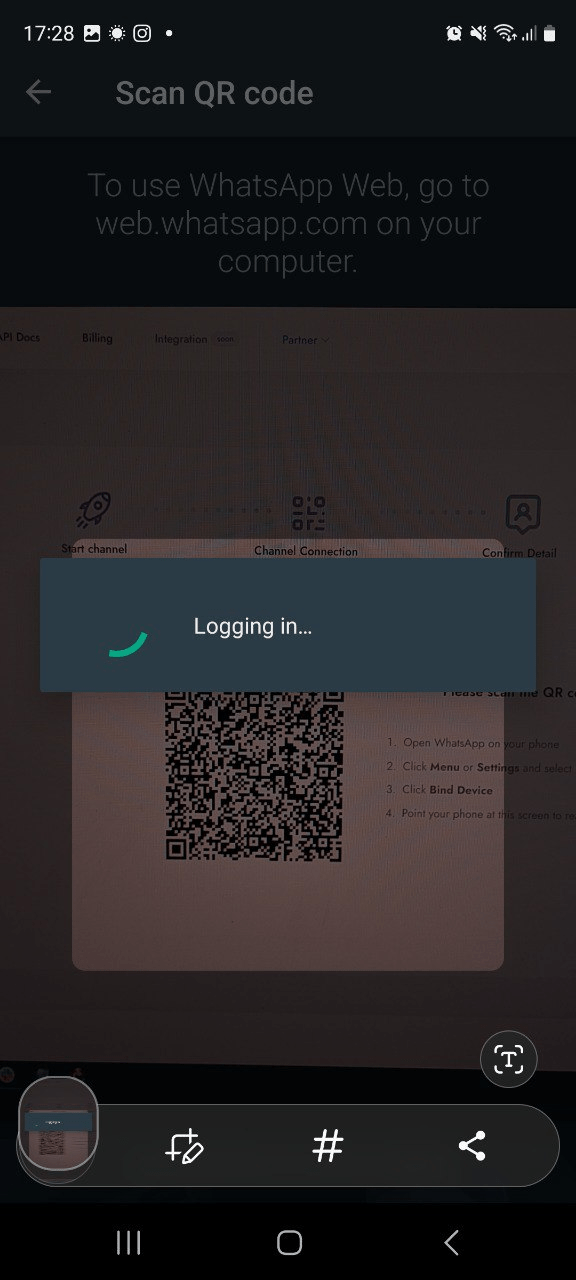
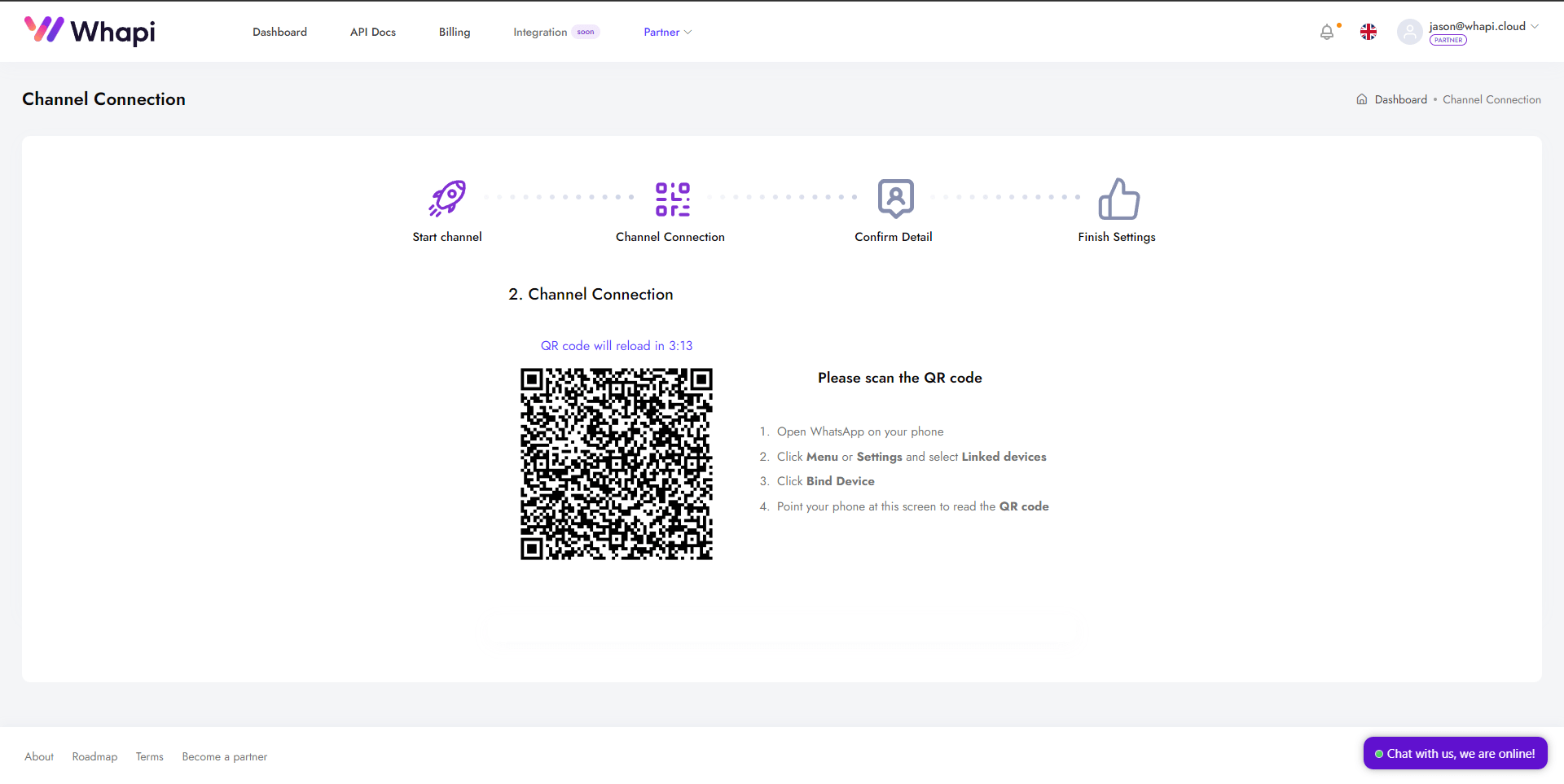
Scan the QR code with your phone. This connects your WhatsApp number via stable web-session sockets—similar to linking WhatsApp Web, but running securely on our servers.
How to connect your device:
- 1) Go to your Whapi.Cloud dashboard and locate your default channel.
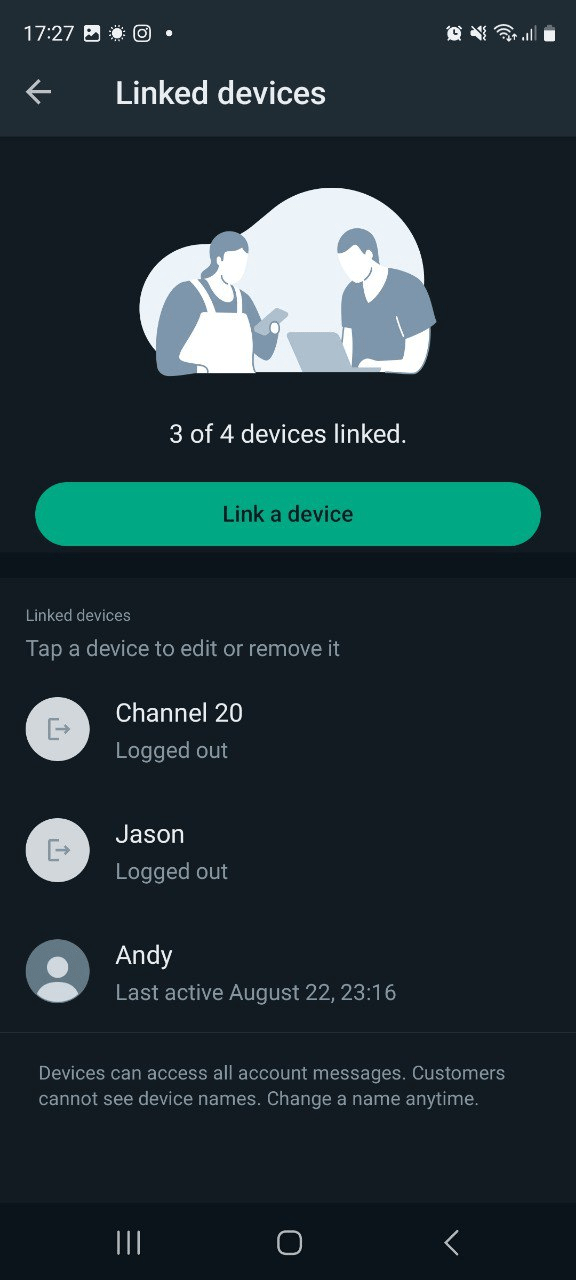
- 2) Open WhatsApp on your mobile device.
- 3) Navigate to Settings -> Linked Devices -> Link a Device.
- 4) Scan the QR code displayed on the screen.
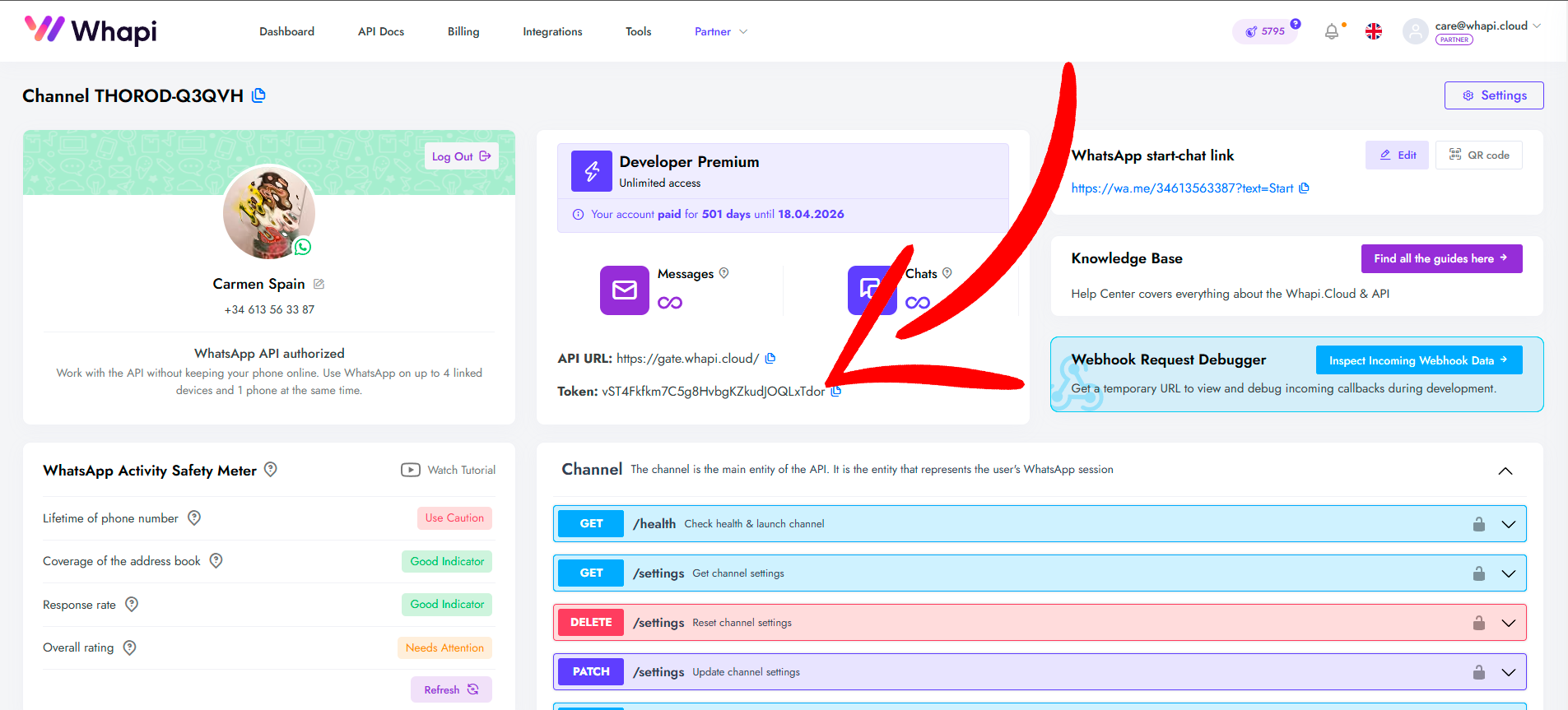
Your unique secure API token will be displayed in the center of the connected channel page.
This token is essential for authenticating API requests — it must be included in the request headers as a Bearer token or passed as a parameter, depending on the method.
Let's explore the key API requests to manage channels programmatically.
How to Automate WhatsApp Channels via API
To create a brand-new WhatsApp Channel programmatically, send a
POST request to the /newsletters endpoint. This is ideal for platforms, SaaS, or multi-channel networks that need to automatically provision separate broadcast environments for different creators or branches.In your request payload, provide the channel's
name and an optional description. You can also upload a profile image in the newsletter_pic parameter. The API returns a unique newsletter_id in the format 120363..._example@newsletter, which you will use to target all future broadcasts.curl --request POST \
--url https://gate.whapi.cloud/newsletters \
--header 'accept: application/json' \
--header 'authorization: Bearer YOUR_API_TOKEN' \
--header 'content-type: application/json' \
--data '
{
"name": "Developer Channel",
"description": "Tech newsletters & API updates"
}
'<?php
// composer require guzzlehttp/guzzle
require_once('vendor/autoload.php');
$client = new \GuzzleHttp\Client();
$response = $client->request('POST', 'https://gate.whapi.cloud/newsletters', [
'body' => '{"name":"Developer Channel","description":"Tech newsletters & API updates"}',
'headers' => [
'accept' => 'application/json',
'authorization' => 'Bearer YOUR_API_TOKEN',
'content-type' => 'application/json',
],
]);
echo $response->getBody();# python -m pip install requests
import requests
url = "https://gate.whapi.cloud/newsletters"
payload = {
"name": "Developer Channel",
"description": "Tech newsletters & API updates"
}
headers = {
"accept": "application/json",
"content-type": "application/json",
"authorization": "Bearer YOUR_API_TOKEN"
}
response = requests.post(url, json=payload, headers=headers)
print(response.text)// POST https://gate.whapi.cloud/newsletters
// Programmatic creation of a brand new broadcast channel on WhatsApp
const createNewsletter = async (channelName, channelDescription) => {
// if you omit the 'name' parameter, gate.whapi.cloud returns a 400 schema validation error
const response = await fetch('https://gate.whapi.cloud/newsletters', {
method: 'POST',
headers: {
'Authorization': `Bearer ${process.env.WHAPI_TOKEN}`,
'Content-Type': 'application/json'
},
body: JSON.stringify({
name: channelName,
description: channelDescription,
newsletter_pic: "https://whapi.cloud/assets/img/whapi/logo-text.svg"
})
});
if (!response.ok) {
throw new Error(`API Error: ${response.status} ${await response.text()}`);
}
const data = await response.json();
console.log(`Channel Created Successfully. NewsletterID: ${data.id}`);
return data.id; // Returns format: newsletter_id_example@newsletter
};OkHttpClient client = new OkHttpClient();
MediaType mediaType = MediaType.parse("application/json");
RequestBody body = RequestBody.create(mediaType, "{\"name\":\"Developer Channel\",\"description\":\"Tech newsletters & API updates\"}");
Request request = new Request.Builder()
.url("https://gate.whapi.cloud/newsletters")
.post(body)
.addHeader("accept", "application/json")
.addHeader("content-type", "application/json")
.addHeader("authorization", "Bearer YOUR_API_TOKEN")
.build();
Response response = client.newCall(request).execute();// dotnet add package RestSharp
using RestSharp;
var options = new RestClientOptions("https://gate.whapi.cloud/newsletters");
var client = new RestClient(options);
var request = new RestRequest("");
request.AddHeader("accept", "application/json");
request.AddHeader("authorization", "Bearer YOUR_API_TOKEN");
request.AddJsonBody("{\"name\":\"Developer Channel\",\"description\":\"Tech newsletters & API updates\"}", false);
var response = await client.PostAsync(request);
Console.WriteLine("{0}", response.Content);How to Send Posts to WhatsApp Channels via API
To publish messages or media updates to a WhatsApp Channel, your system must deliver requests to the corresponding channel JID. If you don't know your Channel ID (JID), use the
GET /newsletters endpoint to retrieve a list of all channels linked to your account.The channel ID will follow the standard format:
120363171744447809@newsletter. Once you have this unique identifier, sending a message is as simple as triggering a POST request.Use the
POST /messages/text endpoint, passing the channel JID in the to parameter and the raw text in the body parameter. This lets you broadcast announcements, links, or alerts programmatically to your entire subscriber base instantly.curl --request POST \
--url https://gate.whapi.cloud/messages/text \
--header 'accept: application/json' \
--header 'authorization: Bearer YOUR_API_TOKEN' \
--header 'content-type: application/json' \
--data '
{
"to": "120363171744447809@newsletter",
"body": "Hello subscribers, this is an automated update!"
}
'<?php
require_once('vendor/autoload.php');
$client = new \GuzzleHttp\Client();
$response = $client->request('POST', 'https://gate.whapi.cloud/messages/text', [
'body' => '{"to":"120363171744447809@newsletter","body":"Hello subscribers, this is an automated update!"}',
'headers' => [
'accept' => 'application/json',
'authorization' => 'Bearer YOUR_API_TOKEN',
'content-type' => 'application/json',
],
]);
echo $response->getBody();import requests
url = "https://gate.whapi.cloud/messages/text"
payload = {
"to": "120363171744447809@newsletter",
"body": "Hello subscribers, this is an automated update!"
}
headers = {
"accept": "application/json",
"content-type": "application/json",
"authorization": "Bearer YOUR_API_TOKEN"
}
response = requests.post(url, json=payload, headers=headers)
print(response.text)// POST https://gate.whapi.cloud/messages/text
// Send a text message post to a public WhatsApp Channel
const sendPostToChannel = async (newsletterId, postContent) => {
// Pass your channel ID in the "to" parameter (format: 120363...@newsletter)
const response = await fetch('https://gate.whapi.cloud/messages/text', {
method: 'POST',
headers: {
'Authorization': `Bearer ${process.env.WHAPI_TOKEN}`,
'Content-Type': 'application/json'
},
body: JSON.stringify({
to: newsletterId,
body: postContent
})
});
if (!response.ok) {
throw new Error(`Failed to send post: ${response.status} ${await response.text()}`);
}
const data = await response.json();
console.log(`Post sent successfully! Message ID: ${data.message.id}`);
return data.message.id;
};OkHttpClient client = new OkHttpClient();
MediaType mediaType = MediaType.parse("application/json");
RequestBody body = RequestBody.create(mediaType, "{\"to\":\"120363171744447809@newsletter\",\"body\":\"Hello subscribers, this is an automated update!\"}");
Request request = new Request.Builder()
.url("https://gate.whapi.cloud/messages/text")
.post(body)
.addHeader("accept", "application/json")
.addHeader("content-type", "application/json")
.addHeader("authorization", "Bearer YOUR_API_TOKEN")
.build();
Response response = client.newCall(request).execute();using RestSharp;
var options = new RestClientOptions("https://gate.whapi.cloud/messages/text");
var client = new RestClient(options);
var request = new RestRequest("");
request.AddHeader("accept", "application/json");
request.AddHeader("authorization", "Bearer YOUR_API_TOKEN");
request.AddJsonBody("{\"to\":\"120363171744447809@newsletter\",\"body\":\"Hello subscribers, this is an automated update!\"}", false);
var response = await client.PostAsync(request);
Console.WriteLine("{0}", response.Content);How to Subscribe Your Session or Bot to a WhatsApp Channel
The
POST /newsletters/{NewsletterID}/subscription endpoint is designed to subscribe your own connected WhatsApp number to any target channel. This is highly useful for building scrapers, parsers, or content trackers that need to automatically follow news channels, competitor feeds, or announcement threads.For security and API validation, make sure to pass the full
newsletter_id (including the @newsletter suffix) in the URL path. Once subscribed, your bot session will receive all newly published messages and media in real time via webhooks.curl --request POST \
--url https://gate.whapi.cloud/newsletters/120363171744447809@newsletter/subscription \
--header 'accept: application/json' \
--header 'authorization: Bearer YOUR_API_TOKEN'<?php
require_once('vendor/autoload.php');
$client = new \GuzzleHttp\Client();
$response = $client->request('POST', 'https://gate.whapi.cloud/newsletters/120363171744447809@newsletter/subscription', [
'headers' => [
'accept' => 'application/json',
'authorization' => 'Bearer YOUR_API_TOKEN',
],
]);
echo $response->getBody();import requests
url = "https://gate.whapi.cloud/newsletters/120363171744447809@newsletter/subscription"
headers = {
"accept": "application/json",
"authorization": "Bearer YOUR_API_TOKEN"
}
response = requests.post(url, headers=headers)
print(response.text)// POST https://gate.whapi.cloud/newsletters/{NewsletterID}/subscription
// Subscribes your connected WhatsApp session to a specific target channel
const autoSubscribeSession = async (newsletterId) => {
// if you pass a malformed newsletterId (e.g. missing '@newsletter'), the API will fail to match the channel
const response = await fetch(`https://gate.whapi.cloud/newsletters/${newsletterId}/subscription`, {
method: 'POST',
headers: {
'Authorization': `Bearer ${process.env.WHAPI_TOKEN}`,
'Content-Type': 'application/json'
}
});
if (!response.ok) {
throw new Error(`Subscription Failed: ${response.status}`);
}
console.log(`Successfully subscribed connection to channel: ${newsletterId}`);
};OkHttpClient client = new OkHttpClient();
RequestBody body = RequestBody.create(null, new byte[0]);
Request request = new Request.Builder()
.url("https://gate.whapi.cloud/newsletters/120363171744447809@newsletter/subscription")
.post(body)
.addHeader("accept", "application/json")
.addHeader("authorization", "Bearer YOUR_API_TOKEN")
.build();
Response response = client.newCall(request).execute();using RestSharp;
var options = new RestClientOptions("https://gate.whapi.cloud/newsletters/120363171744447809@newsletter/subscription");
var client = new RestClient(options);
var request = new RestRequest("");
request.AddHeader("accept", "application/json");
request.AddHeader("authorization", "Bearer YOUR_API_TOKEN");
var response = await client.PostAsync(request);
Console.WriteLine("{0}", response.Content);How to Fetch and Parse WhatsApp Channel Messages
If you are building an automated parser or content aggregator, you need to pull and scrape posts from followed channels. The
GET /newsletters/{NewsletterID}/messages endpoint allows your system to poll historical broadcasts and extract text, links, or media assets programmatically.We highly recommend using pagination parameters like
count, before, or after to incrementally sync content. This lets you run background scraping cronjobs (e.g., hourly or daily) to parse and save channel updates directly to your CRM, CMS, or database (like PostgreSQL or MongoDB) without creating unnecessary API load.curl --request GET \
--url 'https://gate.whapi.cloud/newsletters/120363171744447809@newsletter/messages?count=50' \
--header 'accept: application/json' \
--header 'authorization: Bearer YOUR_API_TOKEN'<?php
require_once('vendor/autoload.php');
$client = new \GuzzleHttp\Client();
$response = $client->request('GET', 'https://gate.whapi.cloud/newsletters/120363171744447809@newsletter/messages?count=50', [
'headers' => [
'accept' => 'application/json',
'authorization' => 'Bearer YOUR_API_TOKEN',
],
]);
echo $response->getBody();import requests
url = "https://gate.whapi.cloud/newsletters/120363171744447809@newsletter/messages"
params = {"count": "50"}
headers = {
"accept": "application/json",
"authorization": "Bearer YOUR_API_TOKEN"
}
response = requests.get(url, params=params, headers=headers)
print(response.text)// GET https://gate.whapi.cloud/newsletters/{NewsletterID}/messages
// Pulls channel historical feed data with pagination
const syncChannelHistory = async (newsletterId, limitCount = 50) => {
const url = `https://gate.whapi.cloud/newsletters/${newsletterId}/messages?count=${limitCount}`;
const response = await fetch(url, {
method: 'GET',
headers: {
'Authorization': `Bearer ${process.env.WHAPI_TOKEN}`
}
});
if (!response.ok) {
throw new Error(`Failed to fetch history: ${response.status}`);
}
const { messages } = await response.json();
// We recommend enforcing database upserts using the message.id as unique constraint to avoid duplicates
messages.forEach(msg => {
console.log(`[${msg.timestamp}] Message ID: ${msg.id} - Content: ${msg.body || 'Media Post'}`);
});
return messages;
};OkHttpClient client = new OkHttpClient();
Request request = new Request.Builder()
.url("https://gate.whapi.cloud/newsletters/120363171744447809@newsletter/messages?count=50")
.get()
.addHeader("accept", "application/json")
.addHeader("authorization", "Bearer YOUR_API_TOKEN")
.build();
Response response = client.newCall(request).execute();using RestSharp;
var options = new RestClientOptions("https://gate.whapi.cloud/newsletters/120363171744447809@newsletter/messages?count=50");
var client = new RestClient(options);
var request = new RestRequest("");
request.AddHeader("accept", "application/json");
request.AddHeader("authorization", "Bearer YOUR_API_TOKEN");
var response = await client.GetAsync(request);
Console.WriteLine("{0}", response.Content);How to Send Channel Invitation Cards via API
To distribute clean, customized join cards to your users (for example, inside an onboarding sequence), WhatsApp supports native channel invitation links. Before you can send a stylized join card, you need to retrieve your newsletter's unique invite code.
You can find this code inside the
invite_code parameter when calling GET /newsletters or GET /newsletters/{NewsletterID}. The returned code is an alphanumeric string (e.g., TESTCODE12345).Once you have the invite code, trigger a POST request to the
POST /newsletters/link/{NewsletterInviteCode} endpoint. This method lets you dispatch a customizable invite card to any private contact, featuring high-quality preview styles and custom CTA text to maximize conversion rate.curl --request POST \
--url https://gate.whapi.cloud/newsletters/link/TESTCODE12345 \
--header 'accept: application/json' \
--header 'authorization: Bearer YOUR_API_TOKEN' \
--header 'content-type: application/json' \
--data '
{
"to": "4915155985667",
"body": "Follow this link to join our automated developer newsletter on WhatsApp: %URL%",
"title": "Join Developer Updates",
"preview_type": "style2"
}
'<?php
require_once('vendor/autoload.php');
$client = new \GuzzleHttp\Client();
$response = $client->request('POST', 'https://gate.whapi.cloud/newsletters/link/TESTCODE12345', [
'body' => '{"to":"4915155985667","body":"Follow this link to join our automated developer newsletter on WhatsApp: %URL%","title":"Join Developer Updates","preview_type":"style2"}',
'headers' => [
'accept' => 'application/json',
'authorization' => 'Bearer YOUR_API_TOKEN',
'content-type' => 'application/json',
],
]);
echo $response->getBody();import requests
url = "https://gate.whapi.cloud/newsletters/link/TESTCODE12345"
payload = {
"to": "4915155985667",
"body": "Follow this link to join our automated developer newsletter on WhatsApp: %URL%",
"title": "Join Developer Updates",
"preview_type": "style2"
}
headers = {
"accept": "application/json",
"content-type": "application/json",
"authorization": "Bearer YOUR_API_TOKEN"
}
response = requests.post(url, json=payload, headers=headers)
print(response.text)// POST https://gate.whapi.cloud/newsletters/link/{NewsletterInviteCode}
// Distribute a newsletter invite card programmatically with a customized visual preview
const distributeInviteCard = async (inviteCode, recipientPhone) => {
const response = await fetch(`https://gate.whapi.cloud/newsletters/link/${inviteCode}`, {
method: 'POST',
headers: {
'Authorization': `Bearer ${process.env.WHAPI_TOKEN}`,
'Content-Type': 'application/json'
},
body: JSON.stringify({
to: recipientPhone,
body: "Follow this link to join our automated developer newsletter on WhatsApp: %URL%",
title: "Join Developer Updates",
preview_type: "style2" // Applies clean, flat infographic preview style to invitation card
})
});
if (!response.ok) {
throw new Error(`Failed to send invite card: ${response.status}`);
}
console.log(`Invite card successfully dispatched to ${recipientPhone}`);
};OkHttpClient client = new OkHttpClient();
MediaType mediaType = MediaType.parse("application/json");
RequestBody body = RequestBody.create(mediaType, "{\"to\":\"4915155985667\",\"body\":\"Follow this link to join our automated developer newsletter on WhatsApp: %URL%\",\"title\":\"Join Developer Updates\",\"preview_type\":\"style2\"}");
Request request = new Request.Builder()
.url("https://gate.whapi.cloud/newsletters/link/TESTCODE12345")
.post(body)
.addHeader("accept", "application/json")
.addHeader("content-type", "application/json")
.addHeader("authorization", "Bearer YOUR_API_TOKEN")
.build();
Response response = client.newCall(request).execute();using RestSharp;
var options = new RestClientOptions("https://gate.whapi.cloud/newsletters/link/TESTCODE12345");
var client = new RestClient(options);
var request = new RestRequest("");
request.AddHeader("accept", "application/json");
request.AddHeader("authorization", "Bearer YOUR_API_TOKEN");
request.AddJsonBody("{\"to\":\"4915155985667\",\"body\":\"Follow this link to join our automated developer newsletter on WhatsApp: %URL%\",\"title\":\"Join Developer Updates\",\"preview_type\":\"style2\"}", false);
var response = await client.PostAsync(request);
Console.WriteLine("{0}", response.Content);Security and Safety: Programmatically Appoint Backup Administrators
A major risk when running high-volume newsletters is losing access due to sudden phone disconnections or standard anti-spam blocks. To secure your broadcast channel, you should immediately automate the process of appointing secondary, backup administrators.
If your primary bot account gets disconnected, a secondary admin maintains full control over the channel, allowing you to restore operations and link a new number without losing your subscriber base. This safety pipeline is executed in two steps: first, send an administrator invitation; second, accept and activate those administrative rights on the channel.
You can implement this programmatically inside your Node.js backend or low-code server as a defensive resilience pattern.
curl --request POST \
     --url https://gate.whapi.cloud/newsletters/120363171744447809@newsletter/invite/4915155985667 \
     --header 'accept: application/json' \
     --header 'authorization: Bearer YOUR_API_TOKEN' \
     --header 'content-type: application/json' \
     --data '
{
  "message": "You are invited to become a channel administrator."
}
'
<?php
require_once('vendor/autoload.php');
$client = new \GuzzleHttp\Client();
$response = $client->request('POST', 'https://gate.whapi.cloud/newsletters/120363171744447809@newsletter/invite/4915155985667', [
'body' => '{"message":"You are invited to become a channel administrator."}',
'headers' => [
'accept' => 'application/json',
'authorization' => 'Bearer YOUR_API_TOKEN',
'content-type' => 'application/json',
],
]);
echo $response->getBody();import requests
url = "https://gate.whapi.cloud/newsletters/120363171744447809@newsletter/invite/4915155985667"
payload = {
"message": "You are invited to become a channel administrator."
}
headers = {
"accept": "application/json",
"content-type": "application/json",
"authorization": "Bearer YOUR_API_TOKEN"
}
response = requests.post(url, json=payload, headers=headers)
print(response.text)// Node.js Implementation of the Dynamic Invitation Pipeline
const adminOnboardingPipeline = async (newsletterId, contactId) => {
try {
// Step 1: Send an administrator invitation to the contact
// POST /newsletters/{NewsletterID}/invite/{ContactID}
const inviteResponse = await fetch(`https://gate.whapi.cloud/newsletters/${newsletterId}/invite/${contactId}`, {
method: 'POST',
headers: {
'Authorization': `Bearer ${process.env.WHAPI_TOKEN}`,
'Content-Type': 'application/json'
},
body: JSON.stringify({
message: "You have been invited to manage our automated broadcast feed. Click accept."
})
});
if (!inviteResponse.ok) {
throw new Error(`Admin Invitation Failed: ${inviteResponse.status}`);
}
console.log(`Step 1 Complete: Admin invite dispatched to ${contactId}`);
// Step 2: Auto-confirm and accept the admin request
// PUT /newsletters/{NewsletterID}/admins/{ContactID}
// Note: In real production systems, you should trigger this second call in your webhook handler
// once you receive the user's acceptance notification from WhatsApp.
const acceptResponse = await fetch(`https://gate.whapi.cloud/newsletters/${newsletterId}/admins/${contactId}`, {
method: 'PUT',
headers: {
'Authorization': `Bearer ${process.env.WHAPI_TOKEN}`,
'Content-Type': 'application/json'
}
});
if (!acceptResponse.ok) {
throw new Error(`Admin Activation Failed: ${acceptResponse.status}`);
}
console.log(`Step 2 Complete: Administrative access fully activated for ${contactId}`);
} catch (error) {
console.error(`Dynamic Invitation Pipeline broke: ${error.message}`);
}
};OkHttpClient client = new OkHttpClient();
MediaType mediaType = MediaType.parse("application/json");
RequestBody body = RequestBody.create(mediaType, "{\"message\":\"You are invited to become a channel administrator.\"}");
Request request = new Request.Builder()
.url("https://gate.whapi.cloud/newsletters/120363171744447809@newsletter/invite/4915155985667")
.post(body)
.addHeader("accept", "application/json")
.addHeader("content-type", "application/json")
.addHeader("authorization", "Bearer YOUR_API_TOKEN")
.build();
Response response = client.newCall(request).execute();using RestSharp;
var options = new RestClientOptions("https://gate.whapi.cloud/newsletters/120363171744447809@newsletter/invite/4915155985667");
var client = new RestClient(options);
var request = new RestRequest("");
request.AddHeader("accept", "application/json");
request.AddHeader("authorization", "Bearer YOUR_API_TOKEN");
request.AddJsonBody("{\"message\":\"You are invited to become a channel administrator.\"}", false);
var response = await client.PostAsync(request);
Console.WriteLine("{0}", response.Content);How to Auto-Tag Paid Partnerships for Ad Compliance
For advertising compliance, regulatory frameworks require clear sponsorship badges on messaging feeds. You can programmatically tag sponsored posts with a paid partnership label.
Use the
POST /newsletters/{NewsletterID}/messages/{MessageID}/paid_partnership endpoint. This forces WhatsApp to render a compliant disclosure badge above the post body in the subscriber's feed.curl --request POST \
--url https://gate.whapi.cloud/newsletters/120363171744447809@newsletter/messages/MESSAGE_ID_12345/paid_partnership \
--header 'accept: application/json' \
--header 'authorization: Bearer YOUR_API_TOKEN'<?php
require_once('vendor/autoload.php');
$client = new \GuzzleHttp\Client();
$response = $client->request('POST', 'https://gate.whapi.cloud/newsletters/120363171744447809@newsletter/messages/MESSAGE_ID_12345/paid_partnership', [
'headers' => [
'accept' => 'application/json',
'authorization' => 'Bearer YOUR_API_TOKEN',
],
]);
echo $response->getBody();import requests
url = "https://gate.whapi.cloud/newsletters/120363171744447809@newsletter/messages/MESSAGE_ID_12345/paid_partnership"
headers = {
"accept": "application/json",
"authorization": "Bearer YOUR_API_TOKEN"
}
response = requests.post(url, headers=headers)
print(response.text)// POST https://gate.whapi.cloud/newsletters/{NewsletterID}/messages/{MessageID}/paid_partnership
// Programmatically applies paid partnership label for legal ad compliance
const applyComplianceTag = async (newsletterId, messageId) => {
const response = await fetch(`https://gate.whapi.cloud/newsletters/${newsletterId}/messages/${messageId}/paid_partnership`, {
method: 'POST',
headers: {
'Authorization': `Bearer ${process.env.WHAPI_TOKEN}`,
'Content-Type': 'application/json'
}
});
if (!response.ok) {
throw new Error(`Compliance tag assignment failed: ${response.status}`);
}
console.log(`Paid partnership badge successfully stamped on message: ${messageId}`);
};OkHttpClient client = new OkHttpClient();
RequestBody body = RequestBody.create(null, new byte[0]);
Request request = new Request.Builder()
.url("https://gate.whapi.cloud/newsletters/120363171744447809@newsletter/messages/MESSAGE_ID_12345/paid_partnership")
.post(body)
.addHeader("accept", "application/json")
.addHeader("authorization", "Bearer YOUR_API_TOKEN")
.build();
Response response = client.newCall(request).execute();using RestSharp;
var options = new RestClientOptions("https://gate.whapi.cloud/newsletters/120363171744447809@newsletter/messages/MESSAGE_ID_12345/paid_partnership");
var client = new RestClient(options);
var request = new RestRequest("");
request.AddHeader("accept", "application/json");
request.AddHeader("authorization", "Bearer YOUR_API_TOKEN");
var response = await client.PostAsync(request);
Console.WriteLine("{0}", response.Content);Boost Engagement with Native Quizzes and Questions
WhatsApp Channels are traditionally one-way feeds, but Whapi.Cloud enables bi-directional engagement by supporting native interactive poll assets inside public channels.
You can send text, images, video, and documents, as well as native interactive assets like quizzes and QA cards using
/messages/quiz and /messages/question endpoints.This turns a passive broadcast feed into an engaging interactive experience for quizzes, surveys, or audience feedback.
curl --request POST \
     --url https://gate.whapi.cloud/messages/quiz \
     --header 'accept: application/json' \
     --header 'authorization: Bearer YOUR_API_TOKEN' \
     --header 'content-type: application/json' \
     --data '
{
  "to": "120363171744447809@newsletter",
  "title": "Does the official Meta WABA support WhatsApp Channels programmatically?",
  "options": ["Yes, fully supported", "Only via BSP partners", "No, it completely lacks support"],
  "correct_option_index": 2
}
'
<?php
require_once('vendor/autoload.php');
$client = new \GuzzleHttp\Client();
$response = $client->request('POST', 'https://gate.whapi.cloud/messages/quiz', [
'body' => '{"to":"120363171744447809@newsletter","title":"Does the official Meta WABA support WhatsApp Channels programmatically?","options":["Yes, fully supported","Only via BSP partners","No, it completely lacks support"],"correct_option_index":2}',
'headers' => [
'accept' => 'application/json',
'authorization' => 'Bearer YOUR_API_TOKEN',
'content-type' => 'application/json',
],
]);
echo $response->getBody();import requests
url = "https://gate.whapi.cloud/messages/quiz"
payload = {
"to": "120363171744447809@newsletter",
"title": "Does the official Meta WABA support WhatsApp Channels programmatically?",
"options": ["Yes, fully supported", "Only via BSP partners", "No, it completely lacks support"],
"correct_option_index": 2
}
headers = {
"accept": "application/json",
"content-type": "application/json",
"authorization": "Bearer YOUR_API_TOKEN"
}
response = requests.post(url, json=payload, headers=headers)
print(response.text)// Node.js implementation for native interactive Channel Quizzes and Questions
const sendInteractivePolls = async (newsletterId) => {
// 1. Send Question message to Channel
// POST https://gate.whapi.cloud/messages/question
const questionResponse = await fetch('https://gate.whapi.cloud/messages/question', {
method: 'POST',
headers: {
'Authorization': `Bearer ${process.env.WHAPI_TOKEN}`,
'Content-Type': 'application/json'
},
body: JSON.stringify({
to: newsletterId,
body: "What is your primary bottleneck when integrating the official WhatsApp Business API?"
})
});
if (questionResponse.ok) {
console.log("Interactive Q&A card published to channel.");
}
// 2. Send Quiz message with a validated correct answer to Channel
// POST https://gate.whapi.cloud/messages/quiz
const quizResponse = await fetch('https://gate.whapi.cloud/messages/quiz', {
method: 'POST',
headers: {
'Authorization': `Bearer ${process.env.WHAPI_TOKEN}`,
'Content-Type': 'application/json'
},
body: JSON.stringify({
to: newsletterId,
title: "Does the official Meta WABA support WhatsApp Channels programmatically?",
options: ["Yes, fully supported", "Only via BSP partners", "No, it completely lacks support"],
correct_option_index: 2 // Option 3 is marked correct
})
});
if (quizResponse.ok) {
console.log("Interactive trivia Quiz published to channel.");
}
};OkHttpClient client = new OkHttpClient();
MediaType mediaType = MediaType.parse("application/json");
RequestBody body = RequestBody.create(mediaType, "{\"to\":\"120363171744447809@newsletter\",\"title\":\"Does the official Meta WABA support WhatsApp Channels programmatically?\",\"options\":[\"Yes, fully supported\",\"Only via BSP partners\",\"No, it completely lacks support\"],\"correct_option_index\":2}");
Request request = new Request.Builder()
.url("https://gate.whapi.cloud/messages/quiz")
.post(body)
.addHeader("accept", "application/json")
.addHeader("content-type", "application/json")
.addHeader("authorization", "Bearer YOUR_API_TOKEN")
.build();
Response response = client.newCall(request).execute();using RestSharp;
var options = new RestClientOptions("https://gate.whapi.cloud/messages/quiz");
var client = new RestClient(options);
var request = new RestRequest("");
request.AddHeader("accept", "application/json");
request.AddHeader("authorization", "Bearer YOUR_API_TOKEN");
request.AddJsonBody("{\"to\":\"120363171744447809@newsletter\",\"title\":\"Does the official Meta WABA support WhatsApp Channels programmatically?\",\"options\":[\"Yes, fully supported\",\"Only via BSP partners\",\"No, it completely lacks support\"],\"correct_option_index\":2}", false);
var response = await client.PostAsync(request);
Console.WriteLine("{0}", response.Content);What Does @lid Mean in WhatsApp Channel Metadata?
Unlike groups, WhatsApp Channels are built with strict subscriber privacy. This means administrators cannot see the phone numbers of their channel subscribers. In your metadata list or when handling subscriber activities (such as post reactions, poll votes, or custom interactive submissions), WhatsApp hides real phone numbers and returns anonymized identifiers instead.
These masked identifiers follow the format
1524746986546@lid. This is WhatsApp's native JID format for masked contact IDs. For CRM mapping and analytics, you can attempt to resolve these identifiers.Using the
GET /contacts/ids/{ContactLID} endpoint, you can query Whapi.Cloud to resolve the anonymized LID to a standard phone number, provided your linked account has permission or previous interaction history with that recipient.curl --request GET \
--url https://gate.whapi.cloud/contacts/ids/1524746986546@lid \
--header 'accept: application/json' \
--header 'authorization: Bearer YOUR_API_TOKEN'<?php
require_once('vendor/autoload.php');
$client = new \GuzzleHttp\Client();
$response = $client->request('GET', 'https://gate.whapi.cloud/contacts/ids/1524746986546@lid', [
'headers' => [
'accept' => 'application/json',
'authorization' => 'Bearer YOUR_API_TOKEN',
],
]);
echo $response->getBody();import requests
url = "https://gate.whapi.cloud/contacts/ids/1524746986546@lid"
headers = {
"accept": "application/json",
"authorization": "Bearer YOUR_API_TOKEN"
}
response = requests.get(url, headers=headers)
print(response.text)// GET https://gate.whapi.cloud/contacts/ids/{contactLid}
// Query standard phone numbers and identities using the anonymized JID lid
const resolveContactLid = async (contactLid) => {
const response = await fetch(`https://gate.whapi.cloud/contacts/ids/${contactLid}`, {
method: 'GET',
headers: {
'Authorization': `Bearer ${process.env.WHAPI_TOKEN}`
}
});
if (!response.ok) {
throw new Error(`Failed to resolve LID: ${response.status}`);
}
const { phone } = await response.json();
console.log(`Successfully mapped LID ${contactLid} to Phone: ${phone}`);
return phone; // Returns standard phone number without the '+' sign
};OkHttpClient client = new OkHttpClient();
Request request = new Request.Builder()
.url("https://gate.whapi.cloud/contacts/ids/1524746986546@lid")
.get()
.addHeader("accept", "application/json")
.addHeader("authorization", "Bearer YOUR_API_TOKEN")
.build();
Response response = client.newCall(request).execute();using RestSharp;
var options = new RestClientOptions("https://gate.whapi.cloud/contacts/ids/1524746986546@lid");
var client = new RestClient(options);
var request = new RestRequest("");
request.AddHeader("accept", "application/json");
request.AddHeader("authorization", "Bearer YOUR_API_TOKEN");
var response = await client.GetAsync(request);
Console.WriteLine("{0}", response.Content);Deployment and Infrastructure for WhatsApp Channel Bots
To run high-volume broadcast channels and handle real-time webhook events reliably, selecting the right deployment environment is crucial. For small or test-scale workloads, low-code platforms like Make.com or n8n cloud are excellent choices that minimize server overhead.
However, for production-grade scale, deploying a dedicated backend webhook listener on servers (using VPS providers like AWS, DigitalOcean, or Hetzner) is recommended. This lets you handle concurrent webhook streams, store payload history locally, and control rate limits directly.
Ensure your server returns an immediate HTTP 200 OK upon receiving a webhook payload. Slow processing times can cause request bottlenecks, retries, and unnecessary delays. Run heavy tasks (like database writes or media processing) asynchronously.
Low-Code/No-Code Channel Integrations: Make, n8n, and Zapier
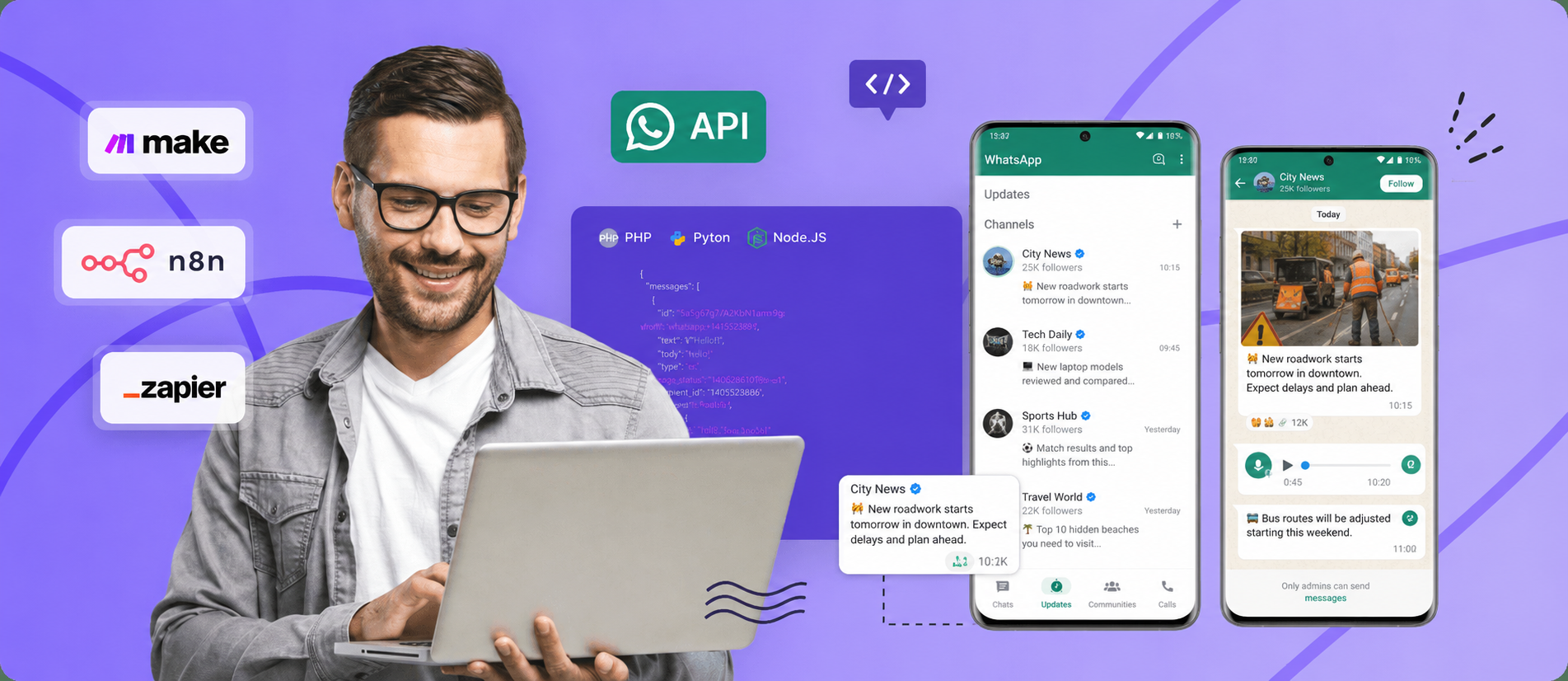
You don't need a custom server to run channel automations. Business integrators can use low-code platforms like Make, n8n, or Zapier to build visual workflows.
A common use case is automatically cross-posting any update published on a Telegram channel, RSS feed, or database directly to a WhatsApp Channel, saving hours of daily manual effort.
You can configure these integrations using standard HTTP Request client nodes, which offer maximum flexibility and prevent execution stalls.
This visual setup eliminates manual overhead, cutting administrative tasks and sync delays by up to 90%.
- Make.com Configuration: Add an "HTTP - Make a Request" module as your action. Set URL to
https://gate.whapi.cloud/messages/text. Select Method:POST. In Headers, addAuthorization:Bearer YOUR_WHAPI_TOKEN. Set Body Type toRaw, Content-Type toJSON (application/json). Under Request Content, write:{"to": "1203632001928471@newsletter", "body": " - Read more: "}, mapping dynamic variables. - n8n Workflow Mapping: If you are setting up an n8n WhatsApp integration, instantiate an "HTTP Request" node. Configure URL as
https://gate.whapi.cloud/messages/text. Select Method:POST. Toggle "Send Headers" and addAuthorizationwith the valueBearer YOUR_WHAPI_TOKEN. Set Body Content Type toJSON. In the JSON parameters editor, map the raw body as{ "to": "1203632001928471@newsletter", "body": "=" }. - Zapier Webhook Triggering: Create a Zap with the action "Webhooks by Zapier" -> "Custom Request". Set Method to
POST. Set URL tohttps://gate.whapi.cloud/messages/text. Under Data, provide raw JSON payload mapping:{"to": "1203632001928471@newsletter", "body": "{telegram_message_text}"}. In the Headers pane, defineAuthorizationasBearer YOUR_WHAPI_TOKENandContent-Typeasapplication/json.
👉 Step-by-step guide on how to use Whapi.Cloud integration with Make.com
👉 Step-by-step guide on how to integrate Whapi.Cloud with n8n
We won't cover setting up external UTM link shortening platforms or custom domain click-trackers here. These routing platforms belong to your distinct marketing analytics stack; our focus is purely on managing your channels and publishing structured posts programmatically via Whapi's core endpoints.
Choosing the Best Architecture for Automated WhatsApp Channels
Choosing the right architecture is critical. While Meta's official API completely lacks channel support, Whapi.Cloud provides a stable, zero-infrastructure bridge.
Developers get complete socket-based control over WhatsApp news feeds, admin assignments, and interactive posts without container restarts, proxy maintenance, or API deprecation worries.
If you need help or have any questions about optimizing your broadcast pipelines, the Whapi.Cloud support team is always available via the chat widget on our website.