TL;DR: Mount express.raw({ type: 'application/json' }) on your /webhook route before any JSON middleware; this one decision determines whether every Stripe signature check succeeds or fails. Strip the leading '+' from the subscriber's phone and append @s.whatsapp.net. POST to /groups/{id}/participants on checkout.session.completed; DELETE on customer.subscription.deleted. Google Sheets handles ≤50 members. SQLite handles the rest. All code is in this guide.
Who Runs Paid WhatsApp Groups in 2026 (and Why Manual Management Breaks)
Fitness coaches, crypto signal providers, real estate deal-finders, and exam-prep tutors are running paid WhatsApp groups at scale; nearly all manage membership in a spreadsheet that reliably breaks past 50 subscribers.
The market is established across four verticals: fitness ($9.99--$140/month), crypto signals ($49--$149/month on safetrading.today), exam-prep tutors in Nigeria and South Africa (₦1,500--R149/month), and luxury retail groups like UK retailer Love Luxe, where the invite link leak is just as active. Open-source projects like dhryvyad/wahooks (MIT, 2026) confirm developer appetite for self-managed solutions beyond commercial SaaS.
The operational pain is quantified. CommuniPass, which charges $29--$299/month as a SaaS for exactly this problem, documents consistent errors at approximately 50 members, where cross-referencing payment dates against WhatsApp display names exceeds human-error tolerance. The time cost is approximately 8 hours per week, or $20,800 annually at $50/hour.
The revenue leakage problem is separate and, in practice, worse. Groups lose 15--20% of subscription revenue to expired members who remain in the group after their payment lapses. The reason it persists is social: WhatsApp sends a visible notification to the entire group when someone is removed via the app UI. As one operator put it directly: "Members stay in the group after their subscription expires because it's awkward to manually kick them." The API-level DELETE call covered in this guide removes members with no notification visible to other members.
Why the Zapier + Raw Invite Link Approach Fails at the First Shared Link
You might reach for Zapier or Make first: Stripe payment event → fetch group invite link → send via email or SMS. This works until one subscriber shares the link.
As NothingApps documented the exact failure mode: "You sell one spot in your VIP group. Within an hour, five ghost members have joined because the buyer shared the link in a public forum." A static invite link sent to every subscriber creates a compounding leak with no mechanism to close it. The Zapier flow also provides no way to remove members when subscriptions expire -- it reacts to payment success but has no DELETE capability against group membership, and no trigger for subscription termination.
The approach this guide covers adds and removes individual members by phone number, not by a shareable link. Invite link rotation remains available as a fallback only for the edge case where a subscriber's privacy settings block direct API addition, handled in the invite-link section below.
The Complete System: Stripe Checkout → Webhook → Whapi.Cloud
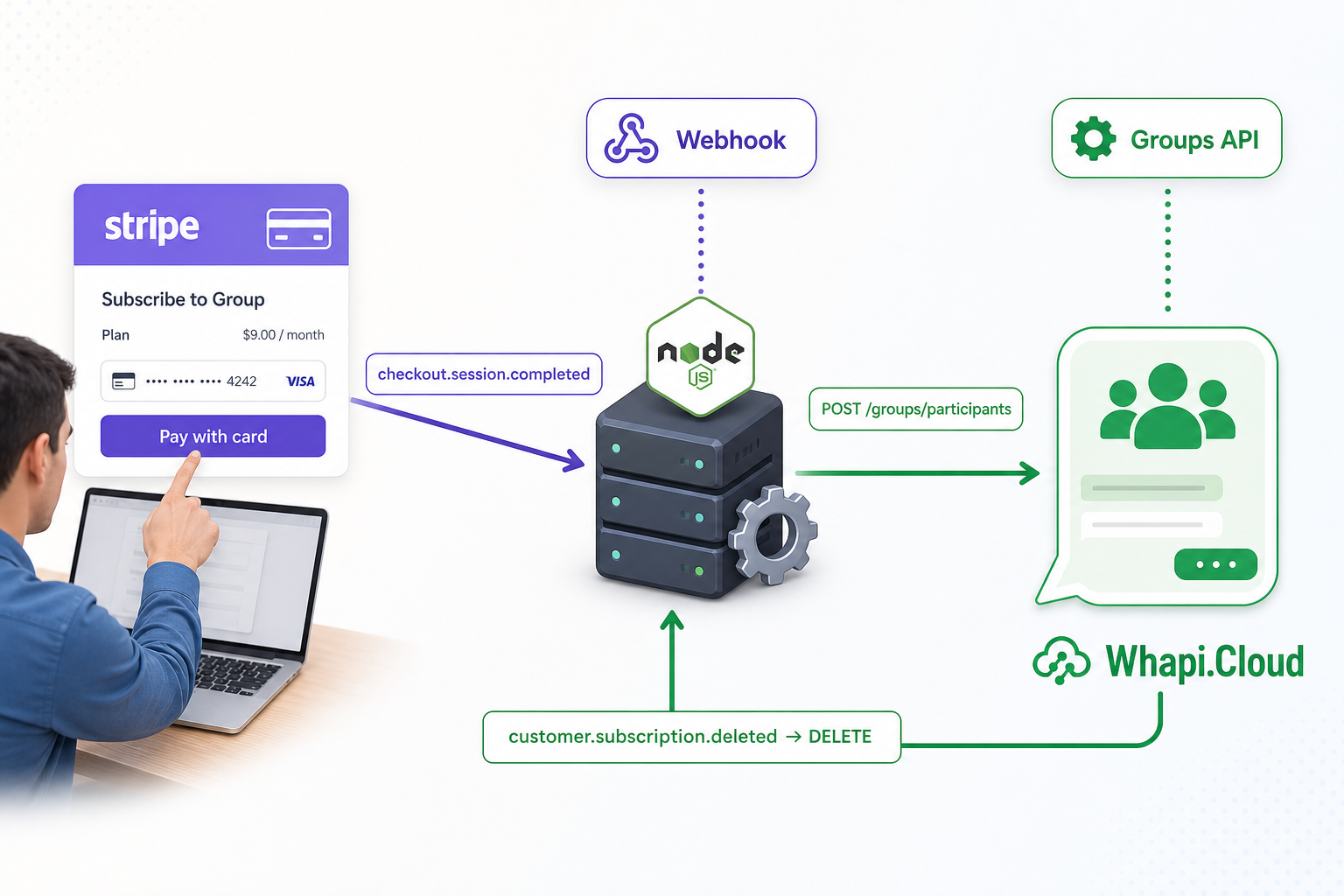
Five components, two Stripe events, one Whapi.Cloud token. The entire membership lifecycle fits in a single Express file with a database module and two API routes.
Runtime flow:
-
Checkout Session creation: Your subscriber completes Stripe's hosted payment page. Their WhatsApp phone number is captured in
metadata.whatsapp_phoneat session creation, not at payment confirmation. -
checkout.session.completed: Stripe delivers this event within seconds of successful payment. Your handler reads the phone from metadata, converts it to a WhatsApp JID, and callsPOST /groups/{id}/participants. The subscriber is in the group. -
Active membership: Your database records the phone, Stripe subscription ID, and group ID. A daily cron job checks for records that the webhook may have missed.
-
customer.subscription.deleted: This fires on cancellation or after Stripe exhausts payment retries. Your handler callsDELETE /groups/{id}/participantswith the member's JID. -
Silent removal: The DELETE call removes the member with no WhatsApp group notification to other members. The social friction problem is gone.
customer.subscription.deleted is the only Stripe event that guarantees expiry-triggered removal. A common wiring mistake is routing removal to invoice.payment_failed. That event fires on each failed retry attempt (up to 4 by default), not when Stripe definitively terminates the subscription. The subscription may recover after a retry. Use customer.subscription.deleted.
Set Up Stripe Checkout with Your Subscriber's WhatsApp Phone
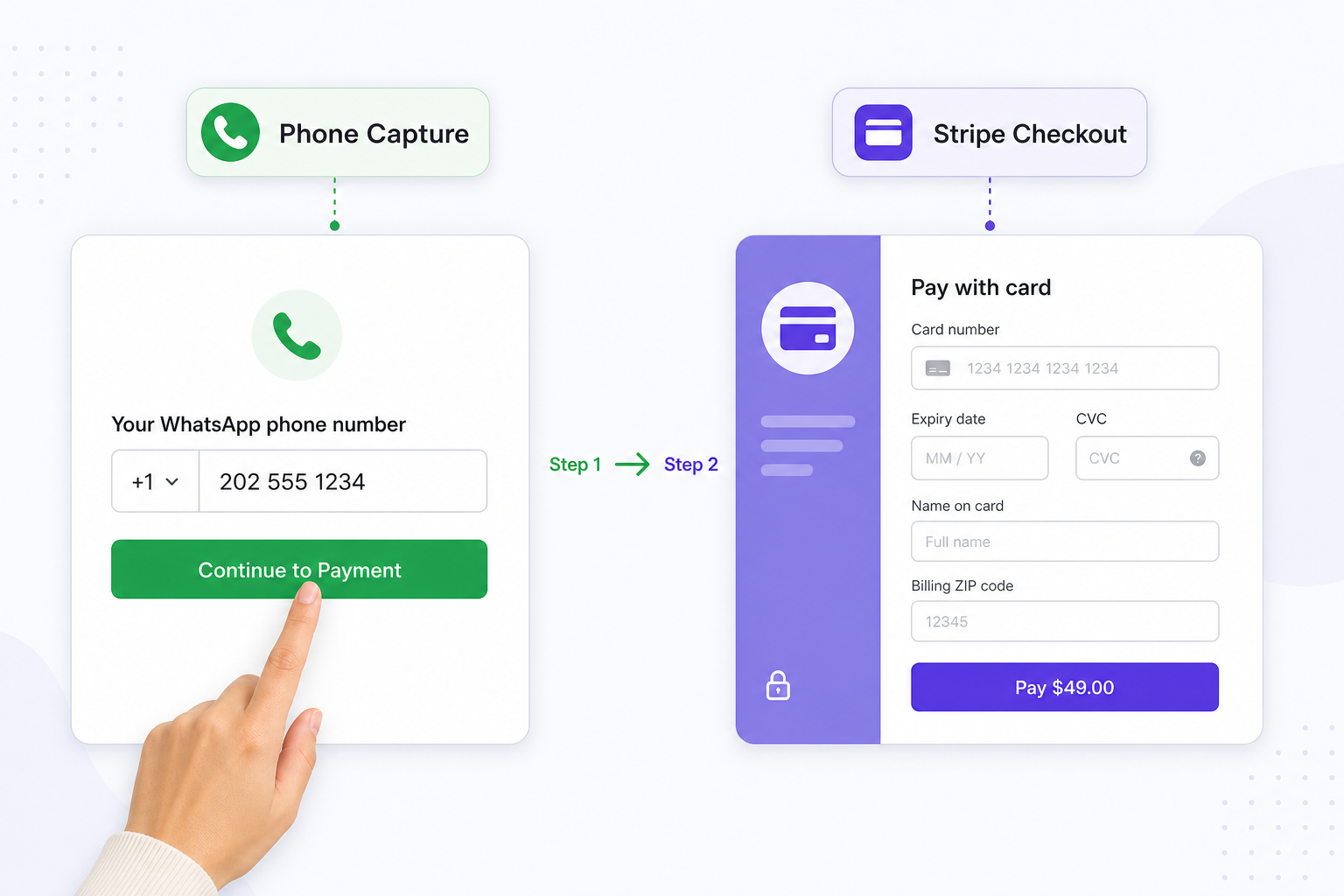
Capture the subscriber's WhatsApp phone number at session creation. You cannot retrieve it reliably from Stripe later without building a separate customer profile lookup.
Add a phone input step in your frontend before the Stripe redirect. Pass the value to your backend when creating the Checkout Session via Stripe's metadata field:
// server.js -- create a Stripe Checkout Session with phone metadata
const stripe = require('stripe')(process.env.STRIPE_SECRET_KEY);

app.post('/create-checkout', async (req, res) => {
  const { phone } = req.body; // e.g. "+12025551234" from your pre-checkout form

  const session = await stripe.checkout.sessions.create({
    mode: 'subscription',
    line_items: [{ price: process.env.STRIPE_PRICE_ID, quantity: 1 }],
    // Store WhatsApp phone here -- webhook reads it from event.data.object.metadata.whatsapp_phone
    metadata: { whatsapp_phone: phone },
    success_url: `${process.env.BASE_URL}/success?session_id={CHECKOUT_SESSION_ID}`,
    cancel_url: `${process.env.BASE_URL}/cancel`,
  });

  res.json({ url: session.url });
});
If whatsapp_phone is absent from session metadata when checkout.session.completed fires, your webhook handler cannot add the member. Validate this field at your checkout form. Reject submissions shorter than 10 digits and require the international prefix so the E.164-to-JID conversion works correctly in the next step.
The session object at completion also contains the subscription ID. Save it alongside the phone number in your database; it is the lookup key when customer.subscription.deleted fires later. Without this pairing, the removal event cannot identify which phone number to remove.
Why Stripe Webhook Signatures Fail -- and the Raw-Body-First Fix
Every Stripe signature verification fails silently if express.json() runs before your webhook handler. The fix is one line in the correct position -- but it typically costs hours to diagnose the first time.
Teams that register express.json() globally then add a /webhook route find that stripe.webhooks.constructEvent() throws "No signatures found matching the expected signature for payload" on every call, even with the correct secret. The error gives no hint. The cause: express.json() has already re-serialized the request body, altering its byte representation enough to invalidate the HMAC-SHA256 signature Stripe computed over the original raw bytes.
The raw-body-first rule: mount express.raw({ type: 'application/json' }) on the /webhook route before registering express.json() globally. Route-specific middleware in Express runs first, so the webhook route receives a Buffer before the global parser touches it.
// server.js -- middleware registration order is non-negotiable
// without express.raw() here, stripe.webhooks.constructEvent throws 400
// even when STRIPE_WEBHOOK_SECRET is correct and matches your dashboard
app.use('/webhook', express.raw({ type: 'application/json' }), webhookHandler);

// All other routes get parsed JSON normally
app.use(express.json());
app.use('/create-checkout', checkoutRouter);
With the route order correct, the webhook handler verifies the signature and routes events to the appropriate business logic:
async function webhookHandler(req, res) {
  const sig = req.headers['stripe-signature'];
  let event;

  try {
    // req.body is a raw Buffer here -- not a parsed object
    event = stripe.webhooks.constructEvent(req.body, sig, process.env.STRIPE_WEBHOOK_SECRET);
  } catch (err) {
    console.error('Webhook signature verification failed:', err.message);
    return res.status(400).send(`Webhook Error: ${err.message}`);
  }

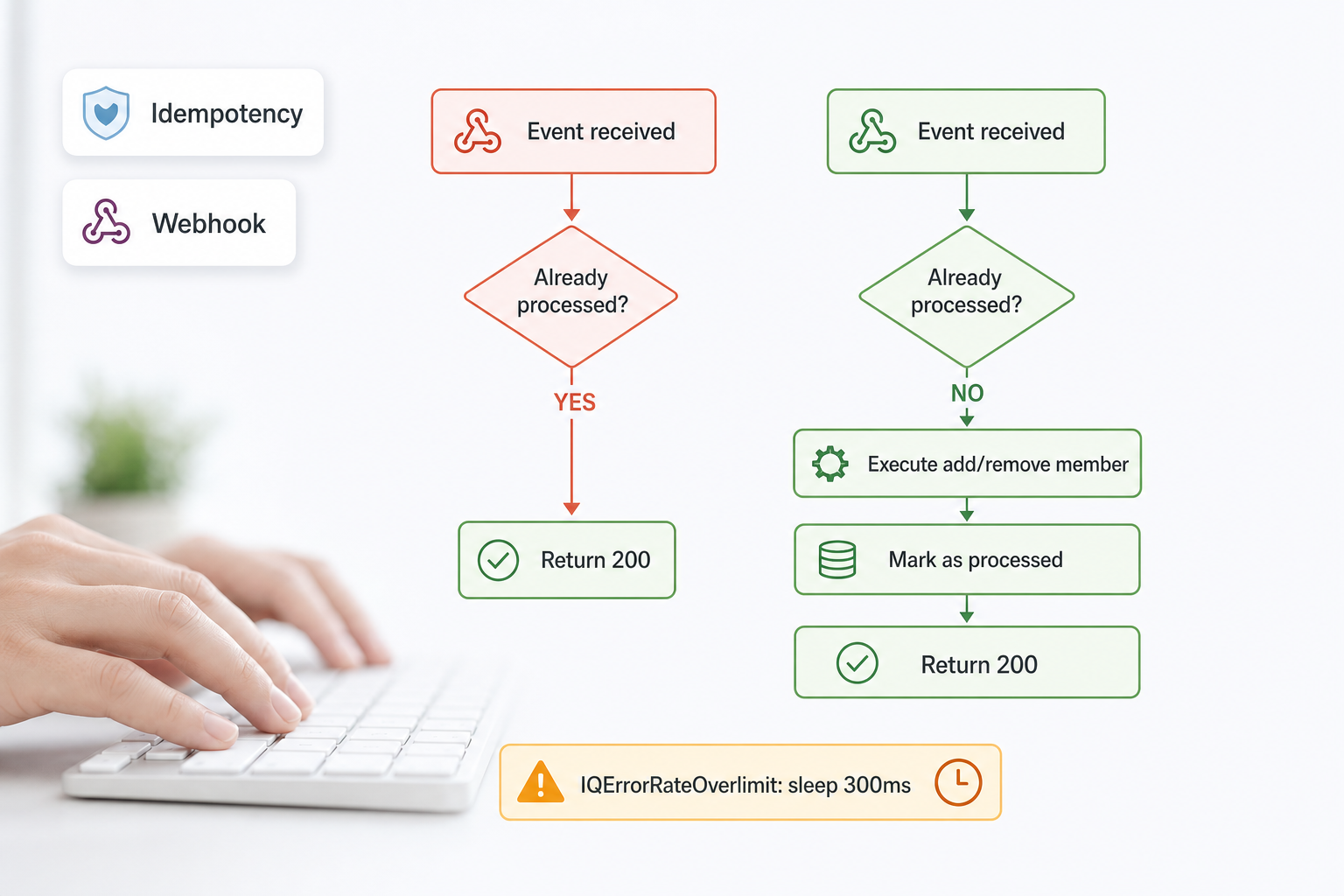
  // Idempotency gate: Stripe delivers each event at least once.
  // A duplicate checkout.session.completed adds the member twice; a duplicate
  // customer.subscription.deleted removes a still-active subscriber.
  if (await db.hasProcessedEvent(event.id)) {
    return res.status(200).send('Already processed');
  }

  switch (event.type) {
    case 'checkout.session.completed':
      await handleCheckoutCompleted(event.data.object);
      break;
    case 'customer.subscription.deleted':
      await handleSubscriptionDeleted(event.data.object);
      break;
    default:
      console.log(`Unhandled event type: ${event.type}`);
  }

  await db.markEventProcessed(event.id);
  res.status(200).send('OK');
}
The idempotency check depends on a processed_events table that records each Stripe event ID after successful handling. The schema for this table is included in the database section below.
Phone Number Normalization: Two Operations That Prevent 90% of Failures
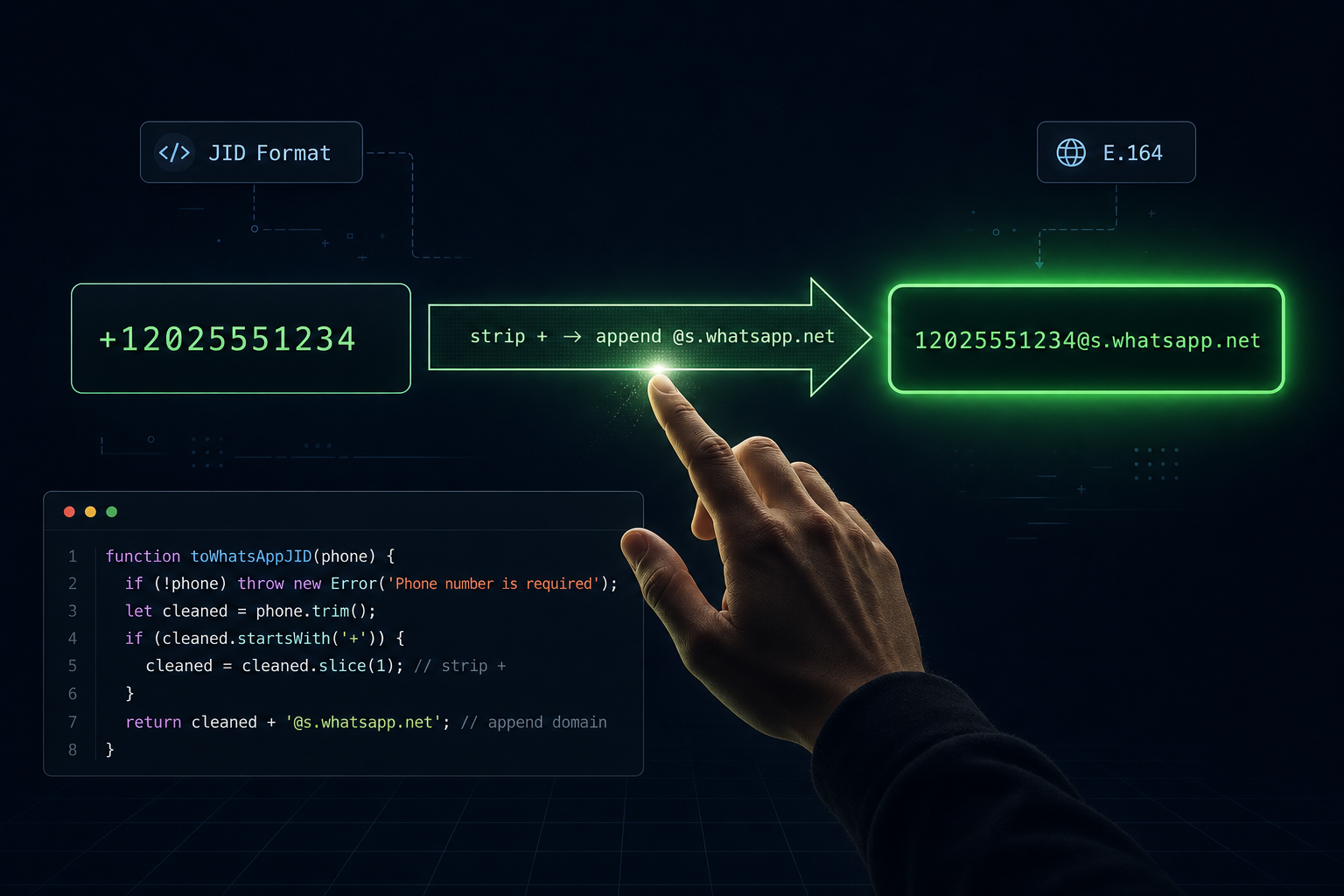
Strip the '+', append '@s.whatsapp.net'. Two string operations, zero ambiguity. Every other failure in Stripe + Whapi.Cloud integrations traces back to skipping one of these steps.
WhatsApp addresses contacts by JID (Jabber ID), not by phone number. The format is {country_code}{national_number}@s.whatsapp.net. Stripe stores numbers in E.164 format with a leading '+'. The conversion is deterministic:
// Converts E.164 phone → WhatsApp JID
// Input:  "+12025551234"  →  Output: "[email protected]"
// Input:  "12025551234"   →  Output: "[email protected]"  (no + present)
function toWhatsAppJID(e164Phone) {
  const digits = String(e164Phone).replace(/^\+/, '');
  return `${digits}@s.whatsapp.net`;
}

// Optional: validate before using
function isValidJID(jid) {
  return /^\d{7,15}@s\.whatsapp\.net$/.test(jid);
}
Teams spend hours debugging every addGroupParticipant call failing with a generic error, only to find the JID contained a '+' or a space from an unstripped input field. This is the single most frequent silent failure in new Stripe + Whapi.Cloud integrations. Call isValidJID() before each API call and log an explicit error if it returns false.
Two edge cases to handle at the checkout form: (1) numbers with spaces or dashes: strip all non-digit characters before the '+' removal; (2) numbers without a country code: reject inputs shorter than 10 digits and prompt for international format.
Add Member on Payment, Remove on Expiry
Two Stripe event handlers, four HTTP calls to Whapi.Cloud. The add-on-payment path runs at checkout; the remove-on-expiry path runs when the subscription terminates.
The checkout handler reads the phone from session metadata, adds the member, then saves the record for later expiry tracking:
async function handleCheckoutCompleted(session) {
  const phone = session.metadata?.whatsapp_phone;
  if (!phone) {
    console.error('No whatsapp_phone in session metadata -- member cannot be added automatically');
    return;
  }

  const groupId = process.env.WHAPI_GROUP_ID;
  await addGroupMember(groupId, phone);

  await db.saveMember({
    phone,
    stripeSubscriptionId: session.subscription,
    stripeCustomerId: session.customer,
    groupId,
  });

  console.log(`Member added: ${phone} (subscription: ${session.subscription})`);
}

async function handleSubscriptionDeleted(subscription) {
  const member = await db.getMemberBySubscriptionId(subscription.id);
  if (!member) {
    // Already removed manually, or was never successfully added
    console.warn(`No member found for subscription ${subscription.id}`);
    return;
  }

  await removeGroupMember(member.groupId, member.phone);
  await db.removeMember(subscription.id);

  console.log(`Member removed: ${member.phone} (subscription: ${subscription.id})`);
}
The Whapi.Cloud API calls are direct HTTP requests to the Groups API. The add call posts the subscriber's JID as a participant:
const sleep = (ms) => new Promise(resolve => setTimeout(resolve, ms));

// POST https://gate.whapi.cloud/groups/{GroupID}/participants
async function addGroupMember(groupId, phone) {
  const jid = toWhatsAppJID(phone);

  const response = await fetch(
    `https://gate.whapi.cloud/groups/${groupId}/participants`,
    {
      method: 'POST',
      headers: {
        'Authorization': `Bearer ${process.env.WHAPI_TOKEN}`,
        'Content-Type': 'application/json',
      },
      body: JSON.stringify({ participants: [jid] }),
    }
  );

  const data = await response.json();

  if (!response.ok) {
    // 403 means the subscriber's privacy settings block direct group addition
    // Fall back to sending them a rotated invite link via DM
    if (response.status === 403) {
      console.warn(`Direct add blocked for ${phone}, sending invite link`);
      return sendInviteLink(groupId, phone);
    }
    throw new Error(`addGroupMember failed (${response.status}): ${JSON.stringify(data)}`);
  }

  // Sleep >250ms between consecutive adds -- prevents IQErrorRateOverlimit
  // which fires after ~4 rapid additions and requires a channel-level retry
  await sleep(300);
  return data;
}

// DELETE https://gate.whapi.cloud/groups/{GroupID}/participants
async function removeGroupMember(groupId, phone) {
  const jid = toWhatsAppJID(phone);

  const response = await fetch(
    `https://gate.whapi.cloud/groups/${groupId}/participants`,
    {
      method: 'DELETE',
      headers: {
        'Authorization': `Bearer ${process.env.WHAPI_TOKEN}`,
        'Content-Type': 'application/json',
      },
      body: JSON.stringify({ participants: [jid] }),
    }
  );

  // This DELETE is silent: no WhatsApp group notification is sent to other members
  return response.json();
}
The removeGroupMember DELETE call produces no notification in the group. WhatsApp's "X was removed by admin" message only appears when a human admin uses the WhatsApp app UI. API-driven removal via DELETE /groups/{id}/participants is invisible to other members. The subscriber simply disappears from the participant list. The entire social friction problem (the awkwardness of manually kicking someone) disappears with it.
Rate Limits, Idempotency, and the 403 Fallback
Three failure modes every production deployment encounters, each with a deterministic fix. Put all three in the code before your first live subscriber payment.
IQErrorRateOverlimit is the WhatsApp server-side error that fires when you call addParticipants too rapidly. A developer filing a GitHub issue documented it precisely: "Unknown error (internally IQErrorRateOverlimit) while calling group.addParticipants() -- typically occurs after 4 successfully added members with default sleep values." The fix in addGroupMember() above is await sleep(300) after each individual add. For migration batches where you're adding 50+ existing subscribers at once, increase the sleep to 500ms and process in groups of 10 with a 3-second pause between batches.
The database module below implements both the idempotency check and the member record storage. It uses better-sqlite3 for synchronous SQLite access, which simplifies the async flow:
// db.js -- SQLite member store with idempotency
const Database = require('better-sqlite3');
const db = new Database('members.db');

db.exec(`
  CREATE TABLE IF NOT EXISTS members (
    id         INTEGER PRIMARY KEY AUTOINCREMENT,
    phone      TEXT NOT NULL,
    stripe_subscription_id TEXT UNIQUE NOT NULL,
    stripe_customer_id     TEXT NOT NULL,
    group_id   TEXT NOT NULL,
    created_at INTEGER DEFAULT (unixepoch())
  );
  CREATE TABLE IF NOT EXISTS processed_events (
    event_id     TEXT PRIMARY KEY,
    processed_at INTEGER DEFAULT (unixepoch())
  );
`);

module.exports = {
  hasProcessedEvent: (id) =>
    !!db.prepare('SELECT 1 FROM processed_events WHERE event_id = ?').get(id),

  markEventProcessed: (id) =>
    db.prepare('INSERT OR IGNORE INTO processed_events (event_id) VALUES (?)').run(id),

  saveMember: ({ phone, stripeSubscriptionId, stripeCustomerId, groupId }) =>
    db.prepare(`
      INSERT OR REPLACE INTO members (phone, stripe_subscription_id, stripe_customer_id, group_id)
      VALUES (?, ?, ?, ?)
    `).run(phone, stripeSubscriptionId, stripeCustomerId, groupId),

  getMemberBySubscriptionId: (sid) =>
    db.prepare('SELECT * FROM members WHERE stripe_subscription_id = ?').get(sid),

  removeMember: (sid) =>
    db.prepare('DELETE FROM members WHERE stripe_subscription_id = ?').run(sid),
};
A 403 from addGroupParticipant means the subscriber's WhatsApp privacy blocks server-side group additions. The only forward path: send a fresh, rotated invite link directly to that subscriber. This is a device-level setting you cannot override. See the add member to group API reference for the exact error shape. The fallback is handled by sendInviteLink() in the next section.
Invite Link Rotation: Closing the Ghost-Member Leak
Every time you send someone an invite link, revoke it immediately and generate a fresh one. One unrotated link can fill your group with non-paying members within an hour.
The mechanism: DELETE /groups/{id}/invite invalidates the current invite code instantly. GET /groups/{id}/invite generates and returns a new code. The new link goes to the subscriber only, via direct WhatsApp DM. Any code that existed before the DELETE (from a previous test, a past subscriber, or a leaked screenshot) stops working immediately.
// DELETE https://gate.whapi.cloud/groups/{GroupID}/invite  (revoke current code)
// GET    https://gate.whapi.cloud/groups/{GroupID}/invite  (get new code)
// POST   https://gate.whapi.cloud/messages/text            (send link via DM)
async function sendInviteLink(groupId, phone) {
  // Step 1: Revoke -- any previously distributed link stops working now
  await fetch(`https://gate.whapi.cloud/groups/${groupId}/invite`, {
    method: 'DELETE',
    headers: { 'Authorization': `Bearer ${process.env.WHAPI_TOKEN}` },
  });

  // Step 2: Get fresh invite code
  const res = await fetch(`https://gate.whapi.cloud/groups/${groupId}/invite`, {
    method: 'GET',
    headers: { 'Authorization': `Bearer ${process.env.WHAPI_TOKEN}` },
  });
  const { invite_code } = await res.json();
  const inviteLink = `https://chat.whatsapp.com/${invite_code}`;

  // Step 3: Send the unique link to this subscriber only via DM
  await fetch('https://gate.whapi.cloud/messages/text', {
    method: 'POST',
    headers: {
      'Authorization': `Bearer ${process.env.WHAPI_TOKEN}`,
      'Content-Type': 'application/json',
    },
    body: JSON.stringify({
      to: toWhatsAppJID(phone),
      body: `Your subscription is confirmed! Join your private group here:\n${inviteLink}\n\nThis link is personalized -- please do not share it.`,
    }),
  });

  console.log(`Invite link rotated and sent to ${phone}`);
}
There is a trade-off: each rotation invalidates all previous codes, including ones sent to subscribers who haven't clicked yet. Keep the direct API add as the primary path. Use rotation only for the 403 fallback, not routine onboarding.
Projects that skip rotation and deliver a static invite URL report the ghost-member pattern within days of their first public promotion. Each non-paying member consumes content, occupies one of the 1,024 group member slots, and reduces the group's perceived exclusivity for paying subscribers. The revenue leak is permanent -- there is no way to retroactively identify which member joined via a shared link versus a paid subscription without API-level participant tracking.
What to Store in Your Database (and at Which Scale)
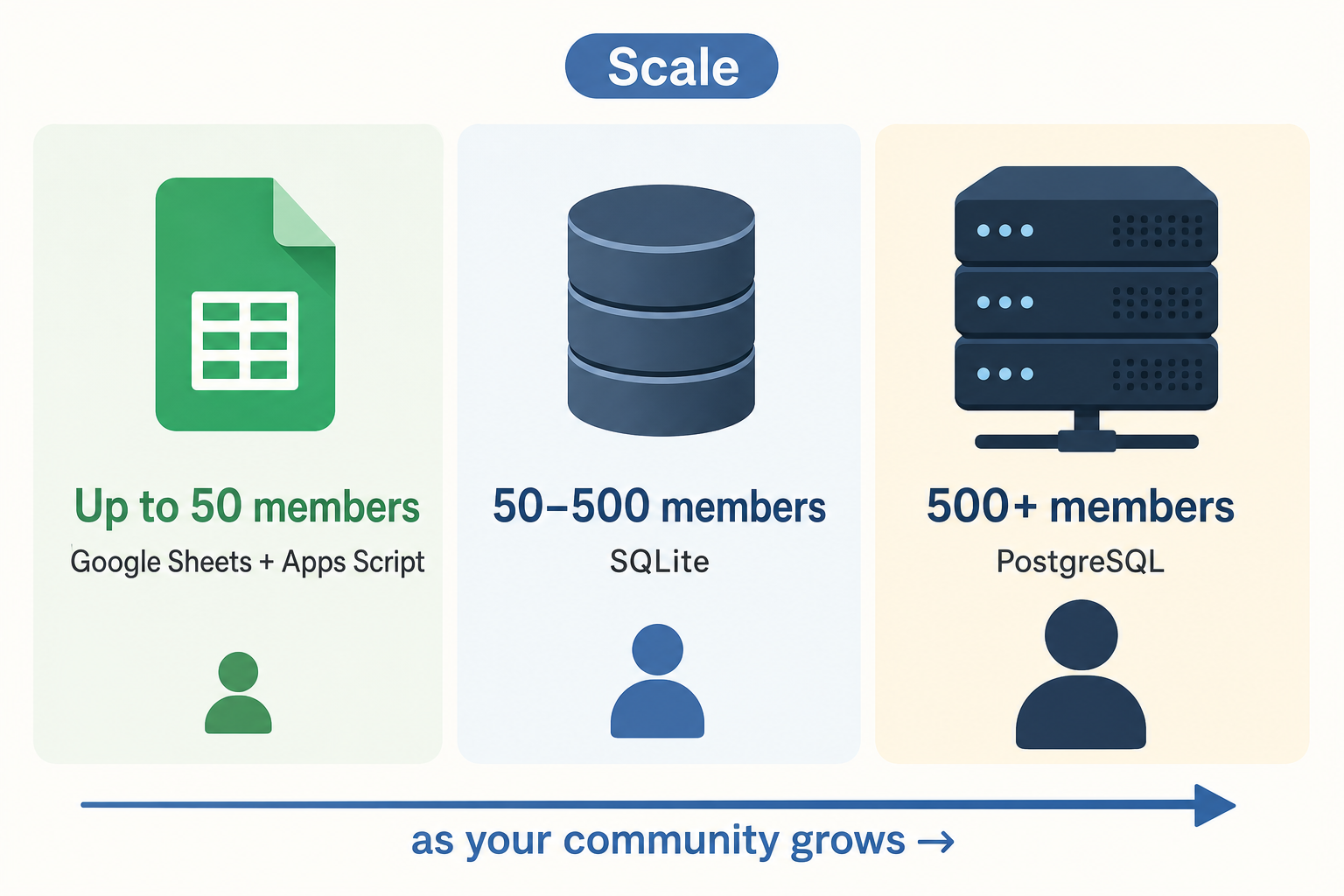
Google Sheets handles 50 members; SQLite handles 50,000. Choose before launch, not after row 51 in your spreadsheet starts producing lookup errors.
Decision table:
| Member count | Storage | Setup time | Idempotency | Migrate when |
|---|---|---|---|---|
| ≤50 members | Google Sheets + Apps Script | ~30 min | Manual duplicate check | Errors appear in lookups |
| 51--500 members | SQLite (file-based, single server) | ~2 hours | processed_events table |
You deploy to multiple servers |
| 500+ members | PostgreSQL or MySQL | ~4 hours + hosting | processed_events + indexed |
Never -- handles full 1,024-member groups easily |
For the Google Sheets tier, a Google Apps Script web app receives POST requests from your webhook server and appends or updates rows. Deploy it as a public web app that your Express server calls instead of a local database:
// Google Apps Script -- deploy as a web app at script.google.com
// Your Express server calls this URL with { action, phone, subscriptionId }
function doPost(e) {
  const data = JSON.parse(e.postData.contents);
  const sheet = SpreadsheetApp.getActiveSpreadsheet().getSheetByName('Members');

  if (data.action === 'add') {
    sheet.appendRow([
      data.phone,
      data.subscriptionId,
      data.customerId,
      'active',
      new Date().toISOString(),
    ]);
  } else if (data.action === 'remove') {
    const rows = sheet.getDataRange().getValues();
    for (let i = 1; i < rows.length; i++) {
      if (rows[i][1] === data.subscriptionId) {
        sheet.getRange(i + 1, 4).setValue('removed');
        break;
      }
    }
  }

  return ContentService.createTextOutput('OK');
}
The SQLite schema from the rate-limits section covers the 51--500 tier without modification. For the 500+ tier, migrate to PostgreSQL: column names transfer directly, SERIAL replaces INTEGER PRIMARY KEY AUTOINCREMENT, and unixepoch() becomes EXTRACT(EPOCH FROM NOW()). When your group hits the 1,024-member ceiling, add a GROUP BY group_id query to your member routing logic to span parallel groups. Over 3,000 businesses run Whapi.Cloud in production today, including paid community operators who've scaled past 1,024 members. When your subscriptions reach hundreds of records, the last thing you need is a WhatsApp protocol update breaking group management at 3am -- Whapi.Cloud absorbs those protocol changes, keeping /groups/{id}/participants stable while the underlying session layer updates transparently.
The No-Code Path: n8n Stripe Trigger and Whapi.Cloud HTTP Node
n8n eliminates the Express server entirely: one Stripe Trigger node, one Set node for phone format, one HTTP Request node to Whapi.Cloud via n8n. Zero custom backend code for the happy path.
Workflow for checkout.session.completed:
-
Stripe Trigger node: configure to receive
checkout.session.completed. n8n provides a webhook URL to register in your Stripe dashboard. -
Set node (phone transform): expression field:
{{ $json.data.object.metadata.whatsapp_phone.replace(/^\+/, '') + '@s.whatsapp.net' }}. This is the entire normalization in one expression. -
HTTP Request node: Method: POST, URL:
https://gate.whapi.cloud/groups/YOUR_GROUP_ID/participants, Authentication: Generic Credential (Bearer token), Body (JSON):{"participants": ["{{ $json.jid }}"]}.
For the removal path, duplicate the workflow and change the Stripe Trigger to customer.subscription.deleted and the HTTP method to DELETE. The trade-off: n8n has no native idempotency. A Stripe retry delivers the event twice, adding or removing the member twice. For communities under 50 active subscribers where retry volume is negligible, this is acceptable. Above that threshold, the Node.js + SQLite path handles deduplication reliably via the processed_events table.
What This System Does Not Cover (And Where to Go Next)
We won't cover multi-tier subscriptions here. Routing silver vs. gold subscribers into different groups requires a Stripe Product ID lookup table and per-tier group IDs that depend entirely on your pricing structure.
Also out of scope: grace-period delays after cancellation, trial-period handling where members join before their first charge, and the official WhatsApp Business API's 8-member group ceiling (which requires 100,000+ daily messages for group management access and does not apply to Whapi.Cloud's web-session implementation). For subscription grace logic, add a grace_days column to your members table and adjust your expiry cron check accordingly.