TL;DR: Official API limits tests; session-based QR APIs scale outbound messaging instantly. Connecting your existing WhatsApp number via Whapi.Cloud takes two minutes and eliminates Meta Business verification paperwork completely. Developers can start sending production-volume notifications immediately without pre-approved templates or per-message fees. We recommend a 7-day warmup to keep your account safe.
The Developer Sandbox Trap: Why Official WhatsApp Testing Stalls on Day One
Facebook Sandbox restricts outbound numbers to five; session-based API runs production-grade testing. Official sandboxes restrict routing to five pre-registered numbers, stalling testing when dynamic databases require immediate delivery verification.
For developers shipping custom alert flows, bypassing Meta Business verification is the only way to launch immediately. In contrast, Whapi.Cloud's session-based API lets you send and receive messages programmatically from your existing phone number in minutes, completely bypassing Meta's weeks of paperwork, sandbox constraints, and template approvals. The rest of this guide explains how this multi-device socket setup works.
In our production audits, we've seen developers lose weeks of launch momentum trying to satisfy Meta's strict verification queues. A software agency founder in Tanzania recently shared that their client onboarding completely stalled for three weeks due to arbitrary Meta verification rejections, despite submitting correct tax documents and business licenses. Real-world systems need to test sending message notifications to arbitrary user groups immediately. Forcing testers to manually log in with one-time passwords (OTPs) just to receive a trial notification destroys early-stage velocity.
The official WABA developer sandbox limits you to five verified test recipient numbers, which must be manually registered using dynamic one-time password (OTP) verifications inside the Facebook Developer dashboard.
In the official WhatsApp Business API, setting up local tunnels like ngrok can trigger re-registration loops and leave numbers stuck in a "Pending" status on the Meta Developer dashboard. In Whapi.Cloud, you connect a number instantly via a QR code and assign a static webhook URL that remains stable, eliminating the need to debug local proxy tunnels or handle Meta registration blocks.
Bypassing Facebook Business Verification with Session-Based Web Sockets
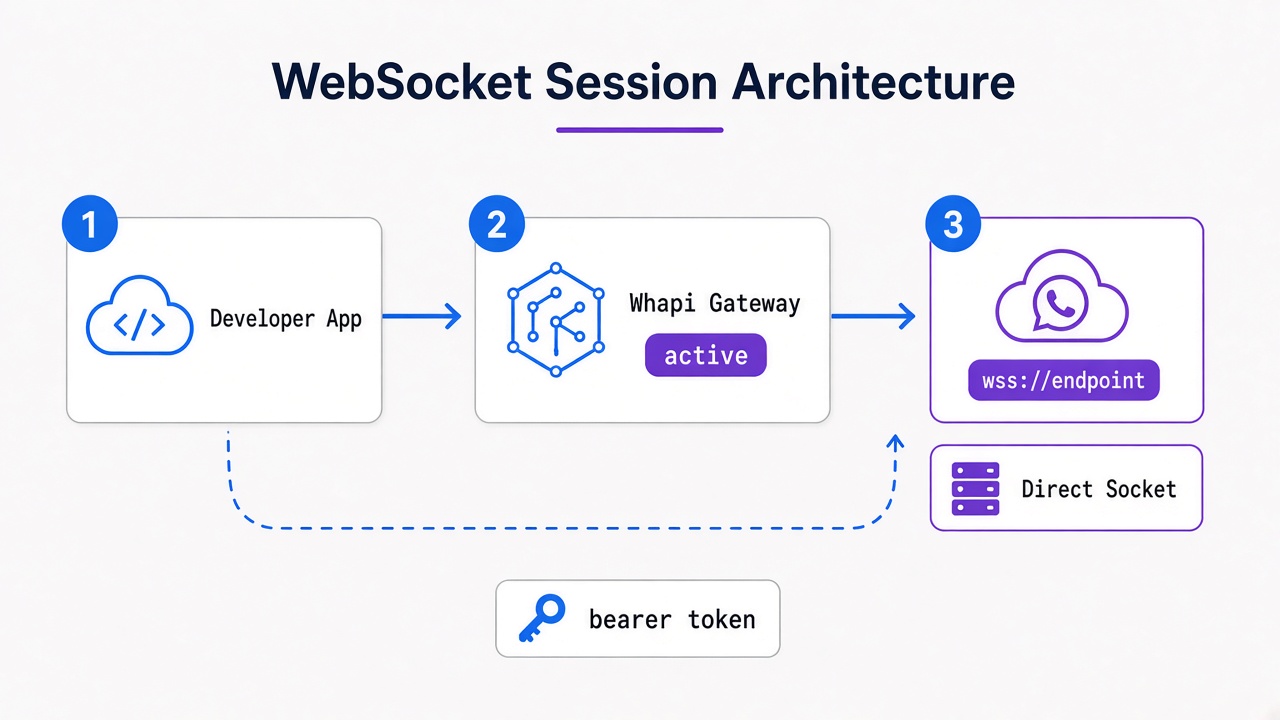
Connecting an existing WhatsApp number via a multi-device socket synchronizes programmatic messaging in minutes, bypassing Facebook Business Manager verification.
To bypass this process, developers leverage the multi-device session pattern, which synchronizes an existing WhatsApp account with our cloud infrastructure via standard web-session socket connections. This mirrors the behavior of a companion device in the WhatsApp Web network. It establishes a secure TCP socket handshake that routes outgoing JSON payloads directly to WhatsApp's servers, eliminating the need for a corporate Meta Business account or pre-approved templates.
Because this protocol routes actions through an active, authenticated mobile session, the gateway operates under the exact same permissions as a physical smartphone. Whapi.Cloud absorbs protocol updates upstream to ensure your client-facing code remains unchanged, managing the socket connection in the cloud. You avoid the heavy infrastructure tax of maintaining self-hosted headless browsers, managing Docker session containers, or tracking silent WhatsApp Web updates.
How to Connect Your Number and Send Your First Message in 5 Minutes
Scanning a secure QR code links your number to Whapi.Cloud instantly, enabling immediate Node.js REST API calls and static HTTPS webhook delivery without Meta approvals.
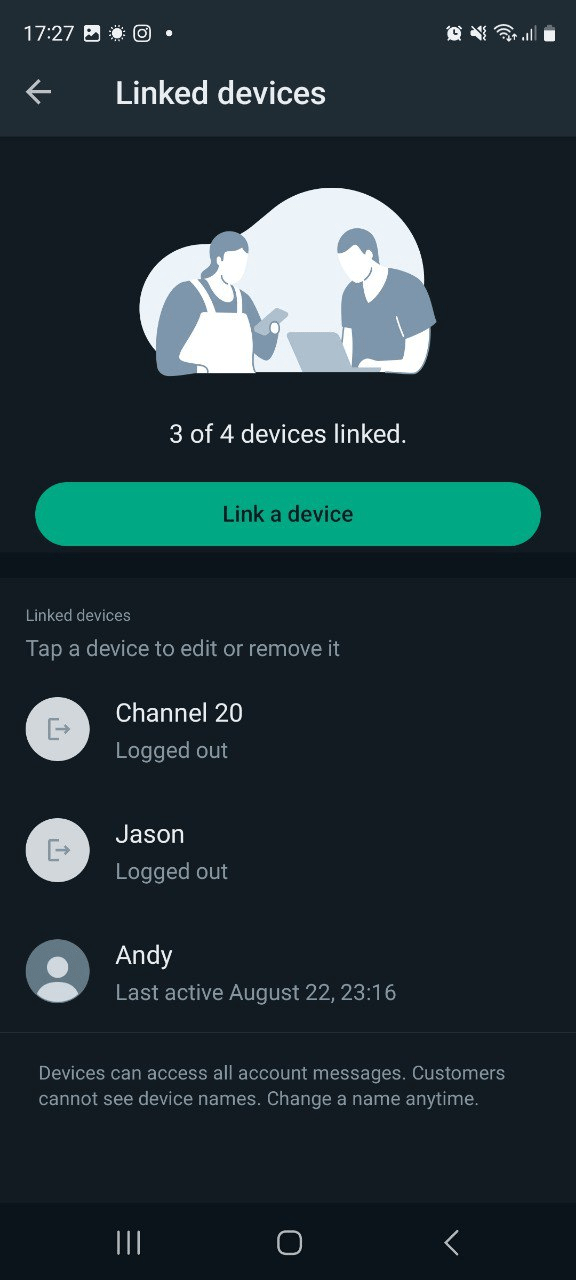
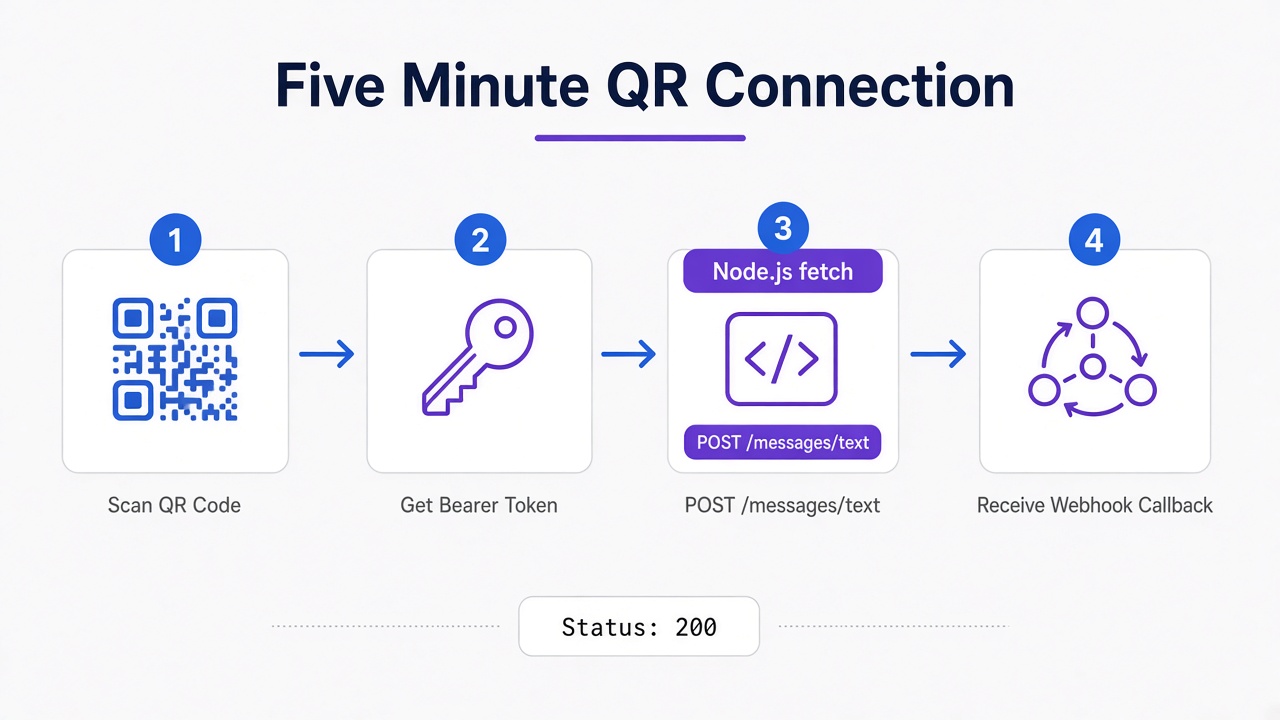
In practice, teams that deploy session-based gateways find that scanning a QR code is the single fastest path to copy-pasting working code. The connection process is straightforward. First, log into the Whapi.Cloud dashboard and retrieve your bearer token. Second, generate the pairing QR code and scan it using your smartphone's Linked Devices menu. Once connected, your phone number acts as an active gateway ready to process standard REST requests.
Your Node.js backend requires a single HTTP POST request containing a valid authorization bearer token and a JSON payload specifying the target phone number and text body.
// Node.js implementation to send a WhatsApp text message
// POST https://gate.whapi.cloud/messages/text

const token = process.env.WHAPI_TOKEN;
const recipient = "[email protected]"; // Format: [email protected] for direct chats

const payload = {
  to: recipient,
  body: "Hello from Whapi.Cloud! This transactional alert was sent programmatically without waiting for Meta business verification."
};

async function sendNotification() {
  try {
    const response = await fetch("https://gate.whapi.cloud/messages/text", {
      method: "POST",
      headers: {
        "Authorization": `Bearer ${token}`,
        "Content-Type": "application/json"
      },
      body: JSON.stringify(payload)
    });

    if (!response.ok) {
      const errorText = await response.text();
      throw new Error(`Whapi API error: ${response.status} - ${errorText}`);
    }

    const data = await response.json();
    console.log("Message sent successfully:", data.message.id);
  } catch (error) {
    // without a valid bearer token in your header, gate.whapi.cloud returns a 401 Unauthorized exception instantly
    console.error("Failed to route WhatsApp alert:", error.message);
  }
}

sendNotification();
Incoming responses and delivery receipts route directly to your defined webhook endpoint. Whapi.Cloud's dashboard lets you input a static HTTPS URL where callbacks deliver immediately as structured JSON payloads. This eliminates local tunnel drops and simplifies callback routing inside environments like Node.js, Python, or workflow engines like n8n and Latenode.
Side-by-Side: Official WABA vs. Whapi.Cloud Session-Based API
Comparing official WABA against Whapi.Cloud highlights critical differences in onboarding speed, template pre-approval gating, per-message conversation costs, and programmatic WhatsApp group access.
Choosing the right path depends on whether you require strict enterprise compliance or instant operational agility. Official business integrations tie your engineering velocity to template approval queues and charging models. In contrast, Whapi.Cloud offers flat subscription rates and native API interfaces.
| Comparison Criteria | Official WhatsApp Business API (WABA) | Whapi.Cloud (WebSocket Session API) |
| Onboarding Time | Up to 3+ weeks for Meta Business verification | Under 5 minutes via direct QR session scanning |
| Messaging Format | Pre-approved templates (HSM) required; strict gating | Free-text JSON payloads; support custom interactive formats |
| Usage Pricing | Per-conversation fees ($0.005--$0.09) + BSP markup | Flat subscription rate; zero per-message charges |
| Group Management | Highly restricted; maximum 8 participants in WABA | Full programmatic control; manage up to 1024 members |
| Sandbox Limits | 5 manually registered phone numbers with mandatory OTPs | Unlimited arbitrary recipient numbers on trial tiers |
At high volumes, Whapi.Cloud's per-number flat rate keeps the budget predictable regardless of how active a conversation thread becomes. The cost is the same whether you send 500 or 50,000 messages that month. Additionally, if your product relies on community interaction, Whapi.Cloud's WhatsApp Groups API gives you full programmatic access to create groups, add participants, and moderate conversations. Official Meta APIs strictly restrict group automation, making session-based setups the only viable way to manage large-scale interactive communities.
In practice, e-commerce stores connecting regular numbers via Whapi.Cloud bypass Meta's per-conversation costs entirely, allowing them to automate transactional alerts at scale. For instance, Shopify merchants deploying automated abandoned cart recovery workflows achieve 26--33% conversion rates compared to standard email. Similarly, sending automated Cash-on-Delivery (COD) order confirmation buttons directly on WhatsApp reduces fake delivery return losses by 35--40%, all without waiting for Meta template approvals or paying variable conversation fees. Developers look for these predictable costs to protect business margins from pricing volatility.
Myth-Busting: Are Session-Based APIs Safe from Platform Bans?
Systematic session warm-up is mandatory; structured sending pacing prevents sudden platform bans by simulating natural human cadences on WhatsApp.
Sending high-volume marketing blasts to cold, unsolicited contact list numbers using a newly paired WhatsApp account will trigger automated anti-spam suspension filters.
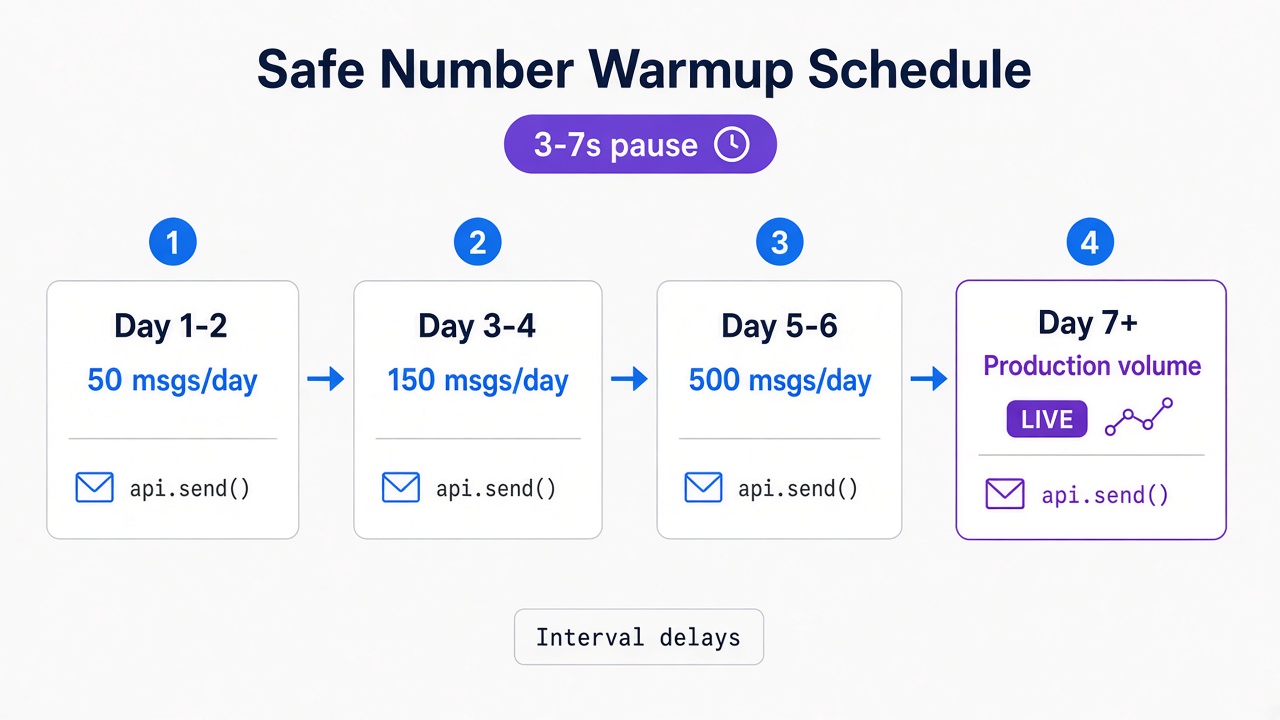
To protect your infrastructure, Whapi.Cloud handles socket-level updates upstream and routes messages through unique, regional proxies. On the application layer, you should implement message queues with random 3-to-7 second delays to simulate human typing cadences. The pattern we encounter most often is a cold number suddenly blasting 1,000 identical marketing messages, which instantly triggers server-side spam detection. To prevent this, developers must schedule a gradual increase in daily sending caps.
Automated spam detection algorithms flag rapid volume spikes on cold numbers, meaning you must enforce a 7-day warming-up sequence starting at fewer than 50 outbound texts daily.
By following Whapi.Cloud's documented ban prevention guidelines and keeping your sending volume within natural limits, over 3,000 active production clients safely maintain high deliverability daily. This warm-up schedule must scale incrementally over seven days, moving from 50 messages to 150, then 500, and finally reaching normal production volume. Keeping your messaging contextual and encouraging replies are the keys to maintaining a robust, production-ready messaging gateway.
If you encounter unexpected blocking or need help optimizing your sending queue, reach out to the Whapi.Cloud support team via the chat widget on whapi.cloud, where our team actively helps developers resolve production issues daily.
Ready to Build Without Meta's Bureaucracy?
Connect your existing WhatsApp number in under two minutes with Whapi.Cloud. Enjoy flat-rate subscription models with zero per-message charges, full programmatic control over your groups and channels, and rapid API deployments.