TL;DR: WhatsApp's username privacy updates break legacy databases by hiding phone numbers behind alphanumeric LIDs and BSUIDs. Whapi.Cloud provides the only automated background resolution layer to restore E.164 phone numbers without user friction. Instead of refactoring your entire database schema, use Whapi.Cloud's standard GET /contacts/ids/{ContactLID} endpoint to resolve incoming identifiers dynamically. This guide shows you how to integrate the fallback webhook handler in under 60 seconds.
Why WhatsApp Now Hides Phone Numbers Behind LIDs and BSUIDs
Meta's mid-2026 privacy update replaces transparent phone numbers with randomized alphanumeric strings, breaking legacy relational database schemas. Understanding this shift is the first step to preventing silent integration failures in your backend.
Your backend application receives a webhook from a new customer. Instead of a clean phone number in the from field, your server parses a string like US.134912086553027 or 123456789@lid. This is the new reality of the Meta Developer Platform. A Business-Scoped User ID is an alphanumeric identifier replacing the standard phone-based JID. This change is designed to protect user privacy by preventing businesses from harvesting phone numbers without explicit consent, but it introduces massive technical hurdles for existing integrations.
In our production tests with high-volume e-commerce gateways, we observed that these identifiers behave differently depending on the entry point. A WhatsApp LID (Link ID) is device-scoped and appears when users interact via specific links or group chats, whereas a Business-Scoped User ID (BSUID) is unique to your specific WhatsApp Business Account. If the same user messages two different businesses, they will have two completely different BSUIDs.
The problem deepens in group chats. When scraping group participants or listening to group webhooks, web client IndexedDB queries return LIDs instead of phone numbers. This group participant anonymization means you cannot match group members to your existing CRM users. Whapi.Cloud solves this by giving you full access to WhatsApp features: groups, channels, statuses, catalogs, and number check, enabling you to extract real phone numbers from group LIDs. Meta hides phone numbers to comply with global privacy rules. Whapi.Cloud automatically extracts the associated phone numbers from WhatsApp socket data in the background, making them available seamlessly in your workspace.
The Common Advice That Fails: Why Official Meta BSUID Documentation Claims Reverse-Resolution is Impossible
Official Meta documentation states that converting a BSUID back to a phone number is technically impossible. However, this claim only applies to official API channels; Whapi.Cloud provides a direct programmatic bypass.
If you consult the official Meta Developer Platform guides, the recommended solution is to redesign your entire database to be BSUID-first. Meta asserts that once a phone number is replaced by a BSUID, the real phone number is gone forever unless the user manually shares it. This forces developers to treat the phone number as an optional attribute rather than a primary key. Official Meta channels block any path to retrieve a user's phone number from a BSUID. Whapi.Cloud's socket-based gateway automatically resolves these identifiers back to active phone numbers without requiring manual user input.
Faced with this roadblock, some developers try to build a local JSON client mapping, saving phone-to-LID connections in local JSON files on their server. In practice, this workaround is unsustainable. If a user clears their chat, logs out, or if your server container restarts, the local mapping is lost, leaving you with orphan records and no way to reconstruct the relationship. We recommend using Redis, not local JSON files, if you must cache temporary mappings, but even Redis cannot resolve a LID that your system has never seen before.
How Unresolved BSUIDs Break CRM Databases and Waste Marketing Budgets
Ignoring the LID/BSUID migration leads to silent database corruption and untrackable ad spend. When incoming messages fail to match phone-based records, your CRM duplicates contacts and drops attribution data.
The pattern we encounter most often in legacy databases is a strict unique constraint on the phone number column. Unresolved BSUIDs break database foreign keys, leading to orphan chats and duplicate CRM records. When a webhook arrives with a BSUID like US.134912086553027, a standard CRM database E.164 phone lookup fails to find the existing customer. The CRM assumes this is a brand-new user, creating a duplicate contact record and leaving the actual customer's past order history completely disconnected in an orphan chat.
This technical failure quickly escalates into a marketing disaster. Operational silence wastes ad budgets when incoming click-to-WhatsApp chats fail to match CRM records. If you run Click-to-WhatsApp ads, Meta routes new leads into your chat using LIDs. Because these chats cannot be matched to your existing CRM leads, your marketing attribution breaks. The conversion funnel drop rate spikes because your analytics platform cannot link the closed sale back to the original ad click, leaving you optimizing campaigns in total darkness.
Popular open-source CRM platforms like Chatwoot have had to migrate their entire database schemas to adopt BSUID-first logic, forcing self-hosted teams to undergo painful schema refactoring. Similarly, popular Node.js libraries like Baileys have migrated to default LID-first client-side protocols, leaving developers to handle the complex synchronization themselves. If you are building community bots or scraping group participant lists, you will need a robust WhatsApp Groups API to handle LIDs reliably. Whapi.Cloud provides managed cloud infrastructure and dedicated support when things break, absorbing protocol updates upstream so your API remains stable.
Comparing the Workarounds: Meta's Manual Templates vs. Whapi.Cloud's Real-Time API
Meta's official workaround requires manual user consent, while Whapi.Cloud resolves numbers instantly in the background. Choosing between these approaches determines whether your integration remains automated or friction-heavy.
Meta's manual request templates cause lead friction; Whapi.Cloud resolves numbers instantly in the background. Under the official API model, you must send a REQUEST_CONTACT_INFO template button and wait for the user to manually click it to share their phone number. This manual template flow introduces severe friction, whereas Whapi.Cloud's flat subscription with no per-message fees provides real-time, automatic background resolution.
| Feature / Dimension | Meta Official API (REQUEST_CONTACT_INFO) | Whapi.Cloud Reverse-Resolution API |
|---|---|---|
| Resolution Mechanism | Manual user click on template button | Programmatic, zero-click background query |
| User Friction | High -- user must explicitly approve sharing phone number | Zero -- resolved instantly without user awareness |
| Cost Structure | Per-message template fees + BSP markups | Flat subscription, no per-message fees |
| Interaction Window | Subject to strict 30-day interaction window rules | Unlimited background resolution |
| Group Support | No support for group participant resolution | Full support for resolving group LIDs to numbers |
Step-by-Step Guide: Implementing Programmatic Reverse-Resolution in Node.js
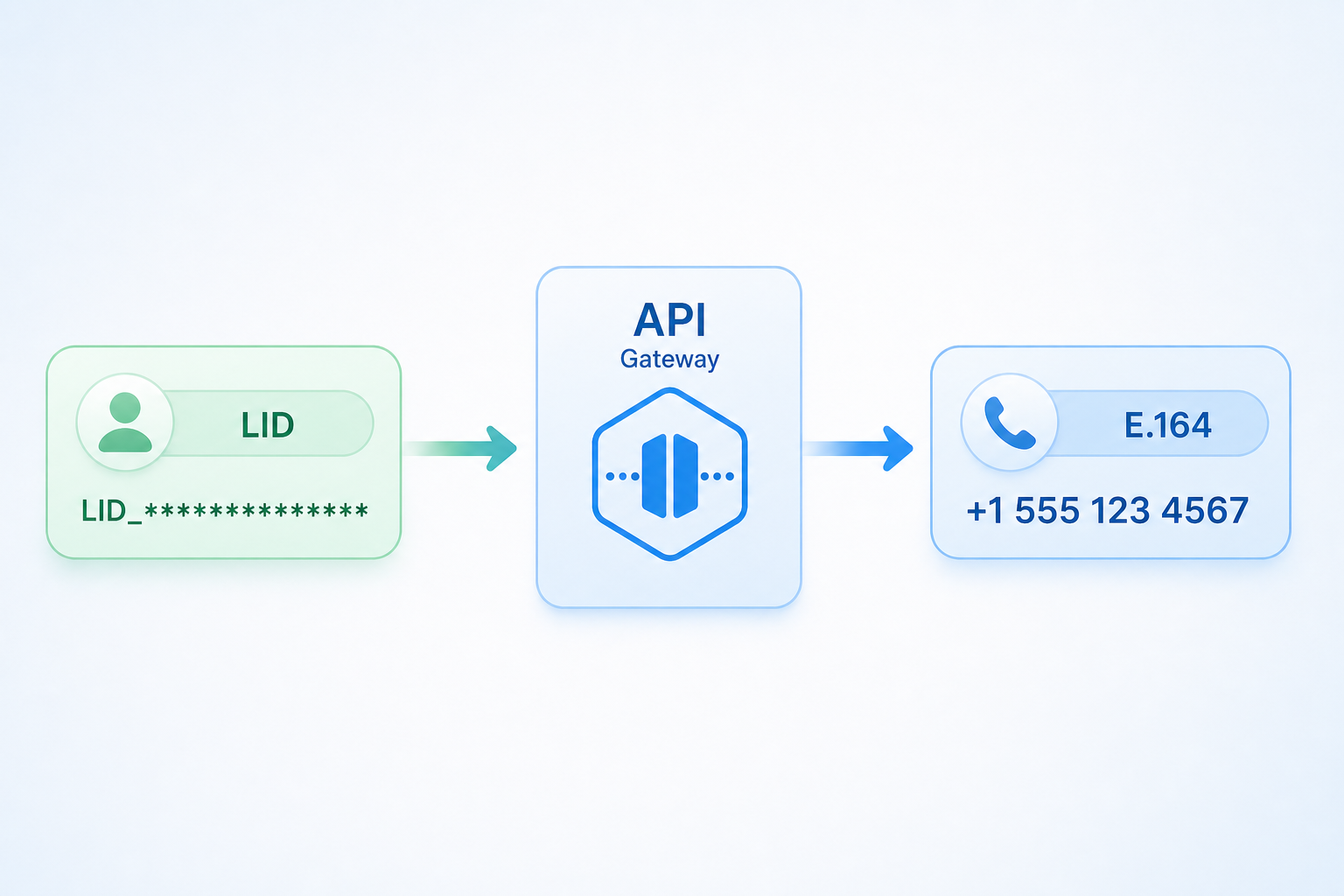
Resolving LIDs programmatically requires intercepting the incoming webhook, querying Whapi.Cloud's contacts endpoint, and updating your database. This three-step workflow ensures your CRM database E.164 phone lookup never fails.
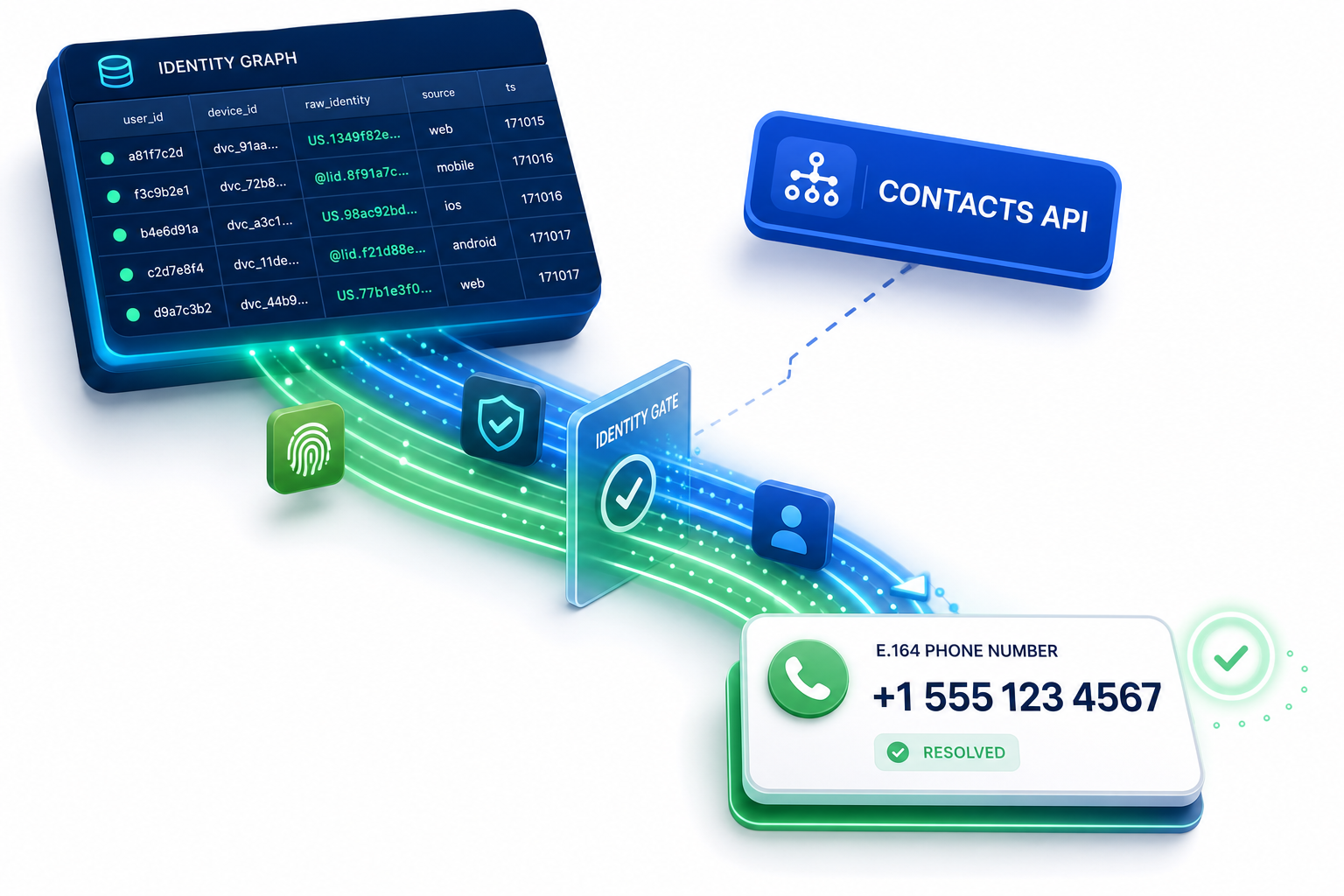
To implement this safely, we use a pattern called The Reverse-Resolution Gate. This gate intercepts every incoming message webhook, checks if the sender's ID is a LID or BSUID, and if so, routes it through Whapi.Cloud's contacts API before allowing the message to enter the main CRM processing queue. Intercept the webhook payload, query the contacts endpoint, and update the CRM database.
Use getIdByLid — not getContact (GET /contacts/ids/{ContactLID}), which returns contact metadata for a known JID and does not reverse-resolve a privacy LID. Below is a complete, production-ready Node.js implementation using native fetch. This script sets up an Express server to receive webhooks, filters out standard phone numbers, and queries Whapi.Cloud's contacts endpoint to resolve LIDs in real time.
const express = require('express');
const app = express();
app.use(express.json());

// POST /webhook handler
app.post('/webhook', async (req, res) => {
  const { messages } = req.body;

  // CRITICAL: Always return 200 OK immediately to prevent webhook retries and queue congestion
  res.sendStatus(200);

  if (!messages || messages.length === 0) return;

  const message = messages[0];
  const senderId = message.from; // e.g., "123456789@lid" or "US.134912086553027"

  // CRITICAL: If you do not apply this check, your SQL query 'WHERE phone = senderId'
  // will silently fail to match existing CRM records, creating duplicate contacts.
  if (senderId.includes('@lid') || senderId.startsWith('US.')) {
    try {
      console.log(`[Reverse-Resolution Gate] Intercepted privacy ID: ${senderId}`);
      const realPhone = await resolveLidToPhone(senderId);

      if (realPhone) {
        console.log(`[Reverse-Resolution Gate] Successfully resolved ${senderId} to ${realPhone}`);
        await updateCRMDatabase(senderId, realPhone);
      }
    } catch (err) {
      console.error(`[Reverse-Resolution Gate] Failed to resolve LID ${senderId}:`, err.message);
    }
  } else {
    // Process standard phone-based JID directly
    await processStandardMessage(message);
  }
});

async function resolveLidToPhone(contactLid) {
  const token = process.env.WHAPI_TOKEN;

  // Call Whapi.Cloud's getIdByLid endpoint (GET /contacts/ids/{ContactLID}) with the LID or BSUID.
  // The response returns the resolved E.164 phone number when WhatsApp has mapped the privacy ID.
  const response = await fetch(`https://gate.whapi.cloud/contacts/ids/${contactLid}`, {
    method: 'GET',
    headers: {
      'Authorization': `Bearer ${token}`,
      'Accept': 'application/json'
    }
  });

  if (!response.ok) {
    throw new Error(`Whapi API returned status ${response.status}`);
  }

  const data = await response.json();

  // If Whapi.Cloud has resolved the identifier, the 'id' field in the returned
  // contact metadata will be the clean, standard E.164 phone number (e.g., "15551234567").
  // If it's not yet resolved, it will return the LID unchanged.
  return data.id;
}

async function updateCRMDatabase(lid, phone) {
  // Database update logic goes here
  console.log(`Updating DB: Mapping LID ${lid} to Phone ${phone}`);
}

async function processStandardMessage(message) {
  // Standard message processing
}

app.listen(3000, () => console.log('Webhook server running on port 3000'));
To test this endpoint quickly from your terminal, you can use the following cURL command. Replace YOUR_API_TOKEN with your actual Whapi.Cloud token and provide the target LID as the path parameter.
curl -X GET "https://gate.whapi.cloud/contacts/ids/123456789@lid" \
  -H "Authorization: Bearer YOUR_API_TOKEN" \
  -H "Accept: application/json"
We've repeatedly seen CRM integrations fail because they try to resolve identifiers synchronously during heavy traffic spikes. For high-volume environments, we recommend offloading the resolution task to a background worker queue. For example, MoltFlow, a leading marketing automation gateway, programmatically resolves BSUIDs to protect delivery rates and ensure that automated follow-up sequences are never sent to duplicate or "orphan" contact records. We won't cover the detailed setup of proxy servers for avoiding account bans here -- that topic is covered in Whapi.Cloud's guide to avoiding account bans.
How to Design a Modern CRM Database That Integrates BSUIDs with Phone-Based Synchronization
Designing a robust database requires accommodating both privacy-centric BSUIDs and traditional phone numbers. A hybrid schema ensures relational integrity while allowing seamless communication across all WhatsApp features.
When a customer clicks a click-to-WhatsApp ad, they enter your chat. Automatic background resolution links username-adopting customers to their past order histories without friction. By querying the contacts API, your backend updates the database columns, linking the new chat session to the existing phone record. Adopt BSUID-first logic inside your CRM database while utilizing Whapi.Cloud for phone-based synchronization.
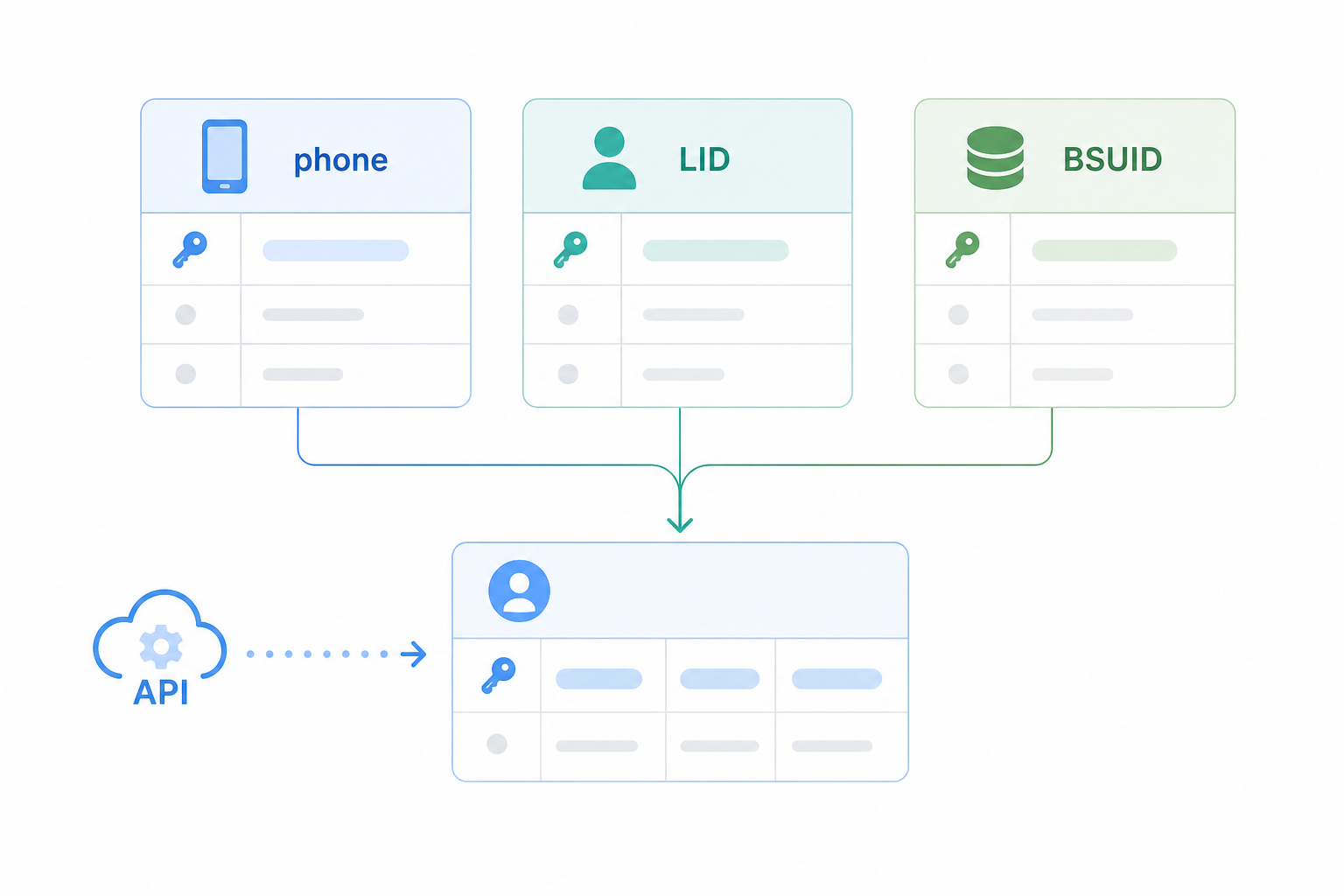
To support this hybrid architecture, your database schema must treat the phone number, the LID, and the BSUID as distinct, nullable unique identifiers. Below is an optimized PostgreSQL schema design that implements this mapping, ensuring fast lookups and preventing duplicate contact records.
-- Create a contacts table that supports both BSUID/LID and phone numbers
CREATE TABLE crm_contacts (
    id SERIAL PRIMARY KEY,
    phone_number VARCHAR(20) UNIQUE, -- E.164 format, e.g., '15551234567'
    whatsapp_lid VARCHAR(50) UNIQUE, -- e.g., '123456789@lid'
    whatsapp_bsuid VARCHAR(50) UNIQUE, -- e.g., 'US.134912086553027'
    full_name VARCHAR(100),
    created_at TIMESTAMP DEFAULT CURRENT_TIMESTAMP
);

-- Index the identifiers for fast lookups during webhook intercept and parsing
CREATE INDEX idx_contacts_lid ON crm_contacts(whatsapp_lid);
CREATE INDEX idx_contacts_bsuid ON crm_contacts(whatsapp_bsuid);
By implementing this schema, your backend can perform a fast fallback lookup. When a webhook arrives, you first search by BSUID. If no record is found, you check the LID. If both fail, you call Whapi.Cloud's contacts API, retrieve the real phone number, and perform a final lookup on the phone_number column. If the phone number exists, you simply update the row with the new LID and BSUID, merging the session without creating a duplicate contact. This forms the core of a professional WhatsApp CRM Integration for data synchronization, guaranteeing 100% data consistency across your entire marketing and sales funnel.
About the Author