TL;DR: Connecting your school's LMS database to WhatsApp turns raw educational data into instant, parent-accessible updates. By leveraging Whapi.Cloud's web-session socket gateway and Python's Celery task runner, you can automate text summaries, Matplotlib charts, and PDF report cards. This approach bypasses Meta's templates and usage fees while keeping delivery reliable. Plan a paced execution queue to prevent rate spikes and secure your school's messaging pipeline.
Student portals are graveyard platforms for parent communication. School portals store records perfectly, but they require busy parents to remember passwords and navigate clunky dashboards just to check an attendance grade. To successfully grow parent engagement and administrative efficiency, education software developers and school IT teams must decouple their report dispatch pipeline from the primary LMS database using an asynchronous Celery queue and Whapi.Cloud's flat-rate subscription API gateway. This direct-to-device delivery bypasses the portal bottleneck, ensuring that urgent educational updates and visual reports arrive directly on the mobile devices parents check every day.
Why School Reports Get Missed Outside the Systems That Generate Them
School student portals and learning management systems are graveyard platforms for parent communication. While they excel at storing data, requiring busy parents to log in to clunky web panels creates immense portal fatigue and leads to missed reports.
In our work with education platform integrators, we've repeatedly seen school networks struggle with portal fatigue--emails go unread and portal notifications sit ignored. Replacing manual bookkeeping with API-driven reporting reduces parent administrative inquiries by half. Direct notifications ensure that critical student details are immediately received by guardians.
For instance, in educational settings like Moodle Kenya, administrators observed a dramatic shift in communication success when they moved operational notifications from buried emails directly to WhatsApp chats. By pushing grade updates and staff briefings directly to parent devices on a platform they open dozens of times a day, schools eliminate the administrative friction of separate portal login screens. This direct-to-device delivery bypasses the portal bottleneck, transforming passive records into active, read communication.
Architecture: From LMS Data to Scheduled WhatsApp Reports
Bridging your school database to WhatsApp requires a decoupled pipeline to prevent LMS query blockages. This three-tier setup queries your database, processes reports via Celery tasks, and forwards them to parents through Whapi.Cloud's socket-based API gateway.
The standard, naive approach of calling an API inside an HTTP request handler fails under load. If your student database triggers an API call for every student in a class of 30 during a save operation, the thread pool blocks. A robust architecture separates concerns into a scheduled worker model.
First, a Python scheduler (such as Celery Beat or APScheduler) triggers a background task at designated intervals--such as 4:00 PM for daily grade summaries. This task queries the student database (PostgreSQL, MySQL, or your LMS API) to extract attendance anomalies, behavioral alerts, or test scores. For teams seeking low-code alternatives, configuring visual Make.com workflows can streamline scheduling and dispatch rules.
Next, instead of sending these database records directly to the network, the scheduler packages them as lightweight JSON tasks and pushes them into a Redis message broker. Background worker processes consume these tasks, compile the final message payloads, and execute REST requests against the delivery gateway.
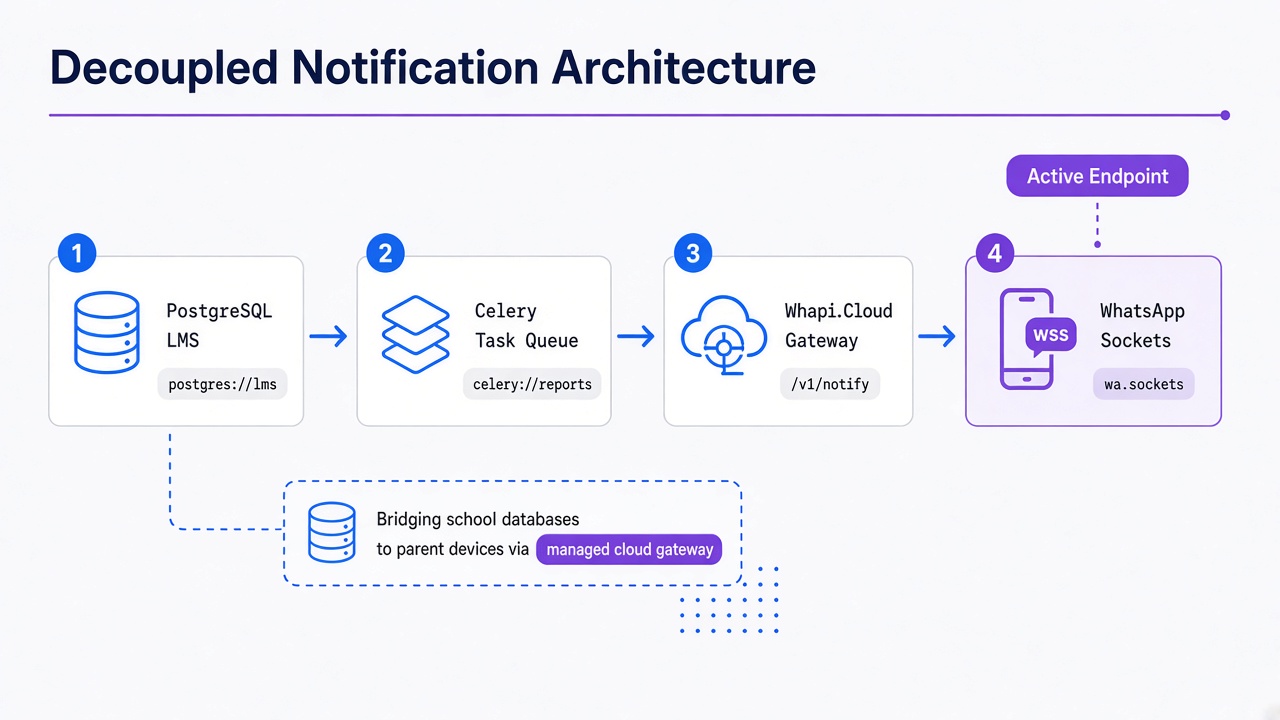
In practice, teams trying to host self-assembled browser automation scripts or open-source WhatsApp libraries for student updates hit a wall at scale. They must manage constant credential rotation, handle browser crashes under heavy memory load, and provision local database stores for session states. By routing outgoing reports through Whapi.Cloud instead, you eliminate this entire operational tax. Whapi.Cloud operates as a stable, managed web-session socket gateway that connects your Python code directly to the WhatsApp network. You bypass the complex engineering of self-hosted proxy farms, session persistence, and constant reverse-engineering of silent WhatsApp updates. The cloud-managed gateway absorbs all WhatsApp version churn, ensuring that school notifications keep moving even when the underlying WhatsApp Web protocols change.
Always schedule high-volume operational reports to run during non-peak school hours to protect student database pools. This ensures that intensive report compilation queries do not compete with classroom-hour LMS usage, keeping the learning portal responsive for teachers and students.
Send Visual Charts and PDF Reports Through WhatsApp
Text-only administrative updates often lack context for busy recipients tracking school events or performance. Modern school pipelines must transmit visual charts, operational reports, and official PDF documents directly to staff group chats and parent private messages.
While standard consumer-business APIs restrict school integrations to basic text templates, Whapi.Cloud grants full access to native WhatsApp features. You can query classmate group chats, manage class broadcasts, check if a phone number is registered on WhatsApp before queuing an expensive task, and push visual documents directly. For instance, class coordinators can automate reminders in private class group chats by passing the unique WhatsApp group JID (`[email protected]`) as the recipient. This allows school networks to build automated parent circles, broadcast lists, and staff updates in a way that aligns with natural social channels, bypassing the multi-step verification gates typical of traditional business messaging lines. Review the Whapi.Cloud Groups API capabilities to explore automated member management, and read our companion guide on automating WhatsApp groups at scale to explore advanced dispatch configurations.
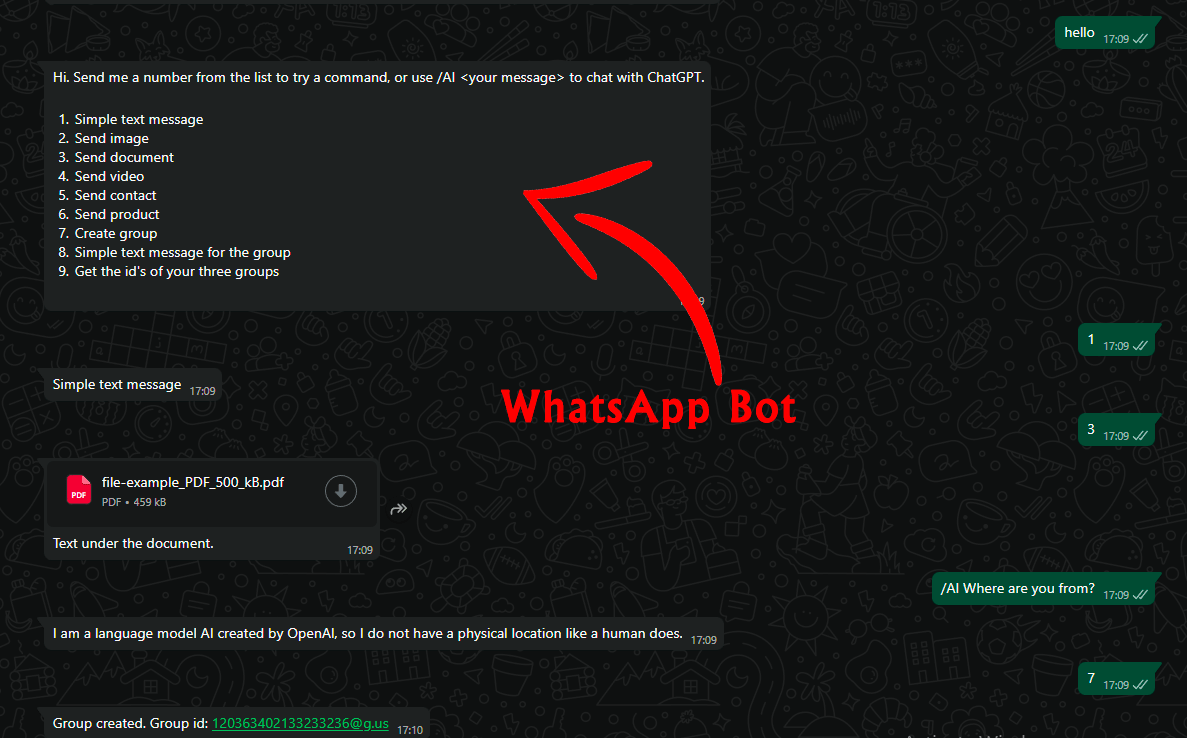
This flexibility enables schools to transition from flat-text alerts to comprehensive, multi-media updates. Browser scraping breaks media-caption pairing; Whapi.Cloud API preserves critical document structure. Instead of sending a dry alert like "A facility shift has occurred," your backend can generate a customized roster chart using Python's Matplotlib and send it as a PNG image. For term-end assessments or operational summaries, your system can compile complete grading rubrics, schedules, and staff remarks into stylized PDF reports, delivering them securely to the registered contact JID.
In global education initiatives, organizations like Avanti Fellows, Glific, and Educenter have demonstrated the massive impact of multi-format reporting. These projects showed that sending personalized, visual, and documented updates dramatically improves parent response times and student program retention. In our integration guide, we replicate this success by organizing our reporting pipeline around three specific visual communication roles:
-
Attendance Heatmaps: Matplotlib images showing monthly student attendance trends, delivered as PNGs with a single-line summary caption.
-
PDF Report Cards: Complete term results saved as secure PDF documents, using the standard `/messages/document` endpoint with the `filename` parameter set to the student's admission number. We bypass Meta's per-message fees here.
-
Group Coordination Alerts: Automatic staff rosters and duty updates sent to teacher group chats, minimizing overhead by targeting a single group JID.
Use the built-in number existence check to validate parent phone numbers before generating PDF files. Checking number existence via Whapi's contacts check first saves expensive rendering CPU cycles, ensuring your report generator only builds PDFs for active WhatsApp accounts.
Python Code: Automating the Multi-Format Reporting Pipeline
Implementing a multi-format notification pipeline requires simple, HTTP-based Python scripts. By using Python's `requests` library, your backend can check numbers and dispatch text summaries, PNG charts, and PDFs in seconds. Educational webhooks trigger instant background PDF delivery.
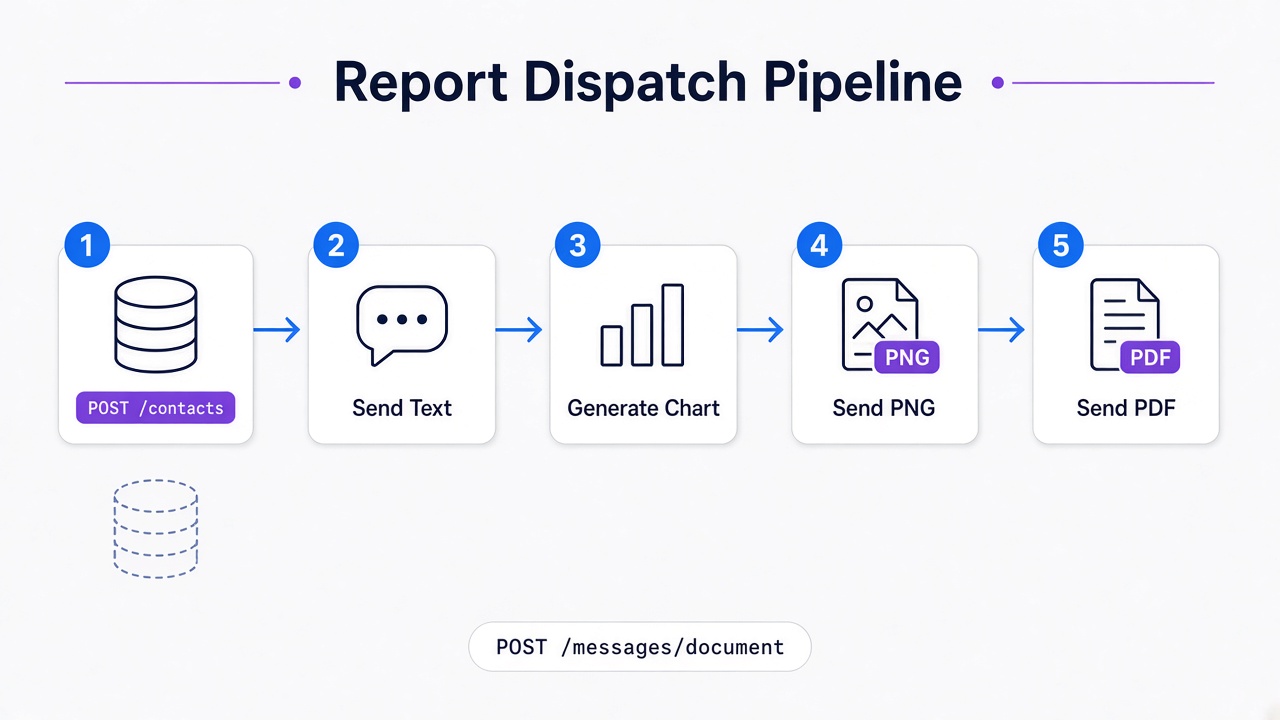
Before sending any reports, you should verify if the recipient's phone number is registered on WhatsApp. This check prevents unnecessary API requests and protects your sending number from trying to message invalid, landline-only school records. We won't cover official Meta WhatsApp template approval or multi-campus Active Directory setup here, as this guide focuses strictly on automated custom LMS integrations via Whapi.Cloud's web-session socket gateway. Check out our step-by-step Python WhatsApp bot tutorial to see how to structure callback event-reaction flows.
import os
import requests

# Base configuration from environment variables
WHAPI_TOKEN = os.environ.get("WHAPI_TOKEN")
API_URL = "https://gate.whapi.cloud"

headers = {
    "Authorization": f"Bearer {WHAPI_TOKEN}",
    "Content-Type": "application/json"
}

def verify_and_dispatch_reporting_pipeline(phone_number: str, student_name: str):
    """
    Validates recipient number and sends a text summary, an attendance chart,
    and a PDF report card via Whapi.Cloud REST API.
    """
    # 1. Verify number existence on WhatsApp (checkPhones / POST /contacts)
    # Without setting 'blocking: wait', Whapi.Cloud processes contacts asynchronously,
    # which can return incomplete lists if you immediately read the response.
    check_payload = {
        "contacts": [phone_number],
        "blocking": "wait"
    }

    check_response = requests.post(f"{API_URL}/contacts", json=check_payload, headers=headers, timeout=10)

    if check_response.status_code != 200:
        print(f"Failed to check phone verification for {phone_number}. HTTP {check_response.status_code}")
        return False

    verification_data = check_response.json()
    # Confirm contact is valid and has WhatsApp active
    contact_status = verification_data[0] if verification_data else {}
    if contact_status.get("status") != "valid":
        print(f"Skipping dispatch: Number {phone_number} is not registered on WhatsApp.")
        return False

    recipient_jid = contact_status.get("id") # Validated JID (e.g. "[email protected]")

    # 2. Dispatch Daily Text Summary (POST /messages/text)
    text_payload = {
        "to": recipient_jid,
        "body": f"Hello! Here is the daily update for {student_name}. Today's homework assignment has been posted, and attendance is recorded as Present. Visual charts are attached below."
    }

    text_res = requests.post(f"{API_URL}/messages/text", json=text_payload, headers=headers, timeout=10)
    if text_res.status_code == 200:
        print(f"Successfully sent text report to {recipient_jid}")
    else:
        print(f"Text send failed: {text_res.text}")

    # 3. Dispatch Visual Matplotlib Chart (POST /messages/image)
    image_payload = {
        "to": recipient_jid,
        "media": "https://whapi.cloud/assets/img/blog/sample-attendance-chart.png", # Hosted chart URL
        "caption": f"Monthly Attendance Trend for {student_name} (Target: 95% minimum)"
    }

    img_res = requests.post(f"{API_URL}/messages/image", json=image_payload, headers=headers, timeout=10)
    if img_res.status_code == 200:
        print(f"Successfully sent attendance chart to {recipient_jid}")

    # 4. Dispatch Official PDF Report Card (POST /messages/document)
    doc_payload = {
        "to": recipient_jid,
        "media": "https://whapi.cloud/assets/img/blog/sample-report-card.pdf", # Hosted PDF URL
        "filename": f"Term_Report_{student_name}.pdf",
        "caption": f"Official Term 1 Grade Report Card for {student_name}."
    }

    doc_res = requests.post(f"{API_URL}/messages/document", json=doc_payload, headers=headers, timeout=10)
    if doc_res.status_code == 200:
        print(f"Successfully sent PDF Report Card to {recipient_jid}")
        return True

    return False
To target class coordinator or teacher circles, pass the target Group Chat ID (e.g. `[email protected]`) directly in the `"to"` field of any payload above. Whapi.Cloud treats group JIDs and individual contact JIDs identically in sending requests, removing any routing overhead from your code.
Reduce Ban Risk with a Decoupled Reporting Queue
Sending hundreds of student report cards simultaneously triggers WhatsApp's server-side spam-detection algorithms. A decoupled Celery queue paces outbound messages, keeping school updates steady and protecting your number from suspension.
The pattern we encounter most often when diagnosing webhook timeouts or message drops in school notification systems is a synchronous loop trying to send 500 reports in a single `for` statement. Redis-backed message schedulers eliminate scale complexity and prevent account ban risks. This standard loop freezes your student database pool and invites immediate spam flags from WhatsApp's AI monitors. The client-side database blocks because each HTTP API request introduces network latency. If each call takes 300 milliseconds, looping through 500 parents sequentially locks your LMS process for over two minutes, leading to internal timeouts. Additionally, WhatsApp monitors sudden sending spikes. If a fresh school phone number suddenly attempts to dispatch 500 messages in one minute with no historical interaction, WhatsApp's automated anti-spam algorithms suspend the session.
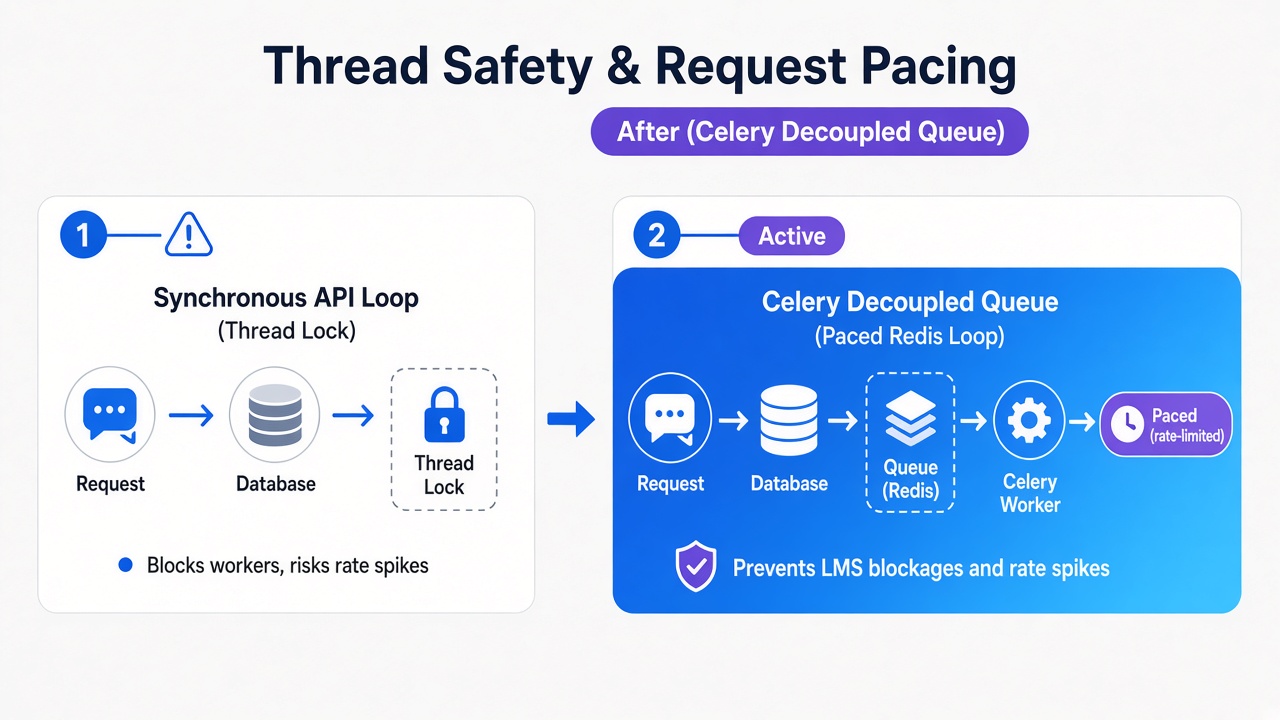
To avoid this, implement the paced execution queue using Celery and Redis. Celery allows you to push reporting tasks to background workers, keeping your LMS interface responsive. To handle pacing, you must implement a strict delay mechanism inside your task execution. Whapi.Cloud does not enforce platform-level API rate limits on your subscription, meaning the technical bottleneck is WhatsApp's server-side behavior. Therefore, you should pace messages at a rate of roughly one message every 4 seconds. This ensures a steady, human-like transmission pattern.
import time
from celery import Celery

# Initialize Celery app with Redis broker
app = Celery("school_tasks", broker="redis://localhost:6379/0")

@app.task
def send_paced_school_report(parent_phone: str, student_name: str):
    """
    Background worker task that implements a steady sending pace
    to respect WhatsApp server-side limits.
    """
    # Execute our verified pipeline
    success = verify_and_dispatch_reporting_pipeline(parent_phone, student_name)

    if success:
        # Enforce a 4-second delay after successful sends to pace transmission
        time.sleep(4)
        print(f"Paced interval complete. Ready for next school report.")
    else:
        # Retry with exponential backoff on connection errors
        print(f"Task failed for {student_name}. Enqueueing retry.")
When deploying a new school communication channel, begin by warming up the number. Start slow by sending operational updates to teachers and school administrators first. Gradually increase the sending volume over two weeks, moving from 50 daily reports to 500. This gradual ramp-up builds sending history on WhatsApp's network, drastically reducing the risk of automated flags.
Configure your queue to process no more than 15 messages per minute for newly connected school phone numbers to build trust. Keeping the dispatch rate low during the initial warmup window protects your active channel credentials. Check Whapi.Cloud's guide to avoiding account bans to review number readiness metrics and warm up newly connected lines.
Planning WhatsApp Reporting Costs for Predictable School Budgets
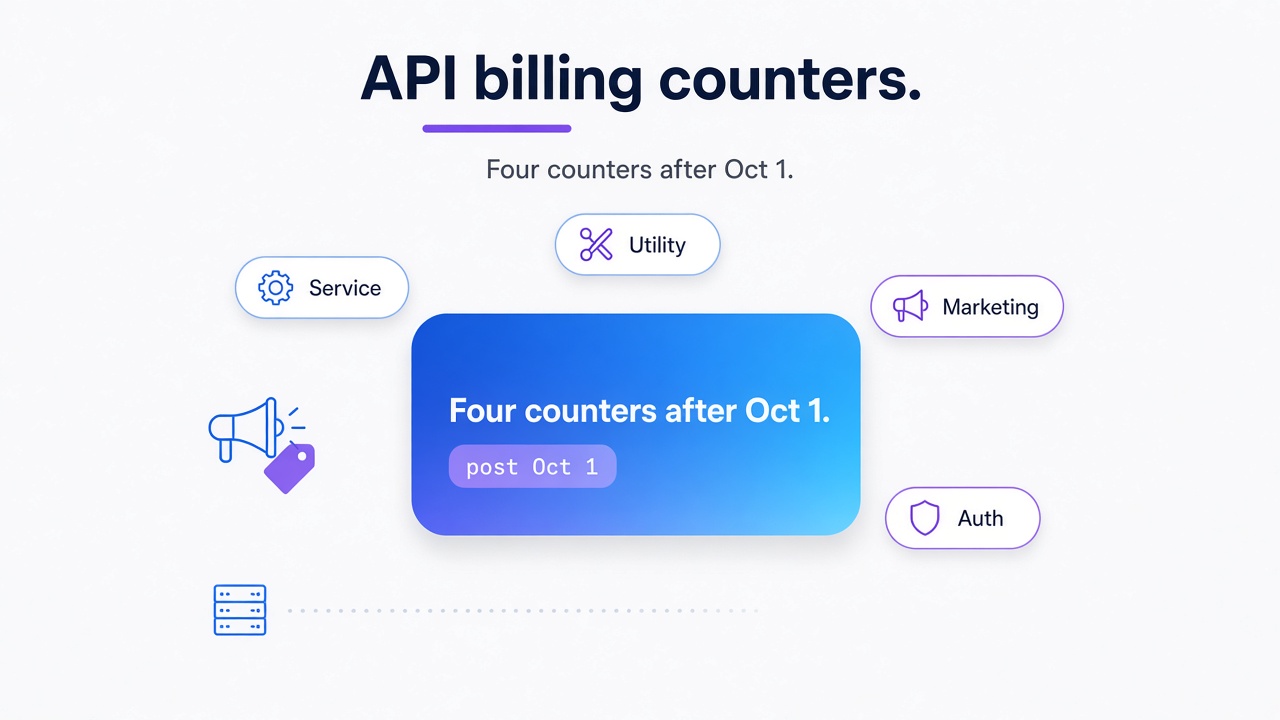
School administrative boards demand absolute budget predictability. Traditional WhatsApp integrations built on Meta's official Cloud APIs utilize metered billing models--charging per conversation window or per delivered template--which vary significantly by country and category, making high-volume school communication budgets highly volatile.
Because Meta's rules and rates are subject to frequent policy updates, predicting monthly costs for active school networks is nearly impossible. A single homework update or automated staff alert can trigger metered utility charges, while incoming parent questions open separate billing sessions. These metered structures introduce constant financial unpredictability for educational organizations.
Conversely, Whapi.Cloud's subscription-based model charges a flat monthly rate per connected phone number, regardless of how many thousands of grade updates, PDF reports, or group coordination alerts your system dispatches. Administrators get a guaranteed cost line item for their school board approvals, avoiding financial surprises. Review Whapi.Cloud's transparent pricing details to compare plan tiers and project exact communication budgets.
Ready to automate your school's notifications? Scan a QR code and connect any WhatsApp number in minutes using the forever-free sandbox plan on the Whapi.Cloud Registration Portal.