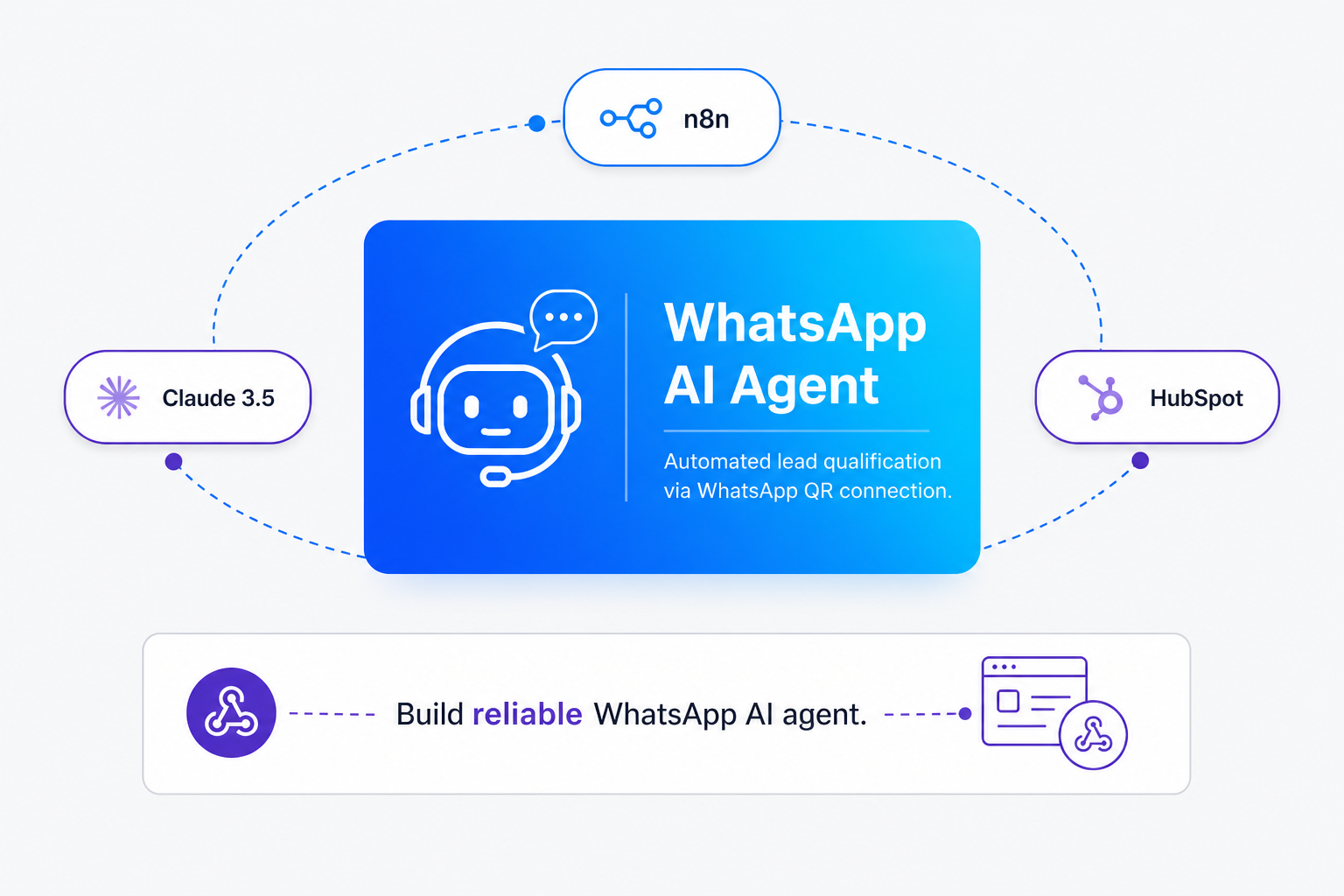
TL;DR: Whapi is faster than Meta's API, and n8n is simpler than custom code. To build a WhatsApp AI agent that qualifies leads 24/7, connect Whapi.Cloud to n8n, use Claude 3.5 Sonnet for BANT extraction, and persist state in n8n Data Tables. Crucially, configure your n8n Webhook to respond immediately with a 200 OK status to bypass the 5-second timeout trap, then process Claude's reasoning asynchronously to prevent infinite duplicate message loops.
Why Does the Official Meta API Onboard So Slowly?
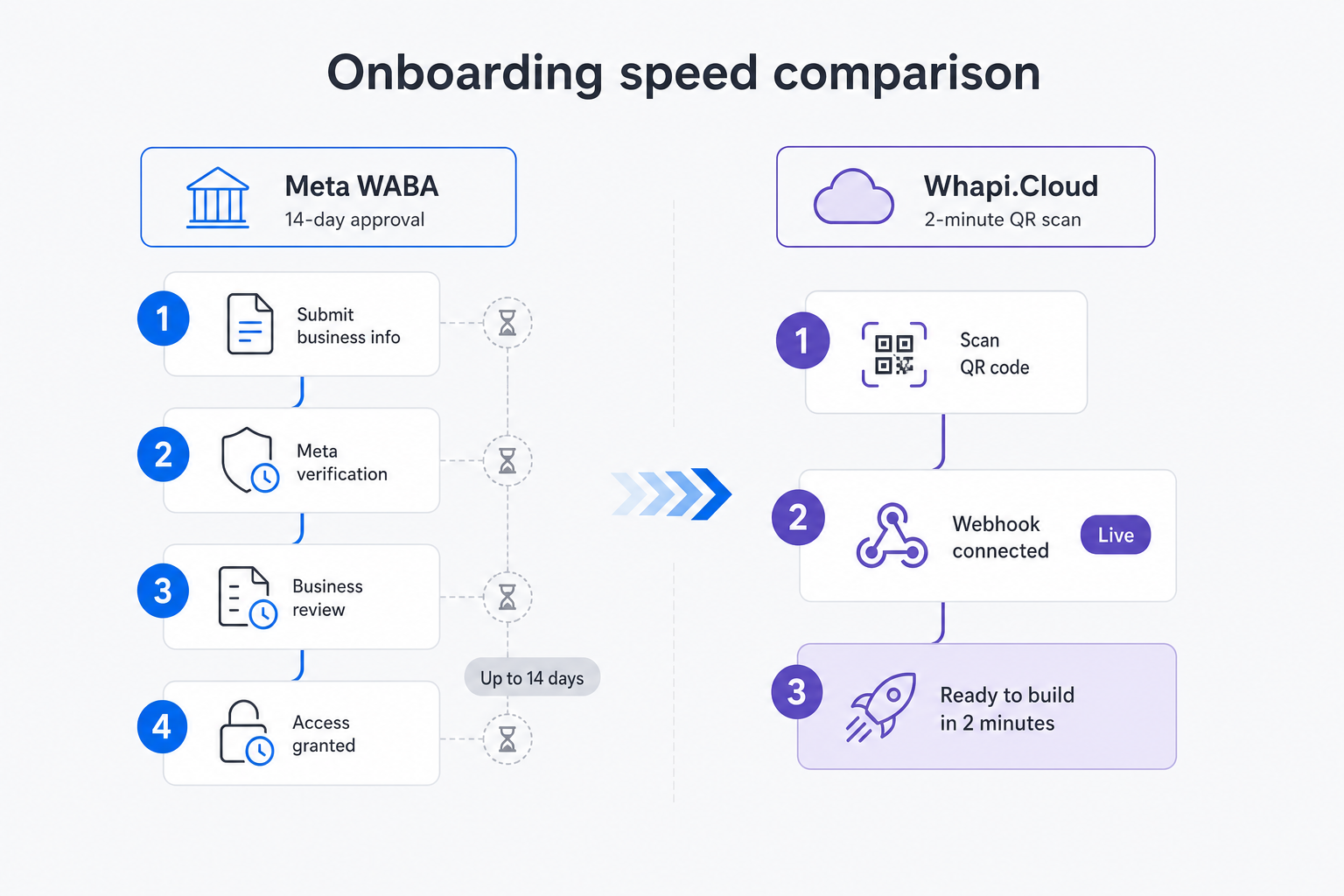
Avoid Meta Developer Console complexity; scan Whapi QR code for instant WhatsApp integration. While Meta's official API onboarding takes days of verification, Whapi.Cloud connects any number in two minutes via QR scan with zero approval gates.
For years, developers and business owners looking to automate customer communication have been forced through the grueling gauntlet of the official Meta Cloud API onboarding. We've seen many teams spend weeks navigating Facebook Business Manager verification, uploading utility bills, waiting for template approvals, and configuring complex developer consoles just to send a single automated test message.
This administrative friction is not just a minor delay; it is a significant barrier to entry for low-code integrators and agile businesses. When your goal is to quickly validate a marketing campaign or deploy a lead qualification assistant, a two-week approval gate can kill the project's momentum entirely. The official API also binds you to strict messaging templates and metered conversation-based pricing that can quickly spiral out of control as your chat volume scales.
Whapi.Cloud completely bypasses Meta's onboarding gates by utilizing web-session sockets to establish a direct connection to any standard WhatsApp account. Instead of configuring webhooks inside the Meta Developer Console and waiting for business verification, you simply scan a QR code using your physical phone--exactly like logging into WhatsApp Web. This grants you full API access in under two minutes, allowing you to send and receive messages, manage groups, and track delivery statuses instantly. Because Whapi.Cloud operates on a flat subscription model, you avoid unpredictable per-message template fees, giving you absolute cost predictability as your AI agent scales.
Webhook Setup: Connecting n8n to Whapi.Cloud
Connecting Whapi.Cloud to n8n via a Webhook node is the foundation of your real-time agent. This setup routes every incoming WhatsApp message directly into your visual workflow with zero delivery delay.
To build a real-time conversational agent, your automation platform must receive incoming messages instantly. In this guide, we use the n8n WhatsApp integration as our primary visual workflow orchestrator because of its native support for AI nodes, structured data tables, and robust HTTP routing. The connection between Whapi.Cloud and n8n begins with a Webhook node that acts as the entry point for every message sent to your WhatsApp number.
Configuring the Webhook Trigger
In n8n, drag a new Webhook node onto your canvas. Set the HTTP Method to POST and the Path to a unique identifier, such as whatsapp-incoming. n8n will generate both a Test URL (for development) and a Production URL. Copy the Test URL, log into your Whapi.Cloud dashboard, navigate to your channel settings, and paste the URL into the Webhook field. Ensure that the webhook is configured to trigger on the messages event, which captures all incoming text, media, and status updates.
Parsing the Incoming JSON Payload
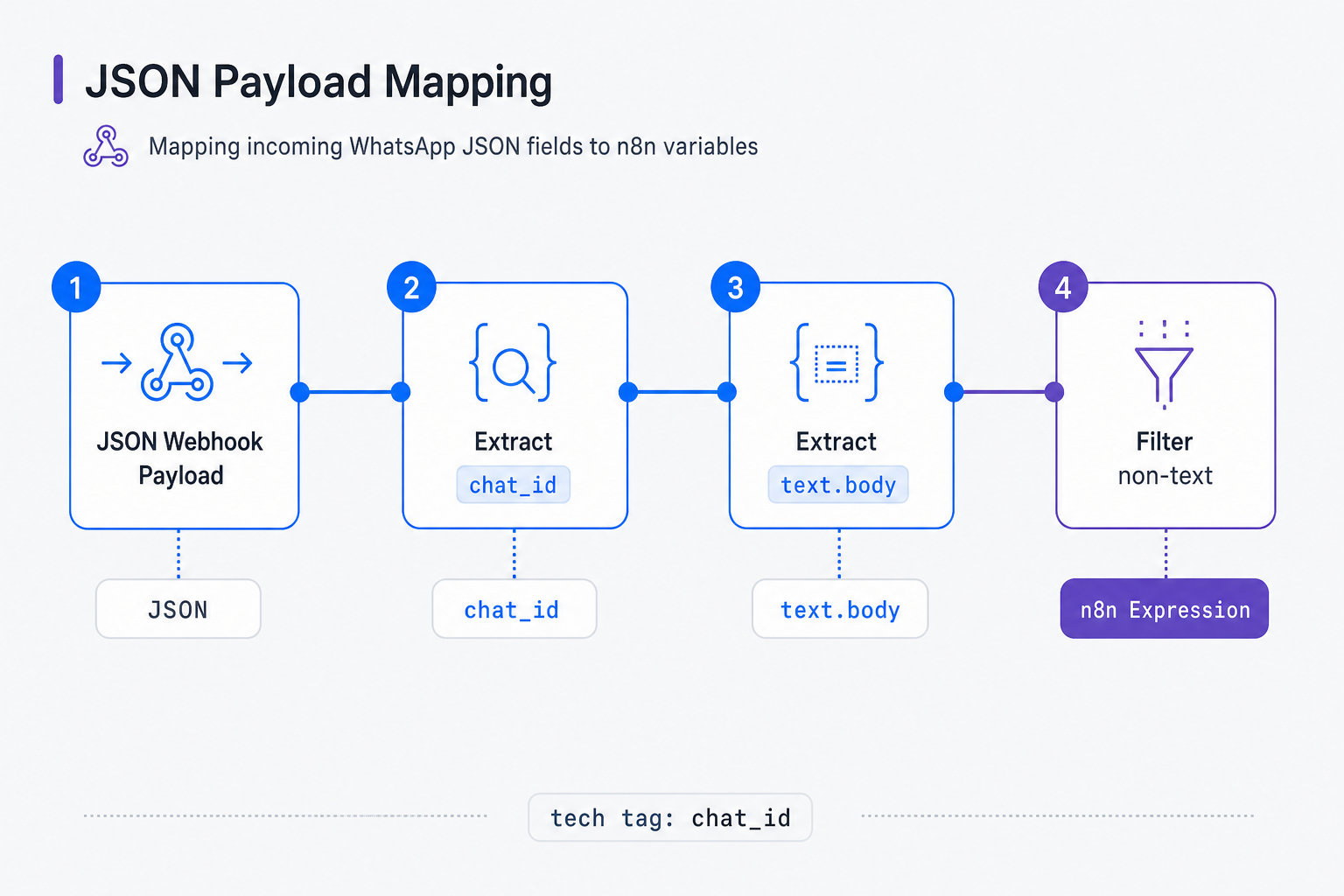
When a user sends a message to your WhatsApp number, Whapi.Cloud dispatches a structured JSON payload to your n8n webhook. This payload contains essential metadata, including the sender's unique phone number, the message body, and the message timestamp. Understanding how to parse this incoming payload is critical for extracting the session ID and routing the text to your AI model, and you can refer to the webhook format reference for full payload details.
A typical incoming payload from Whapi.Cloud looks like this:
{
  "messages": [
    {
      "id": "0123456789ABCDEF",
      "chat_id": "[email protected]",
      "from_me": false,
      "text": {
        "body": "Hi, I am looking for a WhatsApp automation tool for my team of 15. Our budget is around $300/month."
      },
      "type": "text",
      "timestamp": 1725287900
    }
  ]
}
Your n8n workflow must extract the sender's phone number from the chat_id field and the message text from the text.body field. In n8n, you can access these fields using the expression {{ $json.body.messages[0].chat_id }} and {{ $json.body.messages[0].text.body }}. If a user sends a non-text message (such as an image or a voice note), the type field will change, and the text.body field will be empty. To prevent your JSON parser and downstream Claude nodes from failing, always place an n8n Filter node immediately after your webhook to ensure the workflow only continues if the incoming message type is strictly text.
Build an Echo Bot First to Verify Your Route
Adding a simple Echo Bot first ensures webhook routing works before implementing AI. Establishing this basic loop takes five minutes and guarantees that your inbound and outbound message paths are fully operational.
In practice, we find that developers who try to wire up a complex LLM node, a database, and a CRM sync all at once spend hours debugging silent failures without knowing whether the issue lies in their API credentials, their JSON expressions, or their network routing. Establishing a tight, 5-minute feedback loop with a basic "Crawl" stage is the fastest path to a working production system.
To build an Echo Bot, connect an HTTP Request node directly to your parsed Webhook node. Configure the HTTP Request node to make a POST request to Whapi's send text message API endpoint. This node will take the incoming message body and send it right back to the sender's phone number, proving that your inbound webhook and outbound dispatch routes are fully operational.
// POST https://gate.whapi.cloud/messages/text
// This node dispatches the outbound message back to the sender
const whapiToken = process.env.WHAPI_TOKEN;
const recipient = $input.item.json.chat_id;
const incomingText = $input.item.json.text;

const response = await fetch('https://gate.whapi.cloud/messages/text', {
  method: 'POST',
  headers: {
    'Content-Type': 'application/json',
    'Authorization': `Bearer ${whapiToken}`
  },
  body: JSON.stringify({
    to: recipient,
    body: `Echo: ${incomingText}`
  })
});

if (!response.ok) {
  // without checking the status code here, n8n will proceed even if Whapi returns a 401 Unauthorized, causing silent failures in downstream Claude nodes
  throw new Error(`Whapi API error: ${response.status} ${await response.text()}`);
}

return await response.json();
Once you deploy this simple loop, send a text message to your connected WhatsApp number. If you receive an immediate "Echo:" reply, your routing is verified. You can now safely delete the Echo connection and begin upgrading your workflow with Claude's reasoning capabilities.
Claude Integration: Designing the Lead Qualification Brain
Integrating Claude 3.5 Sonnet with n8n turns your messaging pipeline into an intelligent sales assistant. Claude analyzes natural chat and extracts structured customer data with unmatched conversational accuracy.
With your messaging infrastructure verified, you can now replace the simple echo logic with an intelligent sales assistant. We use Claude 3.5 Sonnet for this role because of its exceptional reasoning capabilities, highly natural conversational tone, and superior performance in extracting structured JSON data from unstructured natural language conversations.
Adding the AI Agent Node
In n8n, drag an Advanced AI "AI Agent" node onto your canvas. Connect the "Anthropic Chat Model" sub-node to it, selecting claude-3-5-sonnet as your model. Claude will act as the conversational engine, evaluating each incoming message against your sales criteria and generating a contextually appropriate response that guides the user toward qualification.
Designing the BANT Prompt
Do not guess lead budgets; prompt Claude to extract structured BANT data contextually. The biggest mistake in AI agent design is letting the model engage in open-ended, unstructured chit-chat. To turn conversations into revenue, your agent must follow a structured sales qualification framework. We use the industry-standard BANT (Budget, Authority, Need, and Timeline) model to evaluate whether an inbound lead is highly qualified for your sales team.
To enforce this behavior, you must design a comprehensive system prompt that instructs Claude to play the role of a helpful sales assistant while maintaining a strict data-extraction agenda. Paste the following system prompt into your n8n AI Agent node:
You are a professional, friendly sales assistant for Whapi.Cloud, a leading WhatsApp API provider.
Your goal is to qualify inbound leads using the BANT framework before handing them off to a human sales representative.

BANT CRITERIA TO EXTRACT:
1. Budget: Does the lead have a budget? (e.g., "under $100", "$300/month", "flexible")
2. Authority: Is the contact a decision-maker or developer? (e.g., "developer", "CEO", "product manager")
3. Need: What is their specific use case? (e.g., "lead qualification bot", "customer support", "notifications")
4. Timeline: When do they plan to deploy? (e.g., "immediately", "next month", "exploring")

CONVERSATIONAL RULES:
- Be extremely polite, concise, and helpful. Keep responses under 2-3 sentences.
- Do NOT ask for all BANT information at once. It feels like an interrogation.
- Instead, extract the information naturally. If they mention their use case, acknowledge it, and ask about their timeline or budget next.
- If they ask technical questions about Whapi.Cloud, answer them using the facts below, then steer the conversation back to qualification.
- Once all 4 BANT criteria are extracted, politely inform them that a sales representative will contact them shortly, and output a structured JSON block containing the extracted data at the very end of your response.

WHAPI.CLOUD FACTS:
- Whapi.Cloud connects any WhatsApp number via QR code scan in under 2 minutes.
- It bypasses Meta's 14-day business verification and template approval gates.
- It operates on a flat subscription model with no per-message fees, making costs highly predictable.
- It supports WhatsApp Groups, Channels, Statuses, and Number Existence Checks.
By structuring the system prompt this way, Claude is constrained to act as a focused sales mechanism. It will naturally guide the user through the qualification funnel, ensuring that you gather high-signal commercial data without sacrificing the natural, human-like quality of the interaction.
Why Do Simple AI Bots Loop and Break Under Traffic?
Synchronous webhook execution in n8n causes duplicate message loops from 5-second timeout retries. To prevent infinite recursive loops under traffic, you must decouple message ingestion from slow AI reasoning nodes.
When you build a prototype on your local machine, a Synchronous Linear Webhook Workflow--where the webhook node waits for the Claude node to finish, which then waits for the Whapi send node--seems to work perfectly. However, the moment you deploy this architecture to production and experience real customer traffic, the entire system will break down into infinite, recursive loops of duplicate messages.
The 5-Second Webhook Timeout Trap
The root cause of this failure is a hard system-level threshold: WhatsApp and Whapi.Cloud enforce a strict 5-second timeout on all webhook deliveries. If your n8n webhook node does not return an HTTP 200 OK response within 5 seconds, the sending server assumes the delivery failed due to network congestion or server downtime. To guarantee message delivery, the server immediately triggers a duplicate retry loop, sending the exact same message payload again.
Because Claude 3.5 Sonnet requires between 2 to 4 seconds to process a prompt and generate a response, any minor network latency or API queue delay will push your total execution time past the 5-second mark. While your first n8n execution is still waiting for Claude to finish, n8n receives the duplicate retry webhook. This spawns a second, parallel execution. When both executions eventually finish, they both send a reply to the user. This double reply triggers further user messages, leading to an infinite loop that floods your WhatsApp account, burns your Anthropic API tokens, and ultimately results in your number being flagged for spam. To protect your channel, follow our best practices on how to avoid WhatsApp bans.
Decoupling Webhook Ingestion from Claude Reasoning
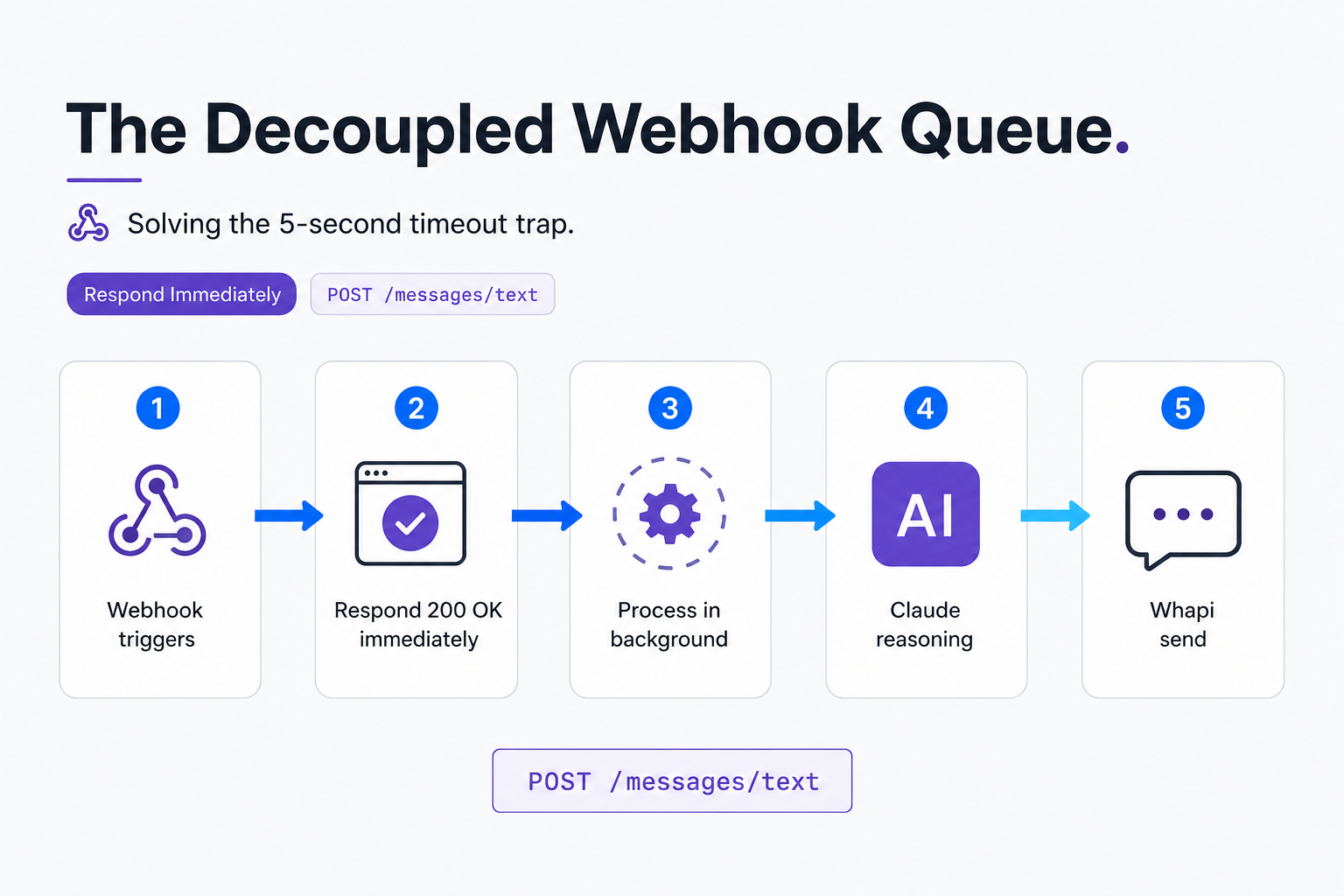
Solve timeout traps by configuring n8n Webhooks to respond immediately before invoking Claude. The pattern we encounter most often in production-grade integrations is the absolute necessity of decoupling your ingestion layer from your processing layer. Instead of running a single, synchronous linear workflow, you must split your logic into an asynchronous queue. This ensures that n8n acknowledges the incoming WhatsApp message instantly, freeing the webhook connection before the slow AI node is ever executed.
Decoupling your ingestion layer from your processing layer is the single most critical production decision for low-code integrators building WhatsApp lead qualification agents. To implement this Decoupled Webhook Queue pattern in n8n, select your Webhook node and navigate to its settings panel. Locate the Response Mode dropdown and change it from the default "When Last Node Finishes" to Respond Immediately. In the response body field, enter a simple JSON object: { "status": "success" }. This forces n8n to return an HTTP 200 OK status to Whapi.Cloud within milliseconds of receiving the payload, completely neutralizing the 5-second timeout retry trigger.
By shifting to an asynchronous architecture, you protect your system from traffic spikes. Whapi.Cloud absorbs the rapid incoming message bursts, n8n queues them safely, and your downstream Claude nodes process them at their own pace without ever triggering duplicate executions. While self-hosted open-source libraries push the burden of session persistence, queue management, and proxy rotation onto your team, Whapi's managed cloud infrastructure handles these protocol updates and session states upstream. This ensures your webhook routing remains stable and active even during high-volume campaigns or sudden WhatsApp protocol shifts.
To visualize this architecture, consider the following process flow:
State Management: Persisting BANT Data in n8n Tables
Store persistent BANT qualification states using native n8n Data Tables without external databases. Storing conversation variables in a local table keeps your Claude payloads small, focused, and contextually aware.
Large Language Models are fundamentally stateless; they have no native memory of prior interactions. If you do not persist the conversation history and the extracted BANT parameters across multiple message exchanges, Claude will treat every incoming message as a completely new interaction, asking the same questions repeatedly and frustrating your users.
Why Stateless LLMs Fail
In a typical sales conversation, a user might state their use case in the first message, their budget in the third, and their timeline in the fifth. If your system relies on the LLM's raw context window without external state persistence, you are forced to send the entire raw chat history back to Anthropic on every single turn. This not only spikes your API costs exponentially but also increases the risk of Claude losing track of the core BANT fields mid-conversation.
Setting Up the BANT State Machine
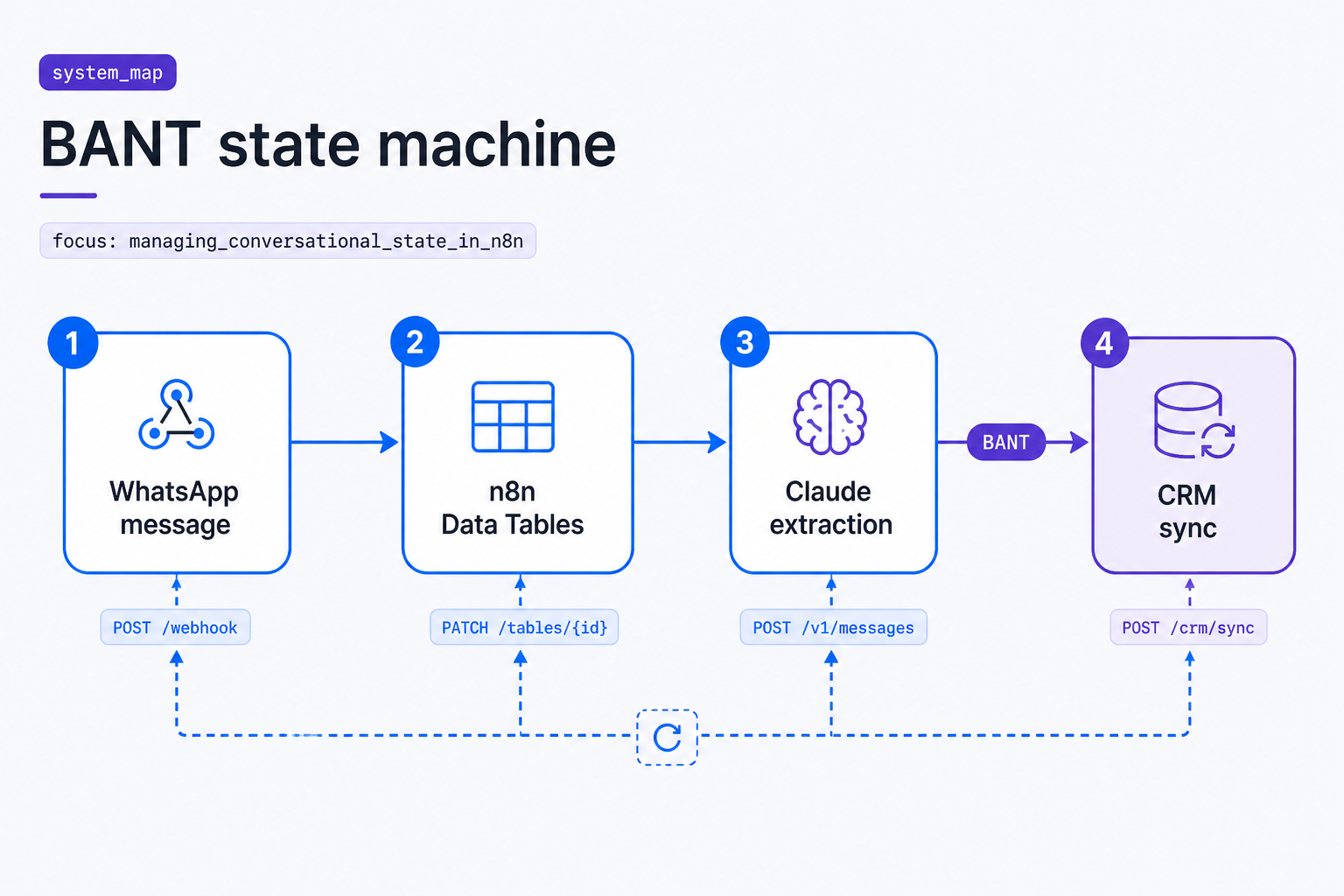
Storing conversation variables in a local table keeps your Claude payloads small, focused, and contextually aware, preventing the model from losing track of the core BANT fields mid-conversation. To solve this, we implement a low-code state storage system using native n8n Data Tables. This allows you to persist a structured record for each active phone number, tracking which BANT criteria have been successfully extracted and whether the lead has reached "qualified" status. By storing these variables in a structured table, you can pass only the relevant state and the last few messages to Claude, keeping your API payloads small and highly focused.
Before writing your workflow, create a new n8n Data Table named whatsapp_leads with the following schema:
| Field Name | Data Type | Key Type | Description |
|---|---|---|---|
phone_number |
String | Primary Key | The sender's unique WhatsApp ID (e.g., [email protected]) |
budget |
String | Nullable | Extracted budget details (e.g., $500/month) |
authority |
String | Nullable | Role of the contact (e.g., CEO, Developer) |
need |
String | Nullable | The core use case or technical requirement |
timeline |
String | Nullable | Expected deployment timeline (e.g., Immediate) |
qualified_status |
Boolean | Default: false |
Set to true once all 4 BANT fields are populated |
When a new message arrives, your n8n workflow queries the whatsapp_leads table using the sender's phone_number. If no record exists, n8n creates a new row with empty BANT fields. If a record does exist, n8n pulls the current state variables and passes them to Claude as helper context. When Claude generates its response, it also outputs any newly extracted BANT fields, which n8n writes back to the table, advancing the state machine toward full qualification.
Sync Your Qualified Leads Directly to HubSpot
Map Claude output directly to HubSpot CRM properties to automate qualified lead creation. Once a lead is qualified in n8n, the workflow instantly updates HubSpot, giving your sales team immediate access.
The ultimate business value of a WhatsApp AI agent is not just having a pleasant conversation; it is the seamless transition of qualified opportunities into your active sales pipeline. Once your n8n state machine marks a lead as qualified, the workflow should automatically trigger downstream CRM actions, ensuring your sales team has immediate access to rich, structured lead cards.
Triggering CRM Actions on State Change
In your n8n workflow, place an If node immediately after the Data Table update step. Configure the If node to check if the qualified_status field has transitioned from false to true. If the lead is newly qualified, route the execution path to a HubSpot node. The HubSpot node will first search for an existing contact using the phone number; if none is found, it creates a new contact card, mapping Claude's extracted BANT data directly to custom HubSpot properties. This seamless CRM integration prevents data silos and ensures that your sales pipeline is always populated with qualified leads.
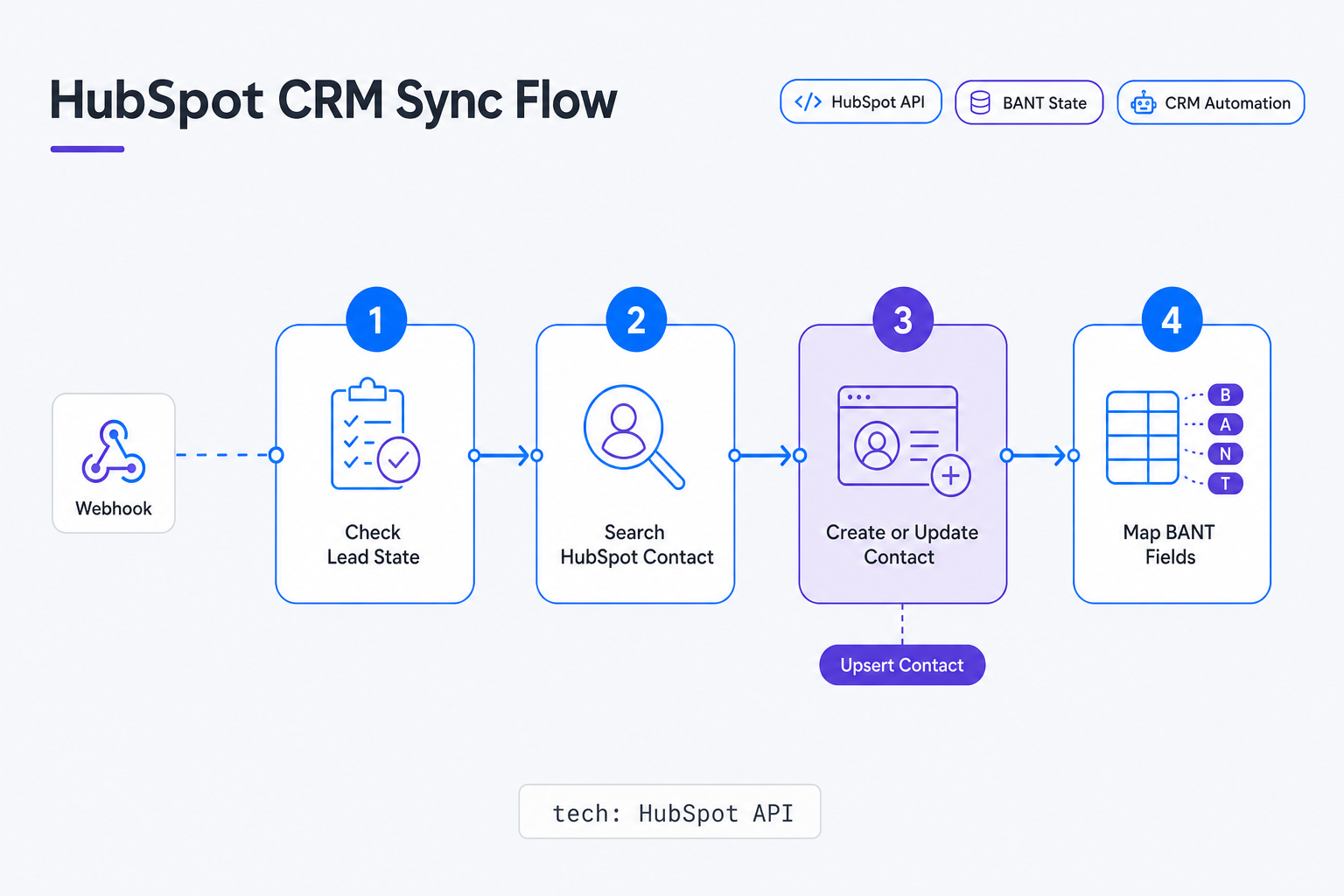
We won't cover detailed HubSpot custom property creation here -- you can find that in HubSpot's official developer documentation. However, mapping the natural language variables extracted by Claude to structured CRM fields is straightforward. For example, Claude's extracted budget string maps to HubSpot's annual_revenue or a custom whatsapp_budget field, while the need string populates the contact's initial notes or description field, giving your sales reps instant context before they make their first outbound call.
At high volumes, your messaging economics become the primary constraint on your margins. If you build your agent on top of metered messaging APIs, every back-and-forth exchange during the qualification process incurs a per-message fee, which can quickly erode your customer acquisition ROI. Whapi.Cloud's flat subscription pricing plans eliminate this risk entirely. Because you pay a fixed monthly fee per connected WhatsApp number, your cost remains completely predictable whether your AI agent qualifies 50 leads or 5,000 leads a month. This predictable cost structure makes it highly profitable to run aggressive, high-volume lead capture campaigns directly through WhatsApp.
By automating this entire pipeline--from the initial QR-code connection on Whapi.Cloud, through the decoupled webhook queue in n8n, to the final HubSpot CRM sync--you build a highly resilient, cost-effective lead generation machine that works tirelessly to grow your business. Automate WhatsApp lead capture with n8n and Claude to scale CRM qualification 24/7, ensuring that no high-intent prospect is ever left waiting for a response.
Ready to build your own WhatsApp AI Agent? Register your free account on Whapi.Cloud and start building in minutes.