TL;DR: Wire /whapi/webhook as an Odoo public controller with csrf=False, subscribe to Whapi messages.post events, and store each message.id before creating crm.lead. Send stage alerts with POST https://gate.whapi.cloud/messages/text and Authorization: Bearer. Test inbound on Community Edition with the free Sandbox before upgrading the channel.
Odoo Community Edition developers ship CRM lead intake with Whapi inbound webhooks plus outbound REST on a custom Python module they control. Copy-paste deliverable: webhook in, idempotent crm.lead, stage alert out.
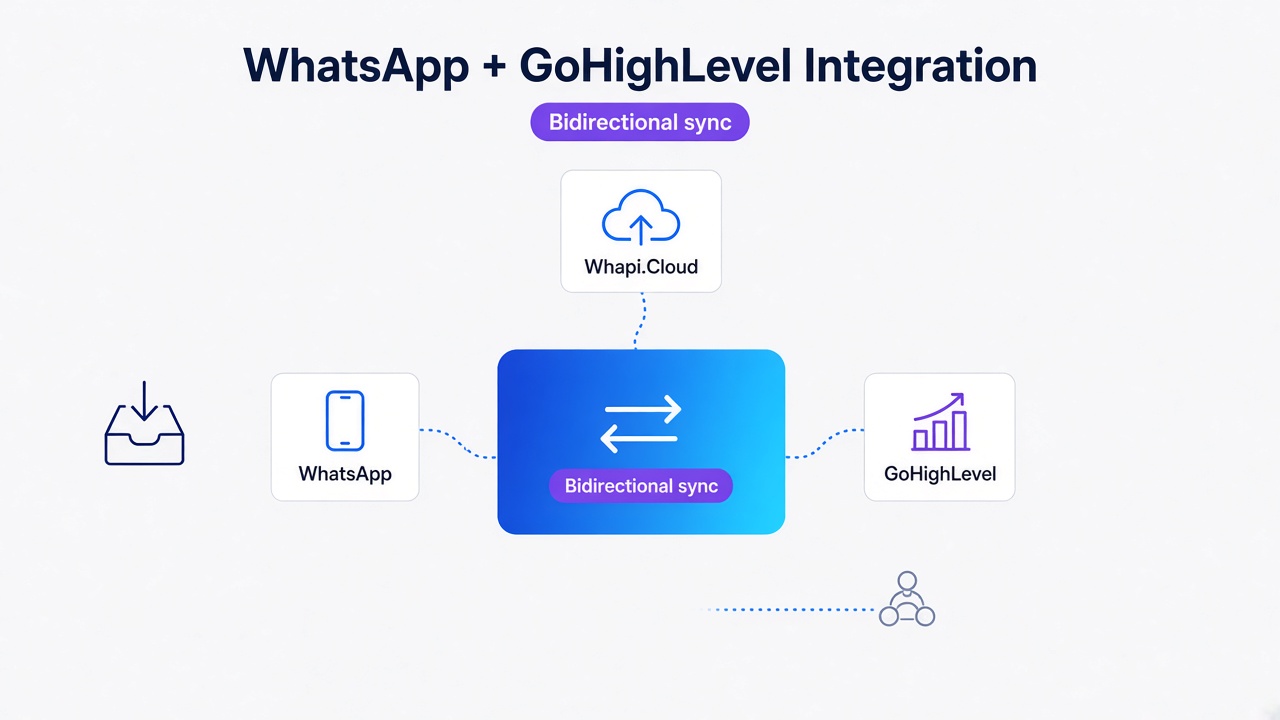
If outbound WhatsApp sends work but customer replies never land in CRM, the failure is almost always inbound webhook routing, not your API token. On the Odoo forum, integrators report exactly that pattern: "Sending messages works, but incoming messages are not appearing in Odoo." Meta's native Odoo connector adds Enterprise licensing and 2--7 business days of business verification before you can test a real pipeline. Whapi connects by QR scan and posts JSON to your controller within minutes.
Why Whapi REST Unlocks Community CRM Lead Intake
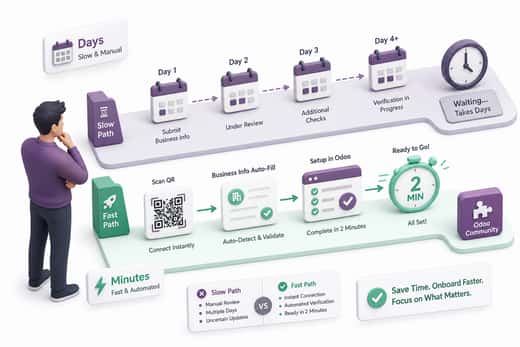
Enterprise blocks native WhatsApp; Whapi REST unlocks Community CRM intake without Meta verification.
Odoo's official WhatsApp app is Enterprise-only. Community Edition teams hit a hard wall: no built-in connector, no supported path to auto-create crm.lead from chat. Apps Store modules fill the gap at $50--$300+ with OPL-1 licenses and no source to debug when inbound traffic stalls.
Whapi.Cloud connects through web-session sockets, the same mechanism WhatsApp Web uses. Scan a QR code in the dashboard, copy your Bearer token, and register a webhook URL. In the official WhatsApp Business API, business verification typically takes 2--7 business days before production messaging; with Whapi, most teams send a test inbound message the same afternoon they install the module.
Real estate agencies, e-commerce stores, and clinic intake desks running Odoo CRM use this pattern daily: a WhatsApp inquiry creates a scored lead, and a stage change triggers a follow-up reminder. We skip Meta hub.challenge HMAC verification here; that path belongs to Enterprise Meta connectors, while Whapi's JSON webhook already covers Community Edition.
Integration Approach Comparison
Pick the Python path you can deploy on Community Edition and debug when inbound traffic stalls. Four options dominate Odoo WhatsApp CRM projects today.
| Approach | Community Edition | Setup time | Code ownership | Inbound reliability notes |
|---|---|---|---|---|
| Odoo Enterprise native WhatsApp | No | Days (Meta verification + WABA) | Closed core module | Forum reports: outbound OK, inbound silent until WABA/webhook reset |
| Apps Store OPL-1 (e.g. whatsapp_lead_hook) | Yes (module-dependent) | Hours (Meta tokens + install) | Closed source (~228+ LOC black box) | Still Meta WABA-dependent; limited troubleshooting |
| Custom Meta Cloud API Python controller | Yes | Days--weeks | Full (you maintain HMAC + token refresh) | Production number failures reported; tokens expire ~60 days |
| Whapi REST + Odoo http.Controller (this guide) | Yes | ~2 min QR + module install | Full Python module you control | JSON webhook; no template gate on stage notifications |
The OCA mail_gateway_whatsapp module is AGPL and Community-friendly, but it still requires a Meta WABA, manual Facebook dashboard webhook wiring, and test credentials that rotate every 24 hours. It routes Discuss mail; it does not ship an idempotent crm.lead pipeline out of the box. One Odoo module with a public route beats inserting n8n in the middle when you need a single controller stack trace for duplicate-lead bugs.
Module File Structure
Scaffold one addon, whapi_crm_lead, with __manifest__.py, controllers/whatsapp_webhook.py, models/crm_lead.py, and security/ir.model.access.csv. Install on Odoo 17/18 Community with -i whapi_crm_lead. Use Whapi Sandbox (5 active conversations/month, 150 messages/day, free permanently) to validate inbound parsing before production traffic hits the same controller.
Mapping Whapi Webhook Events to Odoo Fields
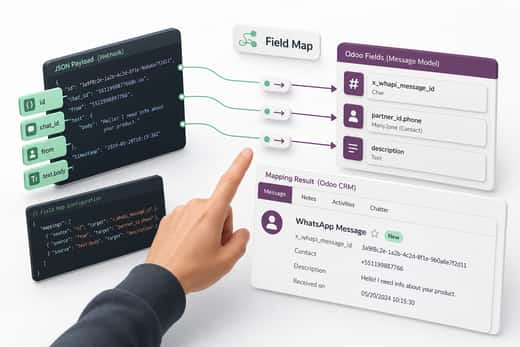
Parse Whapi payload, match partner phone, upsert open crm.lead, post chatter. That four-step chain is the inbound half of the pipeline.
Whapi posts a WebhookPayload JSON body to your URL on event messages.post. The messages array holds Message objects from the incoming webhook format reference. Ignore rows where from_me is true; those are outbound echoes, not customer leads.
| Whapi webhook field | Odoo target | Notes |
|---|---|---|
messages[].id |
crm.lead.x_whapi_message_id (Char, indexed) |
Idempotency key; check before create |
messages[].from or chat_id |
res.partner.phone / mobile |
Normalize to E.164; fallback last 10 digits |
messages[].text.body |
crm.lead.description + mail.message body |
Only when type is text |
messages[].from_name |
crm.lead.contact_name |
Pushname when present |
messages[].timestamp |
crm.lead.create_date context |
Unix epoch from provider |
Configure the channel webhook with PATCH https://gate.whapi.cloud/settings, passing a webhooks array entry with your HTTPS URL, mode: POST, and events including messages. Add a shared secret in headers and validate it in the controller before parsing JSON.
Build the Webhook Controller
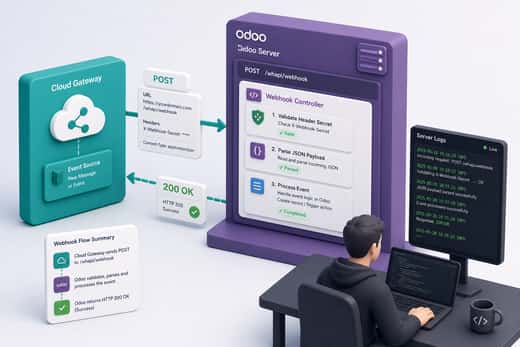
Return HTTP 200 within one second, even if lead processing runs afterward. Whapi retries failed callbacks with linear backoff when your endpoint does not answer 200.
Register a public route because Whapi's servers have no Odoo session cookie. Disable CSRF on that route only. Validate your shared header before touching request.jsonrequest. The event-reaction model applies here: Whapi POSTs an event, your controller reacts, and a slow handler triggers retries.
# controllers/whatsapp_webhook.py
import logging
from odoo import http
from odoo.http import request

_logger = logging.getLogger(__name__)

class WhapiWebhookController(http.Controller):

    @http.route("/whapi/webhook", type="json", auth="public", csrf=False, methods=["POST"])
    def whapi_inbound(self, **kwargs):
        # Without the shared-secret check, anyone who discovers this URL can POST fake leads.
        expected = request.env["ir.config_parameter"].sudo().get_param("whapi.webhook_secret")
        incoming = request.httprequest.headers.get("X-Whapi-Secret")
        if not expected or incoming != expected:
            return {"status": "forbidden"}

        payload = request.jsonrequest or {}
        messages = payload.get("messages") or []
        Lead = request.env["crm.lead"].sudo()
        for msg in messages:
            if msg.get("from_me"):
                continue
            Lead.process_whapi_inbound(msg)
        return {"status": "ok"}
Point Whapi to https://your-odoo-domain.com/whapi/webhook. Run POST https://gate.whapi.cloud/settings/webhook_test with the same URL to confirm reachability before sending live customer traffic.
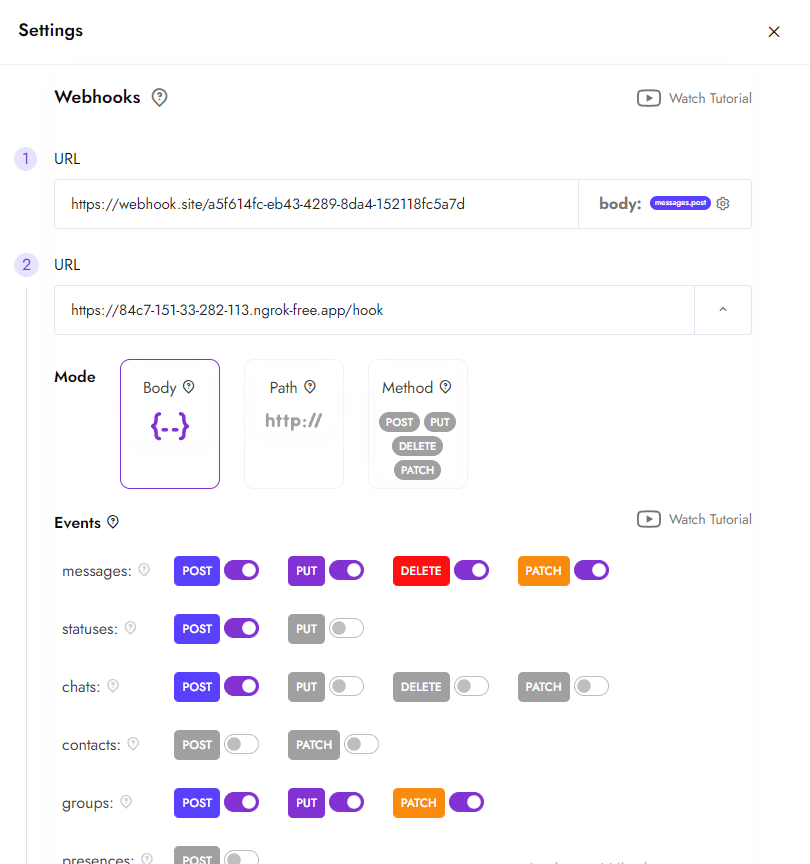
Whapi requires a public HTTPS URL. Teams on private LANs need a reverse proxy with TLS termination before the webhook test will pass.
Idempotent Lead Creation
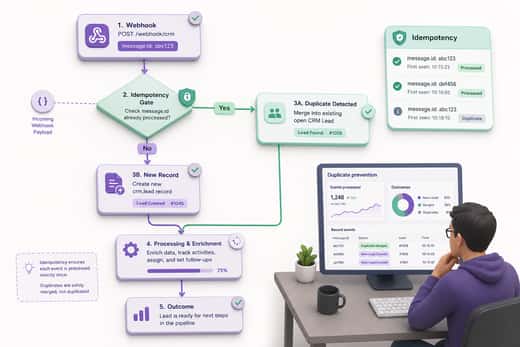
Store message_id before create; webhook retries duplicate CRM leads silently. Apply the idempotency gate on every inbound event.
Whapi may deliver the same messages.post payload more than once if your server is slow or returns a non-200 status. Odoo has no native upsert for external webhook IDs. A developer documenting an Odoo 19 + n8n stack on dev.to put it plainly: duplicate leads appear when you create a record on every POST without checking a unique message identifier.
# models/crm_lead.py
from odoo import api, fields, models

class CrmLead(models.Model):
    _inherit = "crm.lead"

    x_whapi_message_id = fields.Char(index=True, copy=False)
    x_whapi_chat_id = fields.Char(copy=False)

    @api.model
    def process_whapi_inbound(self, msg):
        message_id = msg.get("id")
        if not message_id:
            return
        existing = self.search([("x_whapi_message_id", "=", message_id)], limit=1)
        if existing:
            return existing  # idempotency gate: retry ignored

        phone = msg.get("from") or msg.get("chat_id") or ""
        body = (msg.get("text") or {}).get("body") or ""
        partner = self.env["res.partner"]._find_or_create_from_whapi(phone, msg.get("from_name"))

        open_lead = self.search([
            ("partner_id", "=", partner.id),
            ("type", "=", "opportunity"),
            ("active", "=", True),
            ("stage_id.is_won", "=", False),
        ], limit=1)

        if open_lead:
            open_lead.message_post(body=f"WhatsApp: {body}")
            return open_lead

        return self.create({
            "name": f"WhatsApp - {partner.name or phone}",
            "partner_id": partner.id,
            "phone": partner.phone or phone,
            "description": body,
            "x_whapi_message_id": message_id,
            "x_whapi_chat_id": msg.get("chat_id"),
        })
Merge follow-up messages into the open opportunity while stage_id.is_won is false. Create a fresh lead only after the prior deal is won or lost.
Outbound Stage Notifications via Whapi REST
CRM stage change triggers Whapi REST message, closing the inbound-to-outbound loop. Hook stage_id writes, not only create events.
When a sales rep moves a lead to "Site Visit Scheduled," the customer should get a WhatsApp confirmation without manual copy-paste. Override write() on crm.lead, detect stage_id changes, and call Whapi's text endpoint. In the official WhatsApp Business API, outbound messages outside the 24-hour customer service window require pre-approved templates; Whapi sends session-style text through web-session sockets without template submission, which fits stage alerts tied to CRM state changes.
# models/crm_lead.py (continued)
import os
import requests
from odoo import models

WHAPI_BASE = "https://gate.whapi.cloud"

class CrmLead(models.Model):
    _inherit = "crm.lead"

    def write(self, vals):
        prev_stage = {lead.id: lead.stage_id for lead in self}
        res = super().write(vals)
        if "stage_id" not in vals:
            return res
        token = self.env["ir.config_parameter"].sudo().get_param("whapi.api_token")
        for lead in self:
            if prev_stage.get(lead.id) == lead.stage_id:
                continue
            to = lead.x_whapi_chat_id or lead.phone
            if not (to and token):
                continue
            text = f"Hi {lead.contact_name or 'there'}, your deal moved to: {lead.stage_id.name}."
            # Missing Bearer token returns 401; log it, do not crash the CRM write().
            resp = requests.post(
                f"{WHAPI_BASE}/messages/text",
                headers={"Authorization": f"Bearer {token}", "Content-Type": "application/json"},
                json={"to": to, "body": text},
                timeout=10,
            )
            if resp.status_code >= 400:
                lead.message_post(body=f"Whapi stage alert failed: HTTP {resp.status_code}")
        return res
Verified against the send text message endpoint: POST /messages/text requires to (phone or Chat ID) and body. Store the API token in ir.config_parameter, never in git.
Whapi's flat subscription keeps stage-notification costs predictable compared with per-template BSP billing on official paths.
Troubleshooting Inbound Failures
One-way WhatsApp sync means inbound webhooks failed, not outbound configuration. Start every debug session by confirming Whapi delivered messages.post to your URL.
Symptoms from Odoo forum threads repeat across versions: templates send, replies vanish. We've seen the same one-way pattern on Whapi installs when the webhook URL still points at a stale staging tunnel after a DNS cutover. One user wrote after Meta verifications passed: "This would mean the so-publicised whatsapp funcionality in Odoo is absolutely useless." On Whapi, the equivalent failure is usually local: wrong URL, missing HTTPS, secret mismatch, or Odoo returning 403 on a public route blocked by a multi-database filter.
-
Webhook test: Run
POST /settings/webhook_testfrom the Whapi dashboard. Expect HTTP 200 and a hit in Odoo logs within 2 seconds. -
Is
messagesenabled on the webhook entry? Connection health pings alone will not create leads. -
CSRF / auth: Only the Whapi route should use
auth="public", csrf=False. Accidentally wrapping JSON routes with portal auth returns HTML login pages to Whapi. -
Duplicate rows? Search
x_whapi_message_idon both records. Empty values mean the idempotency gate never ran.
If you encounter unexpected behavior after these checks, reach out to the Whapi.Cloud support team via the chat widget on whapi.cloud. The team actively helps customers resolve production webhook issues.
Multi-Database Gotchas on Staging Hosts
auth='public' controllers break on multi-DB hosts unless the addon is loaded in server_wide_modules and the database filter routes Whapi traffic to the correct CRM database. Symptom: webhook test returns HTTP 200 on the wrong empty DB while production CRM stays silent. Set an explicit dbfilter on the public hostname you register in Whapi.
Wire Whapi inbound webhooks and outbound REST on Community Edition with this four-file module, and Odoo/Python developers can trial the full CRM pipeline the same day they scan the QR code.