TL;DR: This step-by-step integration guide from Whapi.Cloud, a managed WhatsApp API provider, explains how developers can programmatically retrieve and download WhatsApp profile pictures for automated CRM lead enrichment. Because WhatsApp CDN URLs expire within 24--48 hours, you must implement the local persistence gate to save binary images to secure cloud storage like Amazon S3. The rest of this guide provides the complete Node.js script.
Note for non-technical readers: This article is a detailed technical tutorial written specifically for programmers and systems integrators. If you are looking for a simple consumer utility, a "profile picture viewer," a "dp saver," or a web-based "whatsapp pfp downloader" to "download free" or "viewer online" for "online free" use, this guide does not contain a click-and-run web utility. You can use our interactive web tool or media pages instead.
Why CRM Synchronization and Lead Enrichment Require WhatsApp Avatars
Integrating WhatsApp profile pictures into your CRM transforms anonymous chat logs into verified customer profiles. To automate avatar sync in production without session bans, route requests through Whapi.Cloud and implement the local persistence gate.
The most common first mistake we see in CRM integrations is treating WhatsApp profile pictures as permanent static assets that can be linked directly from a database. Integrators often grab the first URL they find, map it to a contact field in HubSpot CRM, and assume the job is done. Within 24 hours, those links break, leaving the CRM populated with broken image icons and frustrated sales representatives.
In any modern B2B SaaS workflow, lead enrichment and contact verification are critical for customer support response speeds. When a new lead contacts your sales team via WhatsApp, their profile picture is the fastest way to verify their identity and match them to an existing HubSpot CRM record. However, the HubSpot Community feature requests are filled with discussions highlighting the complete lack of automated contact image updates. Developers are forced to build custom synchronization pipelines to bridge this gap. To design a resilient synchronization pipeline, developers can consult our WhatsApp CRM integration decision framework, which covers data sync patterns and phone normalization.
The scale of this opportunity is well-documented. For instance, the WhatsIdent research study successfully scraped and mapped over 9,000 public profile pictures to Facebook profiles, demonstrating how high-signal avatar data is for cross-platform identity resolution. In fact, public profile picture ratio analyses show that more than 60% of WhatsApp users keep their profile pictures set to 'Public,' making them a highly reliable source for automated lead enrichment.
When developers first try to automate this, they usually turn to open-source libraries like whatsapp-web.js or Baileys. This is a fragile path. Deprecated WhatsApp Web store functions trigger TypeError crashes in open-source self-hosted libraries. In whatsapp-web.js, calling `getProfilePicUrl` frequently throws `TypeError: window.Store.ProfilePic.profilePicFind is not a function` because WhatsApp Web updates deprecate underlying JS store functions. Instead of syncing CRM profiles, you get stuck debugging third-party library updates.
Similarly, in @whiskeysockets/baileys, calling `profilePictureUrl` hangs indefinitely or throws a `408 Request Timeout`. This stems from incorrect XML stanza structures when handling WhatsApp's tcToken privacy logic. Nesting the tcToken inside the picture node prevents indefinite Baileys API request timeouts, but manually patching XML stanzas in a self-hosted library drains engineering time away from core feature development.
Building self-hosted scrapers forces you to provision servers, rotate proxy farms, and manage container session persistence. Whapi.Cloud's managed cloud infrastructure eliminates this operational tax. By offloading WhatsApp Web protocol tracking, session state, and proxy rotation to a managed service, your team can focus on writing CRM sync logic instead of debugging crashed headless browsers.
Connect Your Number and Validate WhatsApp Contacts in Minutes
Before retrieving an avatar, you must verify that the phone number exists on WhatsApp. Whapi.Cloud's contact validation endpoint checks reachability in milliseconds, preventing your CRM pipeline from wasting resources on invalid numbers.
In the official WhatsApp Business API, onboarding requires multi-step Meta Business Verification, app review, and strict phone number porting. In Whapi.Cloud, you simply scan a QR code to connect any standard WhatsApp or WhatsApp Business number in seconds -- because Whapi.Cloud establishes a direct web-session socket without platform-certification gates. After scanning the QR code, you can immediately locate your API token in the panel.
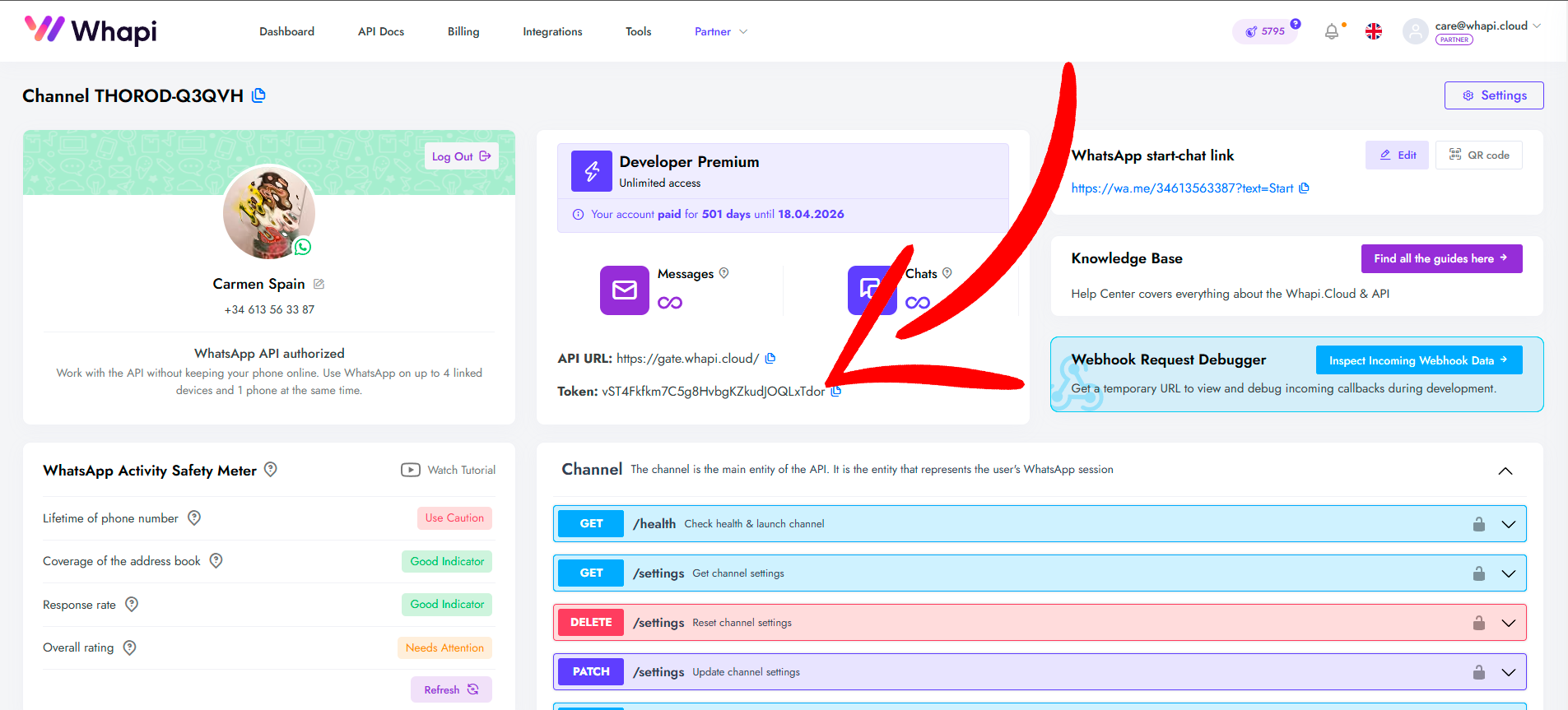
Once connected, the first step in any reliable lead enrichment pipeline is contact verification. Attempting to fetch profile pictures for numbers that do not exist on WhatsApp triggers server-side anti-scraping blocks. We've seen teams trigger silent bans on their channels by blindly querying thousands of unverified numbers. To protect your channel's connection, refer to Whapi.Cloud's guide to avoiding account bans and always validate the contact's presence first.
To perform a whatsapp dp check or verify active numbers, call the `POST /contacts` endpoint. This allows you to check phone numbers in batch before initiating the heavier profile picture retrieval requests.
// POST https://gate.whapi.cloud/contacts
// This script validates if a phone number exists on WhatsApp before we attempt to fetch its avatar.
// Skipping this check and querying non-existent numbers is the fastest way to trigger WhatsApp's anti-scraping bans.

async function validateWhatsAppContact(phoneNumber) {
  const token = process.env.WHAPI_TOKEN;
  const response = await fetch('https://gate.whapi.cloud/contacts', {
    method: 'POST',
    headers: {
      'Authorization': `Bearer ${token}`,
      'Content-Type': 'application/json'
    },
    body: JSON.stringify({
      contacts: [phoneNumber],
      force_check: true
    })
  });

  if (!response.ok) {
    throw new Error(`Contact validation failed with status ${response.status}`);
  }

  const data = await response.json();
  // The response returns an array of checked contacts with their WhatsApp presence status
  const contact = data.find(c => c.input === phoneNumber);
  return contact && contact.status === 'valid';
}
Retrieving Profile Pictures: Call the GET /contacts/{ContactID}/profile Endpoint
The official WhatsApp Cloud API blocks access to contact avatars due to privacy restrictions. Whapi.Cloud bypasses this limitation, allowing you to fetch public profile pictures instantly using a single GET request.

In the official WhatsApp Business API, access to contact profile pictures and user locales is strictly blocked due to user-privacy policies, forcing developers to look for external workarounds. In Whapi.Cloud, you can retrieve public profile pictures instantly via a single HTTP GET request -- because Whapi.Cloud operates over web-session sockets that can access standard public-profile assets directly.
To address this, we must establish a clear technical boundary: public profile pictures are accessible; private WhatsApp DP viewers are a technical impossibility. If a WhatsApp user has set their profile picture privacy settings to 'My Contacts' or 'Nobody,' no API or scraper can retrieve it. However, because the public profile picture ratio is over 60%, the vast majority of your leads will have public avatars that can be retrieved instantly. Competitor schemas like Green API return a conditional structure with `urlAvatar` and `base64Avatar` or empty strings on privacy restrictions. Whapi.Cloud provides a cleaner, more resilient structure.
Whapi.Cloud provides full access to WhatsApp features completely absent from the official API surface. As documented in our general API reference, Whapi.Cloud's `/contacts/{ContactID}/profile` endpoint gives you direct access to a contact's public profile details, including their display name, status, and high-resolution avatar URLs. This allows you to enrich CRM profiles without Meta-imposed data limitations.
Whether your users are searching for "descargar foto de perfil de whatsapp" (Spanish), "baixar foto de perfil do whatsapp" (Portuguese), "whatsapp profil resmi indir" (Turkish), or "скачать фото профиля whatsapp" (Russian), the underlying technical requirement is the same: a stable GET request to retrieve the CDN link.
// GET https://gate.whapi.cloud/contacts/{ContactID}/profile
// Retrieves the contact's profile details, including the high-resolution avatar CDN URL.
// If you skip checking for a 404 or an empty profile object, your sync pipeline will crash with a TypeError when reading properties of undefined.

async function getWhatsAppProfilePicture(contactId) {
  const token = process.env.WHAPI_TOKEN;
  const response = await fetch(`https://gate.whapi.cloud/contacts/${contactId}/profile`, {
    method: 'GET',
    headers: {
      'Authorization': `Bearer ${token}`
    }
  });

  if (response.status === 404) {
    // Handle cases where the contact has no public profile picture or has restricted privacy settings
    return null;
  }

  if (!response.ok) {
    throw new Error(`Failed to fetch profile. Status: ${response.status}`);
  }

  const profile = await response.json();

  // The API returns both a low-res thumbnail ('icon') and a high-res image ('icon_full')
  return {
    thumbnailUrl: profile.icon || null,
    highResUrl: profile.icon_full || null,
    name: profile.name || null
  };
}
Handling CDN Expiration: Why You Must Download Avatars to Cloud Storage
WhatsApp profile picture CDN URLs are temporary and expire within 24 to 48 hours. To prevent broken images in your CRM, your integration must programmatically download and persist these files in cloud storage.

Saving the raw `icon_full` URL directly to your database is a critical architectural trap. Stop debugging temporary WhatsApp CDN links; download profile pictures to secure cloud storage. The CDN URL expiration window is capped at 24--48 hours, after which WhatsApp invalidates the security tokens, returning a 403 Forbidden error. Referencing raw CDN links directly in your CRM leads to broken contact cards in under a day.
To build a production-grade sync pipeline, you must implement the local persistence gate. Whenever your API fetches an avatar URL, you must immediately download the binary image data and upload it to a persistent cloud storage bucket like Amazon S3. Mapping your CRM's contact image field to your own stable S3 URL ensures the avatar remains accessible indefinitely.
Use a persistent cloud storage bucket like Amazon S3 instead of local server memory to store the downloaded avatars. This keeps your application stateless and allows you to scale horizontally. If you are calculating costs, Whapi.Cloud's flat subscription plans listed on our pricing page make it simple to estimate your monthly communication expenses.
// Node.js script demonstrating "the local persistence gate" pattern.
// Downloads the temporary WhatsApp CDN image and prepares it for S3 upload.
// Without downloading the binary data immediately, the temporary CDN URL will expire in 24-48 hours, leaving your CRM with broken image links.

import { S3Client, PutObjectCommand } from "@aws-sdk/client-s3";

const s3 = new S3Client({ region: process.env.AWS_REGION });

async function persistProfilePicture(contactId, tempCdnUrl) {
  if (!tempCdnUrl) return null;

  // 1. Download the binary image data from the temporary WhatsApp CDN
  const imageResponse = await fetch(tempCdnUrl);
  if (!imageResponse.ok) {
    throw new Error(`Failed to download image from CDN. Status: ${imageResponse.status}`);
  }

  const arrayBuffer = await imageResponse.arrayBuffer();
  const buffer = Buffer.from(arrayBuffer);

  // 2. Upload the buffer to your persistent Amazon S3 bucket
  const bucketName = process.env.S3_BUCKET_NAME;
  const s3Key = `avatars/${contactId}.jpg`;

  await s3.send(new PutObjectCommand({
    Bucket: bucketName,
    Key: s3Key,
    Body: buffer,
    ContentType: "image/jpeg",
    ACL: "public-read" // Adjust access control based on your CRM security requirements
  }));

  // 3. Return your stable, persistent cloud storage URL
  return `https://${bucketName}.s3.${process.env.AWS_REGION}.amazonaws.com/${s3Key}`;
}
Configure Channel Settings to Avoid Session Rate Limits and Scraping Blocks
Bulk-scraping WhatsApp profile pictures triggers aggressive anti-scraping rate limits and account bans. Configuring your channel settings and introducing pacing delays ensures safe, long-term operation of your synchronization pipeline.
WhatsApp employs aggressive, server-side anti-scraping rate limits to prevent bulk data harvesting. If you attempt to query hundreds of contact profiles in rapid succession, WhatsApp's security algorithms trigger silent failures, 'not-authorized' errors, or immediate account bans. While self-hosted scrapers force you to manage active number rotation and rotating proxies, Whapi.Cloud's commercial API handles these anti-scraping rate limits internally at the infrastructure layer, managing protocol tracking and proxy pools automatically.
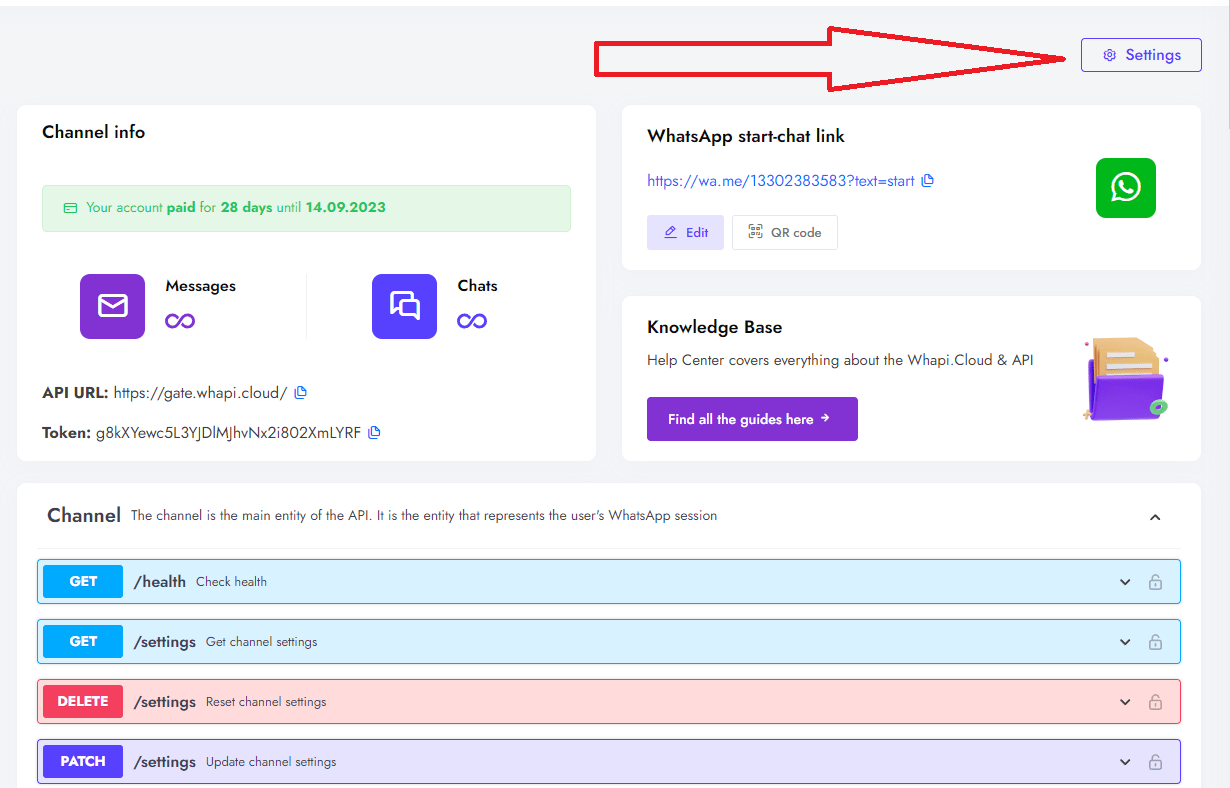
The most common trigger for an immediate ban during channel initialization is bulk avatar downloading on startup. By default, many gateways attempt to sync all contact profile pictures as soon as the session connects. To prevent this, you must disable init_avatars on startup to prevent aggressive WhatsApp anti-scraping account bans. In Whapi.Cloud, you configure this by sending a `PATCH /settings` request, setting `media.init_avatars` to `false`.
Besides disabling bulk initialization, your script must respect pacing limits. We recommend queueing your requests to a maximum of 3 concurrent queries and adding a random delay of 1.5 to 3 seconds between checks. This pacing mimics natural human behavior, keeping your connection health score high and avoiding server-side rate blocks.
// PATCH https://gate.whapi.cloud/settings
// Configures channel settings to disable bulk avatar sync on startup.
// If you leave 'init_avatars' enabled on a channel with thousands of contacts, WhatsApp's server-side security will flag the session as a scraper and suspend your number.

async function configureChannelForSafeSync() {
  const token = process.env.WHAPI_TOKEN;
  const response = await fetch('https://gate.whapi.cloud/settings', {
    method: 'PATCH',
    headers: {
      'Authorization': `Bearer ${token}`,
      'Content-Type': 'application/json'
    },
    body: JSON.stringify({
      media: {
        init_avatars: false // Disables bulk avatar download on session startup
      }
    })
  });

  if (!response.ok) {
    throw new Error(`Failed to update channel settings. Status: ${response.status}`);
  }

  const settings = await response.json();
  return settings;
}
CRM Integration: Deploying the Ready-Made GitHub Downloader Script
Deploying a production-ready sync pipeline requires handling edge cases like private profiles and missing avatars. Our open-source Node.js script provides polymorphic adapters and ready-made integration workflows for HubSpot CRM.

When syncing avatars to HubSpot, your pipeline must handle varied profile states gracefully. Polymorphic adapters map conditional avatar schemas to prevent CRM synchronization pipeline failures. A contact profile might return a high-res URL, only a low-res thumbnail, or no image at all. A polymorphic adapter normalizes these conditional payloads into a standardized schema before sending the data. This means that if a contact has restricted privacy settings, the adapter automatically injects a default placeholder image URL, preventing HubSpot CRM contact-update API calls from throwing a 400 Bad Request exception due to null fields.
For teams building AI-driven workflows, the MCP for WhatsApp API enables AI agents to retrieve and download WhatsApp profile pictures programmatically. By exposing the Whapi.Cloud toolset directly to LLM-powered agents, your autonomous customer support bots can check contact presence, retrieve avatars, and enrich CRM leads on the fly. This architecture allows an AI agent to inspect an incoming chat event, query the user profile, verify its presence, and update your CRM records entirely autonomously, using the same Node.js codebase.
When custom synchronization scripts fail due to sudden open-source library deprecations, developers are left stranded. Whapi.Cloud's support team provides live human assistance and rapid hotfixes to keep your production pipelines running. If you encounter unexpected behavior or need help optimizing your CRM sync, our team is available via the chat widget on whapi.cloud to assist you in real time.
To help you deploy this pipeline in minutes, we have published a complete downloader script in our Whapi.Cloud GitHub repository. This open-source repository includes pre-configured S3 upload handlers, HubSpot CRM mapping workflows, and automated error retry mechanisms. The repository contains a pre-built Express webhook listener that you can deploy to Heroku, Render, or a VPS in a single command, alongside environment variable templates for quick configuration.
// A complete Node.js script demonstrating polymorphic adapter handling for HubSpot CRM.
// Without the polymorphic adapter, a contact with a missing or private profile picture will cause the HubSpot API upload to fail with a 400 Bad Request.

async function syncContactAvatarToHubSpot(phoneNumber, hubspotContactId) {
  try {
    // 1. Validate contact exists on WhatsApp
    const isValid = await validateWhatsAppContact(phoneNumber);
    if (!isValid) return;

    // 2. Fetch profile from Whapi.Cloud
    const profile = await getWhatsAppProfilePicture(phoneNumber);

    // 3. Polymorphic Adapter: Normalize the avatar payload
    let finalAvatarUrl = null;
    if (profile && profile.highResUrl) {
      // If high-res exists, download and persist it to S3
      finalAvatarUrl = await persistProfilePicture(phoneNumber, profile.highResUrl);
    } else if (profile && profile.thumbnailUrl) {
      // Fallback to low-res thumbnail if high-res is restricted
      finalAvatarUrl = await persistProfilePicture(phoneNumber, profile.thumbnailUrl);
    } else {
      // Fallback to a default placeholder if no avatar is public
      finalAvatarUrl = 'https://yourdomain.com/assets/default-avatar.png';
    }

    // 4. Update HubSpot CRM contact image field
    const hubspotToken = process.env.HUBSPOT_ACCESS_TOKEN;
    await fetch(`https://api.hubapi.com/crm/v3/objects/contacts/${hubspotContactId}`, {
      method: 'PATCH',
      headers: {
        'Authorization': `Bearer ${hubspotToken}`,
        'Content-Type': 'application/json'
      },
      body: JSON.stringify({
        properties: {
          hs_avatar_image: finalAvatarUrl // Map the stable S3 URL to HubSpot's avatar property
        }
      })
    });

    console.log(`Successfully synced avatar for contact ${phoneNumber}`);
  } catch (error) {
    console.error(`Sync failed for contact ${phoneNumber}:`, error.message);
  }
}
Automated lead enrichment with WhatsApp avatars improves customer support response speeds in CRMs. By ensuring your sales and support agents have immediate visual context for every incoming message, you eliminate friction, reduce response times, and build stronger customer relationships from the very first touchpoint.